
Exit
  • Global community
    • Language:
      • Deutsch
      • English
      • Español
      • Français
      • Português
  • 日本語コミュニティ
  • 한국 커뮤니티
2

Progress Window stays open

Community Beginner ,
Jun 26, 2020 Jun 26, 2020

When I tell Lightroom to Edit in Photoshop it sends the file to Photoshop and Photoshop shows the progress bar as the file opens. However, once the file is open the progress bar is still active showing the blue bar about 99% complete and the Cancel button is missing. I can move the progress window out of the way and continue to work with no other issues. If I do an edit where another Progress window opens, the first one closes. I can go between Photoshop and Lightroom with no issues except for the Progress window being open. Doesn't happen all the time but most of the time. This started after the upgrade to 21.2.0.
I'm on a Mac using Mojave.


1.4K
Translate
Report
Community guidelines
Be kind and respectful, give credit to the original source of content, and search for duplicates before posting. Learn more
community guidelines
Adobe
New Here ,
Jul 03, 2020 Jul 03, 2020

I have the same problem and in addition I can't save the file unless I "save as..." each time

Translate
Report
Community guidelines
Be kind and respectful, give credit to the original source of content, and search for duplicates before posting. Learn more
community guidelines
Explorer ,
Jul 04, 2020 Jul 04, 2020

Same here. 

* Inventory: Photoshop v 24.3.0; M1 Mac Mini, Ventura 13.2.1, 1 TB SSD, 16 GB RAM; Wacom Intuos Pro M
Translate
Report
Community guidelines
Be kind and respectful, give credit to the original source of content, and search for duplicates before posting. Learn more
community guidelines
Community Beginner ,
Jul 05, 2020 Jul 05, 2020

Same problem. Also PS 21.2.0   I click on the Photoshop window and that sends the Progress Bar window to the back.  Annoying.  

Translate
Report
Community guidelines
Be kind and respectful, give credit to the original source of content, and search for duplicates before posting. Learn more
community guidelines
Explorer ,
Jul 09, 2020 Jul 09, 2020

Same here! very annoying!

Translate
Report
Community guidelines
Be kind and respectful, give credit to the original source of content, and search for duplicates before posting. Learn more
community guidelines
Explorer ,
Jul 27, 2020 Jul 27, 2020

Creative Cloud update for Photoshop addressing critical workflow bugs, crashes, etc. This problem is still on going for me. 

* Inventory: Photoshop v 24.3.0; M1 Mac Mini, Ventura 13.2.1, 1 TB SSD, 16 GB RAM; Wacom Intuos Pro M
Translate
Report
Community guidelines
Be kind and respectful, give credit to the original source of content, and search for duplicates before posting. Learn more
community guidelines
Community Beginner ,
Jul 30, 2020 Jul 30, 2020

Still have the same issue with all latest updates to PS / LR and changing to legacy compositing tool as advised did nothing....very annoying !

Translate
Report
Community guidelines
Be kind and respectful, give credit to the original source of content, and search for duplicates before posting. Learn more
community guidelines
New Here ,
Aug 26, 2020 Aug 26, 2020

Same here. Adobe should have already fixed this!!

Translate
Report
Community guidelines
Be kind and respectful, give credit to the original source of content, and search for duplicates before posting. Learn more
community guidelines
Community Beginner ,
Sep 17, 2020 Sep 17, 2020

same here! annoying as hell! 

Translate
Report
Community guidelines
Be kind and respectful, give credit to the original source of content, and search for duplicates before posting. Learn more
community guidelines
Explorer ,
Sep 29, 2020 Sep 29, 2020

Same, even after yesterday's update. So annoying. How hard can that be to fox?

Translate
Report
Community guidelines
Be kind and respectful, give credit to the original source of content, and search for duplicates before posting. Learn more
community guidelines
Explorer ,
Oct 07, 2020 Oct 07, 2020

Same here even after Oct 20220 update and having last Mac's Catalina OS version... Adobe please fix this!

Translate
Report
Community guidelines
Be kind and respectful, give credit to the original source of content, and search for duplicates before posting. Learn more
community guidelines
Explorer ,
Oct 09, 2020 Oct 09, 2020

Ha! I'm starting to get used to it. No worries Adobe, take your time!

* Inventory: Photoshop v 24.3.0; M1 Mac Mini, Ventura 13.2.1, 1 TB SSD, 16 GB RAM; Wacom Intuos Pro M
Translate
Report
Community guidelines
Be kind and respectful, give credit to the original source of content, and search for duplicates before posting. Learn more
community guidelines
New Here ,
Oct 10, 2020 Oct 10, 2020

I thought I had a corrupt PS, I was going to uninstall and reinstall but reading this, I realize its a bug. Hope Adobe get their act together soon and fix this, It annoying 

Translate
Report
Community guidelines
Be kind and respectful, give credit to the original source of content, and search for duplicates before posting. Learn more
community guidelines
Contributor ,
Nov 03, 2020 Nov 03, 2020

I am having the same problem on a Mac Pro, Catalina 10.15.7. I too switch between LrC v10.0 and PS v22.0.0. The window is a persistent progress window, even when no file is open in Ps. See attached screenshot.
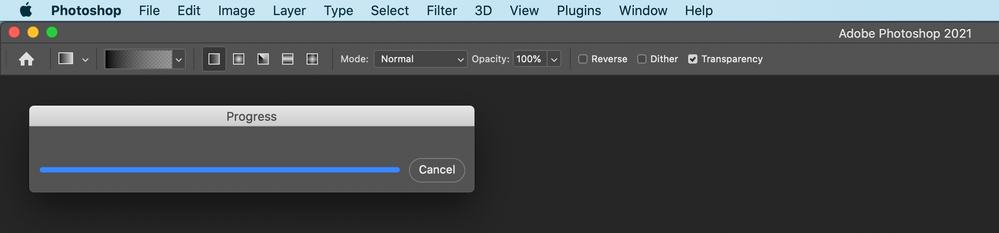
 

Screen Shot 2020-11-03 at 10.13.07 AM.png

Translate
Report
Community guidelines
Be kind and respectful, give credit to the original source of content, and search for duplicates before posting. Learn more
community guidelines
Community Beginner ,
Mar 02, 2021 Mar 02, 2021

Same here. March 2021. Photoshop 22.2 and Lightroom 10.1.1

Translate
Report
Community guidelines
Be kind and respectful, give credit to the original source of content, and search for duplicates before posting. Learn more
community guidelines
Community Beginner ,
Jan 25, 2022 Jan 25, 2022
LATEST

This issue went away for a while for me, but now it's back. Photoshop 23.1.0, Lightroom Classic 11.1. I can't get the Progress window to close when I click Cancel, and all I can do is move it out of the way. Any updates, Adobe???

Translate
Report
Community guidelines
Be kind and respectful, give credit to the original source of content, and search for duplicates before posting. Learn more
community guidelines