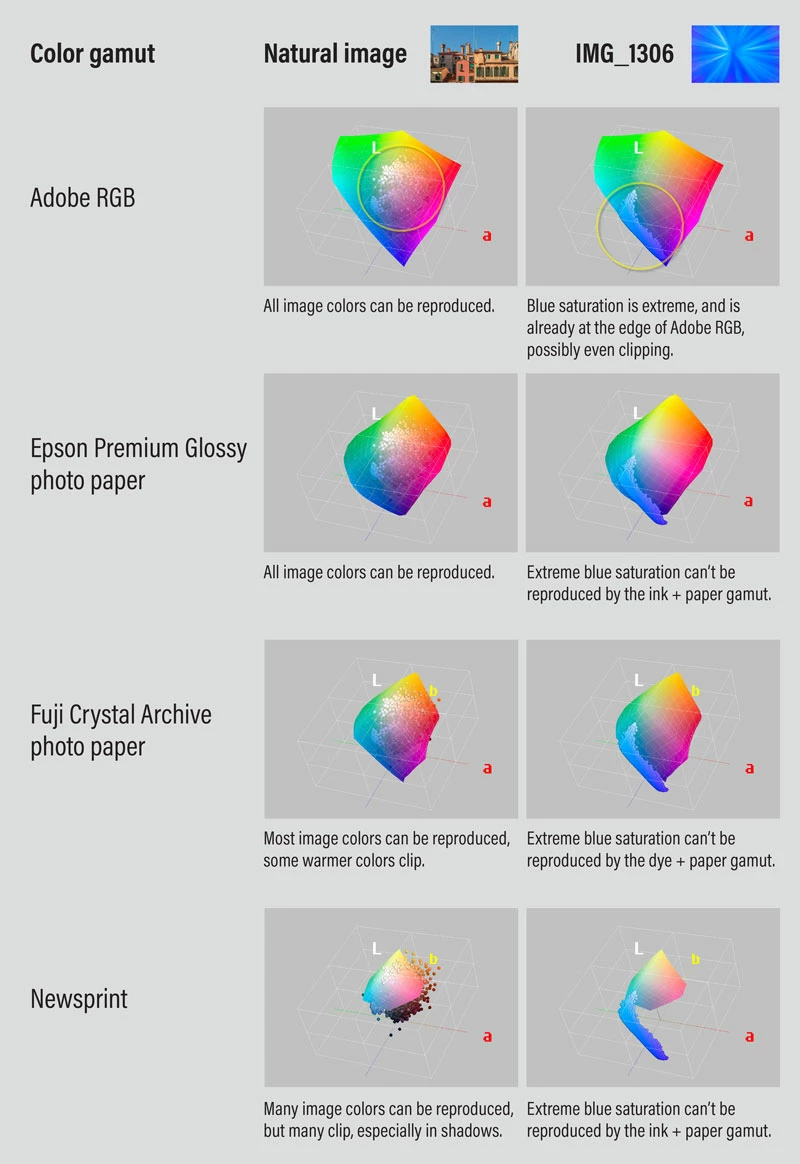
The others are correct, specifically the blue saturation is so extreme that it is outside the printable gamut of inks, dyes, and papers. Fuji Crystal Archive is a traditional photo paper, right? If so, then it’s limited by the gamut of its color dyes, which is definitely a much smaller gamut than an RGB computer display.
Compounding this challenge is that the uploaded image is mostly blue. But blue is already one of the most difficult colors to reproduce in print, it always has been. Highly saturated blue is even more difficult.
I made the chart below to show what is going on. It shows various color gamuts, including three print gamuts, and also the image colors plotted against it (the dots). You can see that with a typical natural scene from a camera, most or all colors can be reproduced on larger print gamuts. But if you’re creating a synthetic image, you have to be aware of any target reproduction gamuts (such as Fuji Crystal Archive) in advance, and design your colors so that they are within that gamut. In other words, the following is backwards…
Is there a 'standard' procedure of additional adjutments to bring the 'color proof' version similar to the original image?
By @marcofranchini
…the standard procedure is to edit the image (nondestructively) so that it looks good within the color gamut of the proof preview. For example, creating and editing the image with soft proofing on either all the time, or regularly checked in it so that colors aren’t being created that can’t be printed. Dan Margulis wrote many good books and articles about things like how to tweak correction curves to get the most out of an image under the gamut and luminosity limits of print.
…(blues/light blues with white rays) and lots of luminosity: the 'Color Proof' version loses all the luninosity, and when i try to bring it back the hue turns to green.)
By @marcofranchini
This might be impossible, because of the specific combination of high blue saturation and high luminosity. The problem with high luminosity is that paper can’t be that bright, period. For example, if an image was edited with the display set to a high luminosity (for example, 300 nits or above), and the image white point is set to look fantastic that way, then the luminosity is so high that print can’t reproduce it. The only way the print can be that luminous is if a blindingly high amount of light is pointed at it, because paper can only reflect light, it can’t emit light like a computer display.
For that reason, most print profiles are designed for the level of luminance that can be expected of paper, which is relatively low (think of the level of light reflected by paper under room lighting). To match this, those who edit for print often set their displays to 120 nits or lower. On a current display, that’s half brightness or lower. So, you’ll be more likely to create an image with print-reproducible colors if while editing, you set your display to an appropriately low luminance while also viewing through soft-proofing set up for Fuji Crystal Archive.
If you’ve seen prints that seem to have saturated colors and high luminosity, what you are really seeing are talented editors using the principles of tone contrast and color contrast to make an image look snappier under the known gamut and luminosity limits of print. And it’s also because you aren’t seeing the reproduction next to the original…if you did, that print you thought was so bright would probably not look so good next to the original.


 AdChoices