
Participating Frequently
December 15, 2018
Answered

Ps 2019 Bug?

  • December 15, 2018
  • 8 replies
  • 1328 views

hello all,

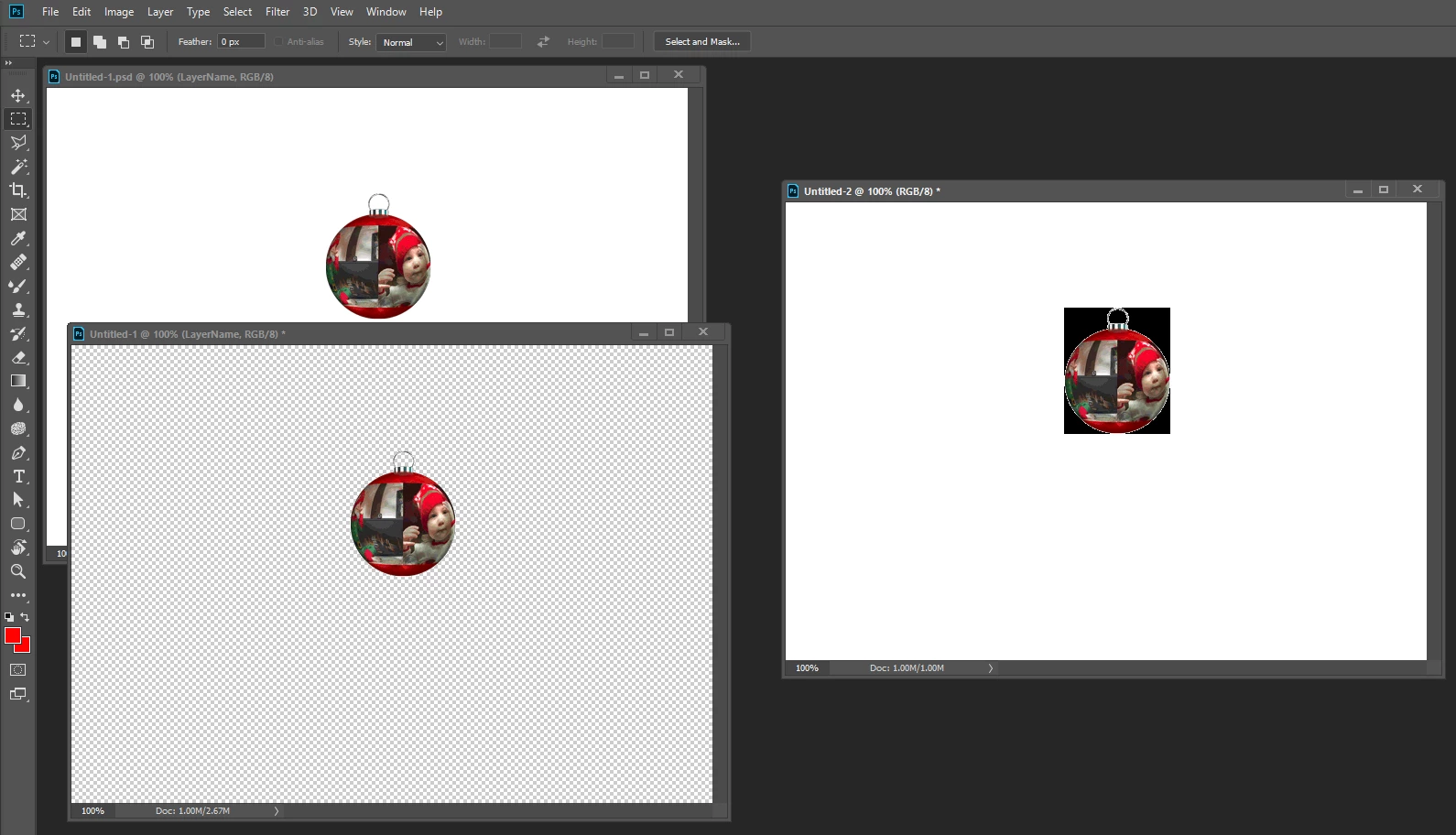
I use scripts and actions to speed through my workflow. one of my actions duplicates the current art layer to a new document, names the document "Separation.psd" and renames the layer to "Layer 0", creating a universal document for the commands that follow. My issue is that Ps 2019 seems to treat this functionality differently than it's predecessors, specifically 2019 duplicates the layer as a background layer, which locks the layer, places it on a white background and names the layer "Background".

My problem is that this a color separation work flow in which transparent elements are quite important, and places the art on a white background basically ruins the art

for my purposes.

Has anyone else found this to be problematic?

Is there an explanation for this shift in layer behavior?

Is there a way to program an action or write a script (.jsx) to work around it?

Many thanks in advance.
This topic has been closed for replies.
Correct answer JJMack

There is a bug in CC 2019 that is also in CC 2018.  It is not in CC 2014 or CS6.   I no longer have CC 2015, cc 2015.5 abd CC 2017 installed so I do not know if the bug is in those.

The code copies the background layer to a new document  fine

The code copies a normal layer above a background layer to a new document  fine

The code copies a normal layer above a normal layer to a new document  fine

The code does not copy a normal layer that is at the bottom stack  to a new document  fine in cc 2018 and cc 2019

the transparency about normal layers bounds are blackened  the layers is made a background named Background and the transparency that was outside the normal layer bounds are turned white,

8 replies

JJMack
Community Expert
Community Expert
December 18, 2018

No I see no work around using Action manager code for duplicate layer.  I do not know in which version Adobe broke Photoshop duplicate layer. CC2014 works correctly CC 2018 and CC 2019 do has CC 2015. CC 2015.5 and CC 2017 installed.

I have never used Duplicate layer in a script. I have used Duplicate document  create new documents used Place and copy paste.  From my testing the problem only seem to happen when you copy a bottom layer that is not a background to a new document. 

JJMack
Legend
December 18, 2018

Please explain in more detail what problem is present in CC2018 (I understand that it is there according to your words) with duplication of layers? What needs to be done to reproduce it? I can not find a single bug. Unfortunately I can not check on CC2019.

Kukurykus
Legend
December 18, 2018

Layer duplicated to a new document from a document with only one layer that is not a background will become a background (flattened) in that new document instead of be simply duplicated as a layer (with transparency, effects etc). That happens in CC 2019, that seems to work still in CC 2018, but for sure in CS6 Extended. You may click links from the other post of me to Photoshop Family to read more. I'm not saying here of duplicating document what works good.

Participating Frequently
December 17, 2018

Thats what I'm thinking, and I was toying around with it some more today and found furhter evidence to suggest that it's a bug.

If i have two documents open, and i use the duplicate layer command to copy a layer from Doc 2 to Doc 1 the layer doesnt change. It only seems to happen when duplicating to a new document.

Thanks for the link, I'll give that a try

Kukurykus
Legend
December 17, 2018

Try this code (it works correctly in CC2019 with normal layer):

sTT = stringIDToTypeID;

(ref = new ActionReference()).putEnumerated(sTT('document'), sTT('ordinal'), sTT('first'));

(dsc = new ActionDescriptor()).putReference(sTT('null'), ref), executeAction(sTT('duplicate'), dsc)

however it duplicates whole document, so doesn't create new document from selected layer

Weird, someone reported that before you just the same day after two months from official release:

Duplicate Layer to new document not working correctly | Photoshop Family Customer Community

There is also your topic you just created: Ps 2019 Bug? | Photoshop Family Customer Community

Participating Frequently
December 17, 2018

The script for duplicate is as follows:

//

var idMk = charIDToTypeID( "Mk  " );

    var desc364 = new ActionDescriptor();

    var idnull = charIDToTypeID( "null" );

        var ref122 = new ActionReference();

        var idDcmn = charIDToTypeID( "Dcmn" );

        ref122.putClass( idDcmn );

    desc364.putReference( idnull, ref122 );

    var idUsng = charIDToTypeID( "Usng" );

        var ref123 = new ActionReference();

        var idLyr = charIDToTypeID( "Lyr " );

        var idOrdn = charIDToTypeID( "Ordn" );

        var idTrgt = charIDToTypeID( "Trgt" );

        ref123.putEnumerated( idLyr, idOrdn, idTrgt );

    desc364.putReference( idUsng, ref123 );

    var idVrsn = charIDToTypeID( "Vrsn" );

    desc364.putInteger( idVrsn, 5 );

executeAction( idMk, desc364, DialogModes.NO );

Kukurykus
Legend
December 17, 2018

This code works same both in CS6 Extended and CC 2019 for document with a background.

When I changed background to normal layer I see difference, so you are right - that's a bug?

From a document with normal layer I got in CS6 normal layer, while in CC2019 background!

You should report it here in no time: Photoshop | Photoshop Family Customer Community

JJMack
Community Expert
JJMackCommunity ExpertCorrect answer
Community Expert
December 17, 2018

There is a bug in CC 2019 that is also in CC 2018.  It is not in CC 2014 or CS6.   I no longer have CC 2015, cc 2015.5 abd CC 2017 installed so I do not know if the bug is in those.

The code copies the background layer to a new document  fine

The code copies a normal layer above a background layer to a new document  fine

The code copies a normal layer above a normal layer to a new document  fine

The code does not copy a normal layer that is at the bottom stack  to a new document  fine in cc 2018 and cc 2019

the transparency about normal layers bounds are blackened  the layers is made a background named Background and the transparency that was outside the normal layer bounds are turned white,

JJMack
Participating Frequently
December 17, 2018

I apologize for the confusion I'm obviously not explaining this very well. The layer name seems to only be a symptom of the larger problem. Mainly duplicating any layer to a new document automatically converts that layer to a background layer. Changing it's appearance, in addition to renaming andlocking it. Ps did not have this behavior in prior versions. I'm trying to find a work around for this occurence that works with all versions.

JJMack
Community Expert
Community Expert
December 17, 2018

Normally you will turn Scriptlisener Action Managet steps into Javescript finction so you can change setting used.  For example ins the Duplicate Layer dialog  you can set the layer name the will new create and the new document Names the will be created  these name will be recorded however you can change the recorded names to be variables that you will pass to the function.   The Scriptlistener code in this case was not for a background layer.   Duplicate background layer to a new document would gray out the option to name the layer it will be background and the new document will get the layers as its background layer. If you duplicate a background layer into an existing document  the layer name  will most likely be background however the layer  will be somewhere in the layer stack above the bottom layer and be a normal layer with the name background.

JJMack
Chuck Uebele
Community Expert
Community Expert
December 17, 2018

Can you show some screen shots of your script/action? How are you creating the new document from the layer?

Participating Frequently
December 17, 2018

I'm recording the script via ScriptListener by clicking layer>duplicate layer then setting the destination as a new document

JJMack
Community Expert
Community Expert
December 16, 2018

I think we need a more details and concise information particularly when you use Background,  A Photoshop document can one have one background layer it a special bottom layer in the layer stack that does not support transparence, no layer can be moved below a document background layer.  A document may have not background layer one is not required.  My Photo Collage template design requires Photo collage templates to have a background layer as will as numbered image frame mapping alpha channels.  My Collage scripts will reject photo collage template  that do not comply with my design.

Also a never hear the term universal document before what is such a document.  The only way a layer can be duplicated as a background layer is by creating a new document with the layer as its background layer or  duplicating the layer into a current open document convert the document  existing background to a normal layer if  it has a background move the duplacated layer to the bttom of the stack and converting it into a background layer which would remove any transparency and make the layer canvas size cropping excess pixels the layer may no longer be a duplicate even in new document the layer may no longer be a duplicate it the original layer had any transparebcy.

JJMack
Kukurykus
Legend
December 15, 2018

Post a 'duplicate part' code that doesn't work in CC 2019 as it did in previous releases.