LindyHop1943
Known Participant
October 16, 2018
Answered

PS 2019 – Color Blend Mode Buggy

  • October 16, 2018
  • 7 replies
  • 11867 views

I just installed the new CC versions and opened the file I last worked on in Photoshop 2019. I was surprised to see a severe color shift on the paper in the center:

This is how the file looks when opened in Photoshop 2018:

The image of the paper has a color blend mode of a sand color, but appears greenish!
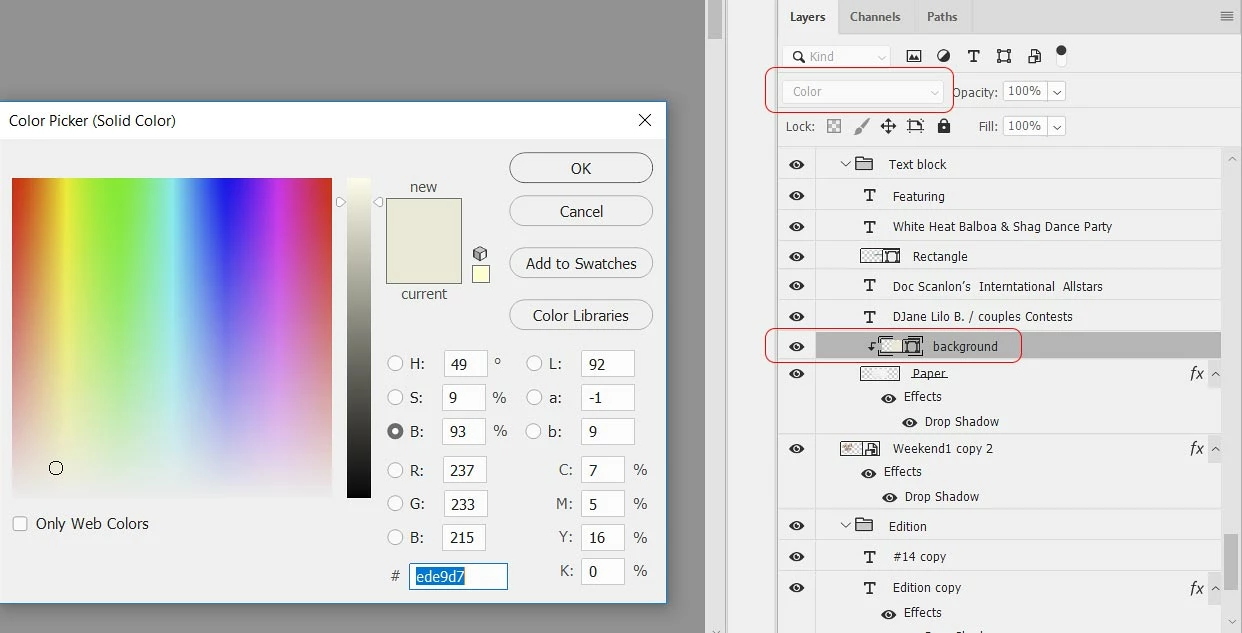
The background layer is just a solid rectangle. When color blend mode is chosen it becomes greenish and there is a stripe in the paper.
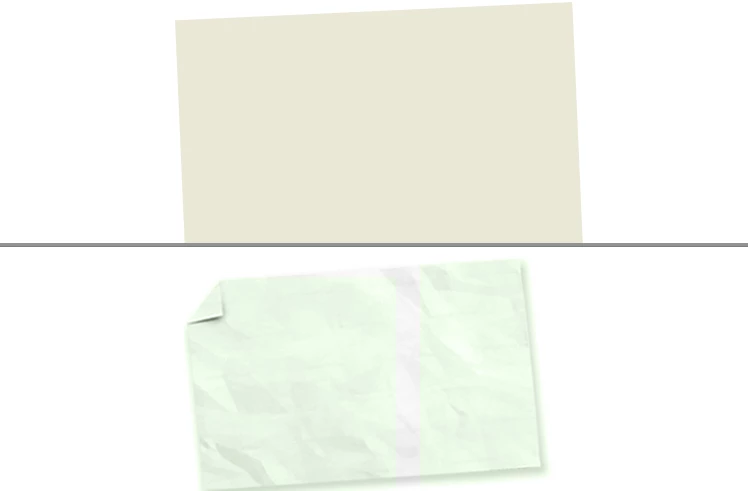
The file still is displayed correctly when opened in Photoshop 2018!

What can cause that issue? Bug?

Marcus

This topic has been closed for replies.
Correct answer davescm

Can you go to Preferences and check 'use legacy compositing' and try it again

7 replies

Noel Carboni
Legend
October 23, 2018

Hi Lindy,

Adobe is now aware of the issue.  In the past when a new major version was released there were often bugs that got fixed in a subsequent update.  We can hope that'll happen soon this time around.

-Noel

D Fosse
Community Expert
Community Expert
October 21, 2018

Just to circle in on possible variables, I updated the Quadro to 411.63, which is the latest "optimal drivers for enterprise" version. It was at 390-something.

Everything is still performing perfectly.

(And yay! - 30 bit works now! It didn't for so long that I thought it was broken by a Windows Update.)

Noel Carboni
Legend
October 21, 2018

https://forums.adobe.com/people/D+Fosse  wrote

(And yay! - 30 bit works now! It didn't for so long that I thought it was broken by a Windows Update.)

For what it's worth, I have had to reselect the 30 bit mode in the nVidia control panel after every driver update.  Even though it LOOKs like it's already set, as though it retained the settings from before, it really didn't.

Is it possible to drag a PSD file to this forum to post it?  It would be good to have just a small one with which to reproduce the problem.

-Noel

Chuck Uebele
Community Expert
Community Expert
October 21, 2018

Sorry, Noel, can't do that. Have to use dropbox or something else.

Chuck Uebele
Community Expert
Community Expert
October 20, 2018

As Mark mentioned, PS has a new compositing engine that crunches layer data and is suppose to be faster. It is a rewrite of the base code. There are still issues with it, but those will be worked out. Sometimes, just turning a layer's visibility off then on will correct the problem for that layer, but if you are having issues, it's best to use legacy compositing.

c.pfaffenbichler
Community Expert
Community Expert
October 21, 2018
There are still issues with it

But under these circumstances the affected people may find its release without accompanying announcements* a bit irritating.

*: At least I found no mention of it in the »What’s new«-section.

D Fosse
Community Expert
Community Expert
October 20, 2018

I am absolutely unable to make anything break here. It all works smoothly, instantly and entirely as expected - with Legacy Compositing unchecked.

All these layers are in Color blend mode:

The card is NVidia Quadro P600. It hasn't been updated for a couple of months since there hasn't been any need (and I'm waiting for news on the 30-bit situation):

LindyHop1943
Known Participant
October 20, 2018

I just did a test. When I add a shaper layer on top of an image the color blend mode does not work. When I create a new layer and draw the rectangle as pixels color blend mode does work. When I draw a shape rectangle, set color blend mode it does not work, but as soon as I rasterize the shape layer the blend mode does work. It seems to be an issue with shape layers!

RosaPerry
Inspiring
October 17, 2018

I have both CC 2018 and CC 2019 installed on my Windows 10 System and the adjustment with solid colour using the 'Color' blend mode works correctly in CC 2018 but not in CC 2019.

Blending a red or cyan adjustment layer in blend mode 'Color' produces a grey monochrome effect on the image below. Blending adjustment layers in other colours in 'Color' blend mode produces weird colours.

I've followed some threads here and have enabled Legacy Compositing and that has rectified the problem in CC 2019. Why though?

I don't understand the first thing about Photoshop's compositing engine and why CC 2019 is different so would appreciate it if someone could explain.

What is the difference between the legacy and non-legacy compositing?

Here's my OS specs

Operating System: Windows 10 Home 64-bit

Version 1803

OS build 17134.345

(10.0, Build 17134) (17134.rs4_release.180410-1804)

Processor: Intel(R) Core(TM) i7-6700 CPU @ 3.40GHz (8 CPUs)

Operating System: Windows 10 Home, 64-bit

DirectX version: 12.0

GPU processor: GeForce GTX 970

Driver version: 372.70

Direct3D API version: 12

Direct3D feature level: 12_1

CUDA Cores: 1664

Core clock: 1215 MHz

Memory data rate: 7010 MHz

Memory interface: 256-bit

Memory bandwidth: 224.32 GB/s

Total available graphics memory: 20409 MB

Dedicated video memory: 4096 MB GDDR5

System video memory: 0 MB

Shared system memory: 16313 MB

Video BIOS version: 84.04.36.00.71

IRQ: Not used

Bus: PCI Express x16 Gen3

Device ID: 10DE 13C2 29783842

Part Number: G401 0010

Rosa
c.pfaffenbichler
Community Expert
Community Expert
October 17, 2018
What is the difference between the legacy and non-legacy compositing?

A valid question and something Adobe has not offered a lot of information (or any) on … (Edit: or at least I failed to find that information so far.)

Do all the affected parties work on Windows, though?

Mark C. Dahm
Community Manager
Community Manager
October 18, 2018

The compositor crunches layer data for screen display, and there is a LOT of performance upside to upgrading it. The differences between Legacy on or off are too numerous to mention, but you are not losing out a bit if you find it necessary to use the Legacy option.

Known Participant
October 17, 2018

I'm having an issue in some blend modes where random squares are introduced (see red in image), and I had photoshop hang on me and get really slow in select and mask mode. Legacy mode seems to have fixed the blend mode issue, dont know about select and mask lagging though.

D Fosse
Community Expert
Community Expert
October 17, 2018

That last one looks like a video driver issue.

Known Participant
October 17, 2018

Don't have that issue in the latest 2018 photoshop, and as I mentioned, it went away with legacy compositing on. IDK if its helpful, but these are my computer specs:

Macbook Air 13 inch early 2015

1.6ghz intel core i5

Memory 8gb 1600mhz ddr3

Graphics Intel HD Graphics 6000 1536mb

Edit: Operating System: High Sierra 10.13.6

Participant
October 16, 2018

Hi there, im having the exact same issue, when i use and adjustment layer with solid color and use with the layer blending mode "color" it becomes almost unsaturated dark purple, which didn't happened before the update. Below the example, it was supposed to be bright

red:

(i need this fixed asap, its affecting my work...)

davescm
Community Expert
davescmCommunity ExpertCorrect answer
Community Expert
October 16, 2018

Can you go to Preferences and check 'use legacy compositing' and try it again

c.pfaffenbichler
Community Expert
Community Expert
October 16, 2018
Can you go to Preferences and check 'use legacy compositing' and try it again

See Photoshop > Preferences > Performance > …

davescm , have you seen documentation on what the difference between legacy and non-legacy compositing is?