
Participating Frequently
November 13, 2019
Answered

PS 2020 mask/gradient banding?

  • November 13, 2019
  • 6 replies
  • 3654 views

So I've noticed the masks and gradient displays show heavy banding with PS 2020. I never had this issue previously, always smooth transitions if I'm painting on a mask or using gradients. But ever since upgrading to PS 2020, there have been some pretty significant bands appear with masks and gradients. Not sure if this is just a display issue or not... I'm working with 16-bit ProPhoto files. Settings are all the same as previous PS installs and this doesn't happen with other applications. Has anyone else had this issue since installing PS 2020, and has anyone resolved the issue? Again, this didn't appear until installing PS 2020 last week and PS 2019 (v20) did not have this problem. Running on Windows 10 with latest updates.
This topic has been closed for replies.
Correct answer samaardman

Yes, resetting preferences is what I had in mind. It seems to resolve a number of similar problems post-update. Not all of them of course, but if the preferences have been migrated from the previous version, it should be tried first.


Good news: we've resolved the issue on our PC's.  I'll detail our fix below: hope it helps anyone else who experiences this.


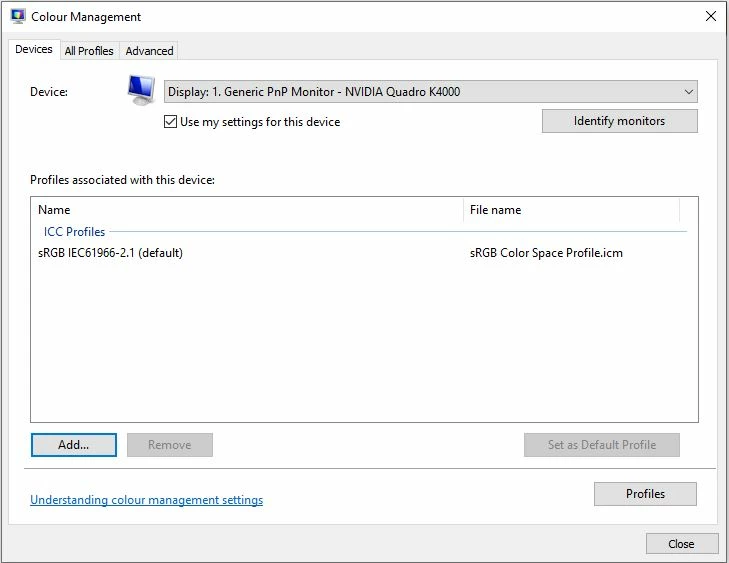
The issue for us was related to our ICC profiles.  The problem was apparent when a custom ICC profile was chosen as the default.  Our custom ICC profiles are generated whenever we run a monitor calibration.


The problem went away as soon as we chose one of the built-in ICC profiles, in this case we used:

sRGB IEC61966-2.1


To change the ICC profile click the windows start menu and start typing "color..."


Color Management (or Colour Management in the UK) should be on top of the list.


Click on it, select the monitor (Device) you wish to associate a profile and tick the "Use my settings for this device" check box.


You'll then be able to add a profile with the "Add" button.


We haven't yet tried recalibrating our monitors but will do so when we're less busy.


6 replies

trevorp56149524
Participant
November 26, 2019

I'm also encountering this banding issue with Gradients AND using the Soft Brush where I didn't previously have any issues with banding. 

Have tried the suggested fix but does not resolve.

I am using windows 10 on MS Surface Studio and GForce GTX1060 Graphics processor.

Any other suggestions welcome.

D Fosse
Community Expert
Community Expert
November 26, 2019

This whole thread is a confirmation that banding is somewhere in your display system. The question is to find out exactly where - monitor profile, GPU, video driver.


Banding happens in 8 bit color depth, and your display pipeline is 8 bit depth, even if the document is 16 bit.


In 8 bit depth, you have only 256 discrete steps per channel. So there will always be some banding on screen with a Photoshop gradient (unless you have a 10 bit capable monitor and video card). The standard way to deal with it is to add a tiny amount of noise.

trevorp56149524
Participant
November 26, 2019

Thanks for your reply.

Have switched to 16bit wherever I have found this option e.g. LR export and shall be working in 16 bit as much as possible.

Certainly improves things but care is still needed I notice. 

samaardman
Inspiring
November 21, 2019

Hi, we're also having the same issue.  Running PS 2020, Windows 10 is up to date, previous versions don't have the issue.  It only seems to be a problem with our 4k monitors, 1080 monitors are unaffected.  Tried the latest Nvidia driver; no effect.  

D Fosse
Community Expert
Community Expert
November 21, 2019

I did a thorough check for any display anomalies, before and after updating Windows to the latest 1909 version (precisely because of the 1903 bug). Everything spotless. That's on a 2560 x 1440 monitor, NVidia Quadro. If higher monitor resolutions show problems, that clearly points to the video driver.


Just as troubleshooting, what happens if you set GPU to "Basic", or uncheck it altogether?

samaardman
Inspiring
November 21, 2019

Thanks for replying so quickly.


Previous versions of Photoshop i.e. 2019 and 2018 don't have the issue at higher monitor resolutions.  If the GPU driver was at fault, it will cause problems in these versions as well.


The machine in question is still running Win 1903, but that's ok as it's still in service (until December 2020).


This does feel like a bug to me.

D Fosse
Community Expert
Community Expert
November 15, 2019

darior, check your display profile again. Make sure the correct profile is used. Just to rule it out, update your video driver also.


If you have color banding, the most common cause is video card calibration tables.

Inspiring
November 17, 2019

D_Fosse, thanks for your help but nothing is changed. I have Nvidia Quadro K1200 with the latest drivers (14 november) on Windows 10 pro. I also followed the instructions in the above link provided https://windowsreport.com/nvidia-color-banding-fix/ but this not solves the banding problems experienced with the CC2020 version. Bandings are particularly evident in the color picker panel and on the layer masks.
Running PS CC2019 there are not banding issues with the same machine in the same condictions while PS CC2020 shows bandings. If grafic card causes this kind of problem, even the CC2019 version should show the same banding issue but is not the case.

Inspiring
November 15, 2019

I've experienced the same issue, with any kind of picture, 16/8bit, ProPhoto, Adobe RGB 1998 or sRGB. In the CC 2019 version there is not any kind of banding with gradients or masks. Tested all both versions using the same Pc at the office where I work, Windows 10 Pro, Nvidia Quadro, all drivers updated and same monitor calibrated with i1Display Pro. It seems to be a bug.

brandondtAuthor
Participating Frequently
November 15, 2019

After further research, this appears to be a bug with Windows 10 color management system. An update released in the spring became a required update about the same time PS 2020 was released, at least that's when Windows update decided to install it for me and generally that's when an update becomes required instead of optional. Anyway, take a look at this article and see if it helps you: https://windowsreport.com/nvidia-color-banding-fix/ ... for me just changing the Device Profile in the advanced menu to my monitor's default profile *seems* to have fixed the issue, at least initially as I haven't gotten to do much with it yet. My custom calibrated profile did NOT work and had heavy banding, even though it's still loaded and used as a LUT in my monitor. So, from what I can see it's a screwy Windows bug that happened to time with the release of PS 2020. But I'm still researching whether this is really an acceptable solution. There's not a lot of info on how Windows handles it's color management. Also, I might add that I removed PS 2019 when upgrading so I am unable to compare the two.

D Fosse
Community Expert
Community Expert
November 15, 2019

You're referring to a well documented bug in the 1903 release. That didn't last long though, it was fixed a month or two later. If you still have this problem you haven't updated Windows in a long time.

D Fosse
Community Expert
Community Expert
November 13, 2019

With 16 bit data, any banding you see is generally in your display system, which runs in 8 bit color depth (unless you have a 10-bit capable monitor and video card).


Banding is exaggerated by a bad monitor profile, calibration tables in the video card, or a low quality display panel. When all of these contribute their own imperfections, the result can be highly irregular banding, often with colored bands.


In addition, there is a long-standing bug affecting ProPhoto files only, showing up as cyan colored banding in the shadows. When you have GPU in Normal or Advanced mode, profile conversions are performed in the GPU. ProPhoto is highly compressed in the shadows, and small inaccuracies in the conversion into the monitor profile are exaggerated and results in banding. It's erratic, but Mac and Windows are equally affected. This bug is probably in OpenGL (and/or Metal) code, and outside Adobe's control. It's still only display, not the image data.


Finally, it should be noted that Photoshop displays 8 bit data at zoom levels below 66.67%. Zooming in to 66.67% or higher will eliminate this.

Bojan Živković11378569
Community Expert
Community Expert
November 13, 2019

I am also running latest Photoshop on Windows 10 without masks and gradients banding. Can you post some screenshot and system info so someone may be able to identify potential problem.