
PS 2022/2023 keyboard shortcuts not behaving consistently
- November 26, 2022
- 8 replies
- 7926 views
2018 intel mac mini
macOS 13 ventura (occurred with macOS 12.xx too)
Ever since the released of ps2022 and beyond, keyboard shortcuts do not behave consistently. In one good bit of news, ps2023 has this occur far less often but it still remains roughly 20% of the time. What is happening is when I press my shortcut key, the icon in the tool bar will darken (as if pressed) but as soon as I release the key, the tool I want will deselect and return to the tool I'm currently using. To resolve this, I tap the keyboard shortcut for the tool I want many times quickly. Then it will stick. It primarly affects all brush tools. I have uninstalled and reinstalled all adobe cc apps with no luck. I have deleted ps preferences with no luck as well. I have tried another keyboard thinking the one I'm using might be defective somehow, but the bug remains.
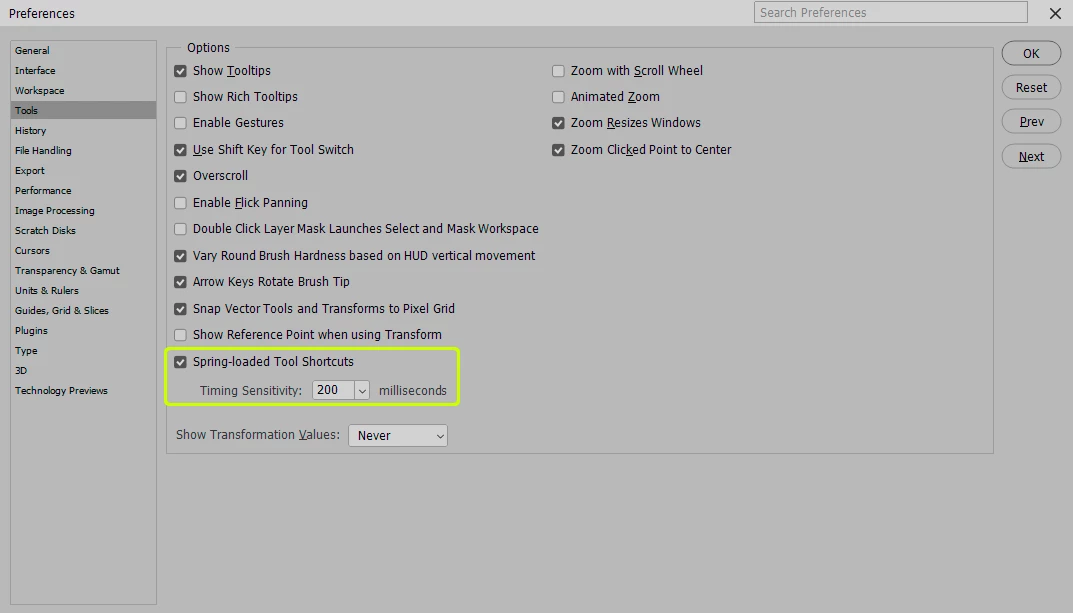
Edit 12/6/22 - This is a "feature" added in photoshop versions after 2021. I have unchecked the box for "Spring-loaded Tool Shortcuts" and now PS is behaving like it should. This feature is awful as all my coworkers have been complaining about it and nobody knew what was happening.

 AdChoices