


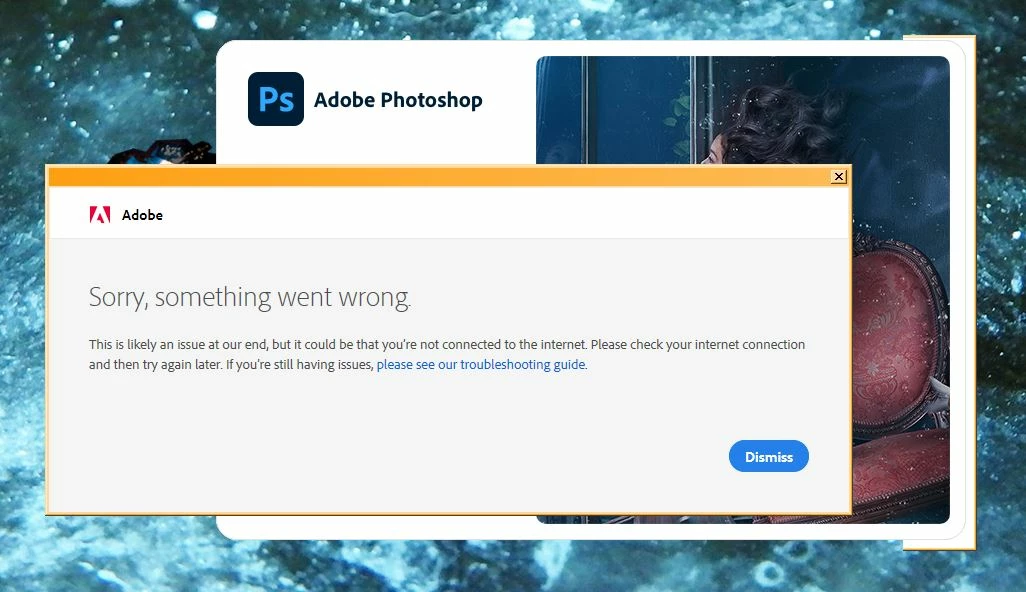
PS 21.2.7 rel : "Sorry something went wrong" on open, shows error, continues if "Dismiss" clicked
Photoshop release 21.2.7 – Photography plan – paid monthly
Running on PC with Win 7 upgraded to Win 10 – upon automated inquiry, it may be identified as one OR the other – reason unknown
Upon opening Photoshop, the error: "Something went wrong" is displayed (see screenshot below), but continues to open Photoshop when the "Dismiss" button is clicked – (I am always connected to the Internet) – and nothing is different about how Photoshop functions.
• I have searched and read all of the Adobe documentation and support articles and found nothing that provides a useful answer,
• This never happened before two or three days ago, but the error notice suddenly started appearing every time I try to open Photoshop now,
• The only clue I have on what changed is that it was about the time I installed the Eclipse program to edit .html and .php files,
• I can't upgrade to a newer release of Photoshop, as 21.1.7 is apparently the latest version that will run on my machine – and I'm not going to go buy a new machine anytime soon – so that solution is out,
• and I really don't want to click the error's Dismiss button every time I open Photoshop.
So – I need to know what to tweak and where to tweak it to resolve this problem.
Can anyone please help me? – I would greatly appreciate it!
 AdChoices