
Participant
August 18, 2021
Pergunta

PS 22.4.3 STYLES - IMPORT STYLES greyed out

  • August 18, 2021
  • 1 resposta
  • 277 Visualizações

Hi there, I'm running PS 2021 (22.4.3) on my MAC  Catalina version 10, and this had been happening all the way back to 2020.

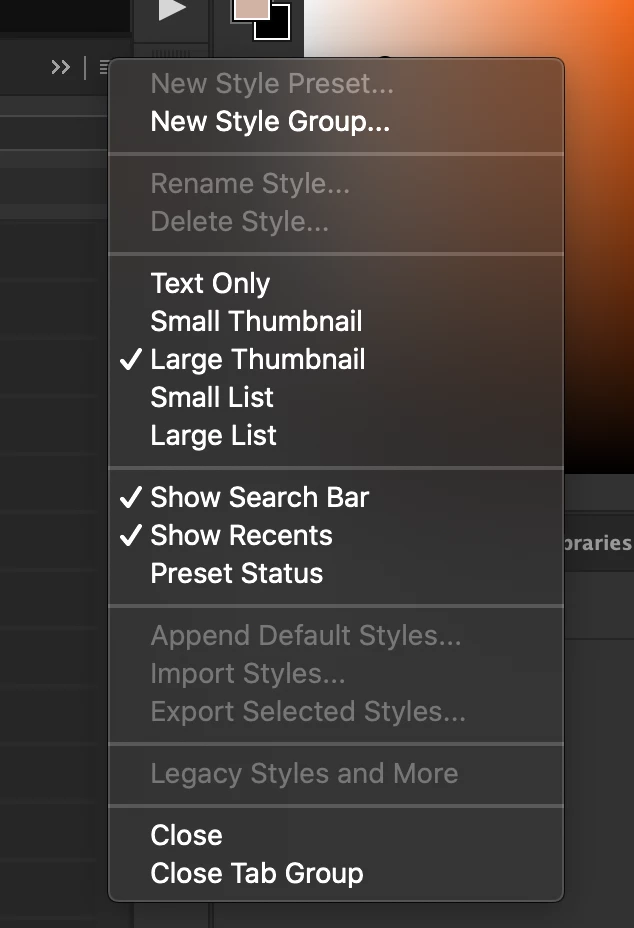
IMPORT STYLES dialogue is greyed out! As a matter of fact half of the entire dialogue box seems to be greyed out, including Legacy Styles etc, please see attached pic.

I'm desperate to have this issue sorted as I've spent quite a bit of money aquiring these styles and plenty of jobs I need them for. For the record the collection is located in Applications/Photoshop 2021/Presets/Styles.

I would so appreciate it if someone out there could help me ASAP.

Cheers
Este tópico foi fechado para respostas.

1 Resposta

c.pfaffenbichler
Community Expert
Community Expert
August 18, 2021

What have you done for all-purpose trouble-shooting so far? 

Restoring Preferences after making sure all customized presets like Actions, Patterns, Brushes etc. have been saved might be a good starting point:

https://helpx.adobe.com/photoshop/using/preferences.html

https://helpx.adobe.com/photoshop/kb/basic-trouble-shooting-steps.html


It might be advisable to place the files in the corresponding Library-folder. 

Participant
August 19, 2021

Thanks mate, much appreciate your suggestions. I'll try them now but can you please tell me when you say 'place files in the corresponding Library-folder' are you suggesting I make copies from my Applications/Photoshop 2021 folder and paste them into my Library/Application Support/Adobe/Adobe Photoshop 2021? Currently there are only 2 folders in there namely AMT and PDF. 

Thanks again.