
Participant
January 24, 2017
Answered

PS 7 help needed

  • January 24, 2017
  • 1 reply
  • 439 views

When I click image, adjustments, hue/saturation to edit my photo I can not see the pop up window to make the adjustments. The popup window is not visible in every edit option. It automatically changes my cursor to the eye dropper tool. Does anyone know how I can fix this?

I have my own workspace and have not changed any options. I would like to uninstall or repair the program but I can't locate my CD

All assistance is appreciated.
    This topic has been closed for replies.
    Correct answer Jeff Arola

    Reset the photoshop 7 preferences.

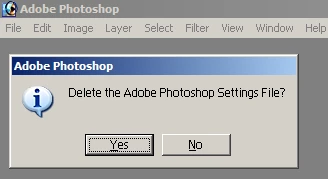
    Press and hold down the Shift+Ctrl+Alt keys just after starting the launch of photoshop 7

    (you have to be quick about holding all three keys down or you won't get the below dialog)

    Keep holding the keys down until you get a dialog asking to Delete the Adobe Photoshop settings file

    Press Yes

    1 reply

    Mylenium
    Legend
    January 24, 2017

    Delete your preferences/ workspace files. You probably moved the panels off screen and the info has become sticky in those configuration files.

    Mylenium

    Participant
    January 24, 2017

    I deleted my workspace, closed PS and reopened it but I have the same issue. My workspace is no longer an option so it has definitely been deleted. If the window was simply moved off screen shouldn't I be able to make PS window small and then see the missing edit popup window? Also, it doesn't appear to be on the correct option I choose. I am choosing to edit the hue/saturation but it automatically changes to the eye dropper option only.

    Jeff Arola
    Community Expert
    Jeff ArolaCommunity ExpertCorrect answer
    Community Expert
    January 24, 2017

    Reset the photoshop 7 preferences.

    Press and hold down the Shift+Ctrl+Alt keys just after starting the launch of photoshop 7

    (you have to be quick about holding all three keys down or you won't get the below dialog)

    Keep holding the keys down until you get a dialog asking to Delete the Adobe Photoshop settings file

    Press Yes