julient86947435
Known Participant
November 11, 2019
Answered

PS. Batch save images with mutiple meta into the title field

  • November 11, 2019
  • 5 replies
  • 1366 views

Hi there, it is my first post.

Let say I want to batch two images. The meta Keyword of the first image is 'A' and the meta Keyword of the second image is 'B'.

During a saving batch script for these two images, is there a way to end up with the files names: A_my-title-image-one and B_my title-image-two ?

Hope that make sense.

Julien

This topic has been closed for replies.
Correct answer Stephen Marsh

Photoshop Option:


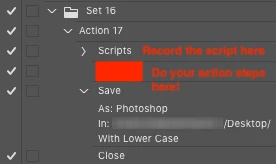
This is another "proof of concept", the script could be written to handle batch processing using an action and or to save the files as well, without being dependent on the Batch command.


#target photoshop

// Keyword to Filename _Prefix.jsx

/* 
A "proof of concept" helper script for the Batch command using a Destination folder with Override action "save as" commands. The action should include "save" and "close" steps. This script should be added to the action as the first step.
*/

/* Start check for unsaved doc */
unsavedDocCheck();

function unsavedDocCheck() {
    if (!documents.length) return;
    try {
        var savePath = activeDocument.path;
    } catch (e) {
        alert("The document must be saved before running this script!");
        return
    }
    /* Finish check for unsaved doc */

    /* Start main code */
    var origDoc = app.activeDocument;
    var baseName = origDoc.name.replace(/\.[^\.]+$/, '');
    var sep = String("_");
    var prefix1 = origDoc.info.keywords;
    // RegEx1 to isolate the first keyword, RegEx2 to sanitize keyword
    var prefix2 = prefix1.toString().replace(/(.+?)(,.+)/, '$1').replace(/[^A-Z 0-9-_]/gi, '');
    var dupeName1 = prefix2 + sep + baseName;
    // RegEx to clean leading underscore if no keyword present
    var dupeName2 = dupeName1.replace(/(^_?)/, '');
    // true to merge layers
    origDoc.duplicate((dupeName2), false);
    // (SaveOptions.SAVECHANGES)
    origDoc.close(SaveOptions.DONOTSAVECHANGES);
    /* Finish main code */

}


https://prepression.blogspot.com/2017/11/downloading-and-installing-adobe-scripts.html


5 replies

Stephen Marsh
Community Expert
Stephen MarshCommunity ExpertCorrect answer
Community Expert
November 13, 2019

Photoshop Option:


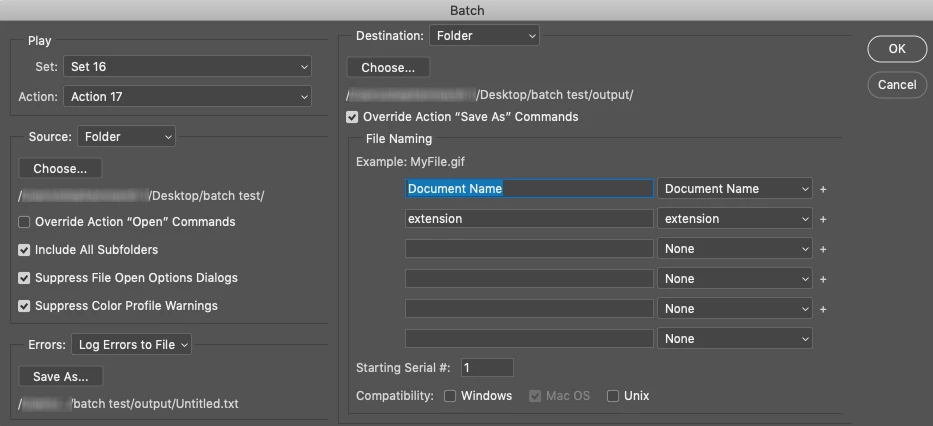
This is another "proof of concept", the script could be written to handle batch processing using an action and or to save the files as well, without being dependent on the Batch command.


#target photoshop

// Keyword to Filename _Prefix.jsx

/* 
A "proof of concept" helper script for the Batch command using a Destination folder with Override action "save as" commands. The action should include "save" and "close" steps. This script should be added to the action as the first step.
*/

/* Start check for unsaved doc */
unsavedDocCheck();

function unsavedDocCheck() {
    if (!documents.length) return;
    try {
        var savePath = activeDocument.path;
    } catch (e) {
        alert("The document must be saved before running this script!");
        return
    }
    /* Finish check for unsaved doc */

    /* Start main code */
    var origDoc = app.activeDocument;
    var baseName = origDoc.name.replace(/\.[^\.]+$/, '');
    var sep = String("_");
    var prefix1 = origDoc.info.keywords;
    // RegEx1 to isolate the first keyword, RegEx2 to sanitize keyword
    var prefix2 = prefix1.toString().replace(/(.+?)(,.+)/, '$1').replace(/[^A-Z 0-9-_]/gi, '');
    var dupeName1 = prefix2 + sep + baseName;
    // RegEx to clean leading underscore if no keyword present
    var dupeName2 = dupeName1.replace(/(^_?)/, '');
    // true to merge layers
    origDoc.duplicate((dupeName2), false);
    // (SaveOptions.SAVECHANGES)
    origDoc.close(SaveOptions.DONOTSAVECHANGES);
    /* Finish main code */

}


https://prepression.blogspot.com/2017/11/downloading-and-installing-adobe-scripts.html


julient86947435
Known Participant
November 16, 2019

Awesome. Thanks Stephen, that's exaclty what I was looking for with Photoshop and an Action process.

Best

Stephen Marsh
Community Expert
Community Expert
November 13, 2019

Bridge Option:


Use a script to batch copy the Keyword to the Title metadata, then use Bridge's Batch Rename Tool to rename selected files using the Title + underscrore + current filename


This is a 2 step workflow, first run the Bridge script, then run Batch Rename.


I have modified an existing script to perform this task and tested that it works as expected. I can post the code for this script if desired.


P.S. A different Bridge script could be created for a custom batch rename without having to go through the Title or Batch Rename Tool, it would simply prefix the keyword and an underscore in front of the filename. This would take a little more work and I don't have a script ready at hand at this time.

Stephen Marsh
Community Expert
Community Expert
November 12, 2019

Julient, to confirm, the images already have existing keyword metadata? Would the keyword only have a single entry, or could there possibly be more than one keyword? Would keywords possibly use special characters that would create illegal filenames?


I have a couple of ideas in mind, one for Bridge and another for Photoshop...

julient86947435
Known Participant
November 15, 2019

Hello Stephen, yes you get my point 🙂

Also yes, an image have only one keyword, not use of special characters, just the '-'

I saw your others responses, looks very relevants to me (keyword to file name prefix). I will look at them later on and get back to you.


I'm a pro photographer, baching (for saving) photos for my customers. At job, shoots are made regarding differents categories of a business. Using an existing meta keyword to define a shoot categorie during a batch saving (having your keyword prefix) will be very appreciated.

melissapiccone
Community Expert
Community Expert
November 12, 2019

This is your option to do what you want, not sure whjy it's more tricky and won't work...

Melissa Piccone | Adobe Trainer | Online Courses Author | Fine Artist
Stephen Marsh
Community Expert
Community Expert
November 12, 2019

Melissa, the OP wishes to rename using keyword metadata, which is not possible using batch.


Adobe Bridge's Batch Rename Tool would be the correct tool for the job – if the metadata option offered a keyword selection, which it does not.


So a custom script for Bridge or Photoshop or ExifTool or another 3rd party option would be required.


melissapiccone
Community Expert
Community Expert
November 11, 2019

Yes - use Bridge - go to tools, Photoshop and choose Batch. You can set up your file naming in there.

Melissa Piccone | Adobe Trainer | Online Courses Author | Fine Artist
julient86947435
Known Participant
November 12, 2019

No. You didn't get my question, it's a bit more tricky... Sorry about that, or read it again.

Please let it know if still unclear.
