Participating Frequently
July 27, 2020
Answered

PS changes file type from .jpg to .psd even without any changes to the file

  • July 27, 2020
  • 1 reply
  • 4124 views

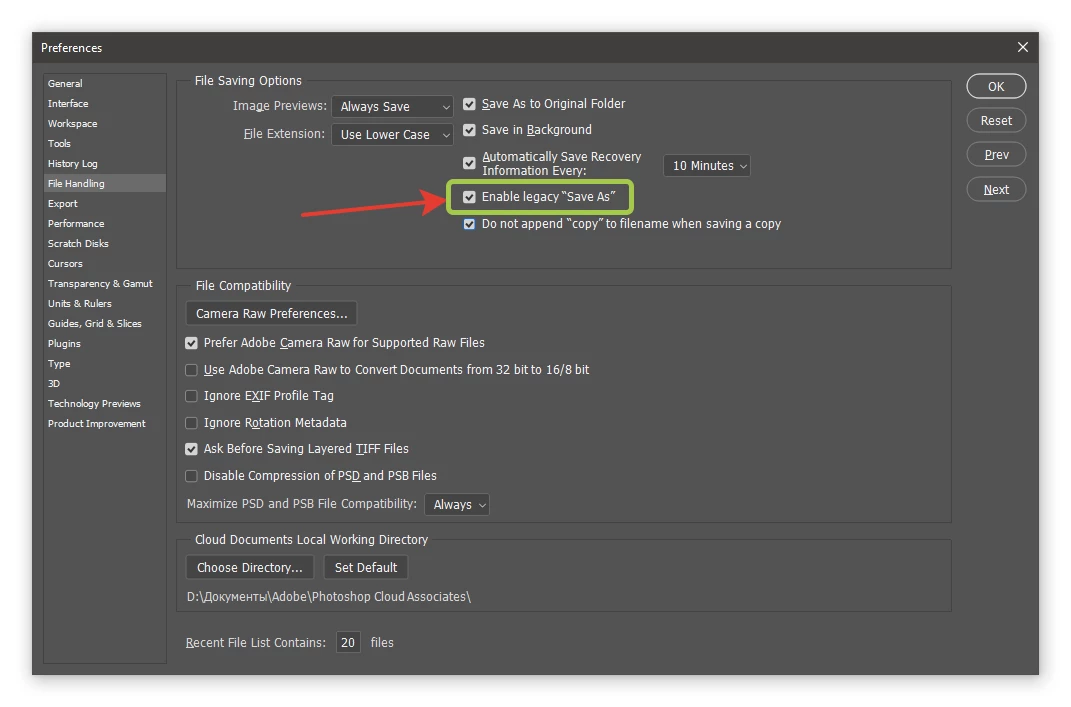
New issue with the latest update in PS CC2020: When I open and close a .jpg file, even to those which I have made no changes - merge layers, merge visible, and flatten image are all grayed out, history shows only open - the file type still defaults to .psd. This is new, I never had PS change the file type previously, unless I asked it to "save as". What can I change so that the file type doesn't automatically default to .psd? Anyone else seeing this issue. It's added an unneccessary step to my workflow - I would like PS to not change the file type. 


This topic has been closed for replies.
Correct answer jazz-y

I am a sports photographer and have been having the same issue in photoshop.  When I edit a jpg it automatically saves as psd and I have to select the "save as a Jpg" option.  I would like to know if I can change anything in preferences and specifically what to change.  It adds a LOT of extra time to edits.  


quote

I am a sports photographer and have been having the same issue in photoshop.  When I edit a jpg it automatically saves as psd and I have to select the "save as a Jpg" option.  I would like to know if I can change anything in preferences and specifically what to change.  It adds a LOT of extra time to edits.  


By @Susan22571635d35u

1 reply

JJMack
Community Expert
Community Expert
July 27, 2020

If you made no changes save should be grayed out and not even available.  You would need to use "Save As" to save the current document any way you want to.   If you add Layers  "Save" will switch to "Save As" so you can save your layers if you want to and may even default "Save As to file type PSD. If you just change pixels in the background layer Save should save over the opened jpeg file.


If  "Save" is saving an opened jpeg as a PSD file try resetting your Photoshop tools and if that does not fix your problem  try resetting your Preferences.  Save should not save an opened jpeg as a psd file.


Save has no dialog and would not show any message.  If you did not add layers to a open jpeg save should not switch to save as. Save should save over the document file opened.  If you open a PSD and add more layers Save should save over the opened PSD file. Save has no dialog.


Save AS has a dialog and may be remembering the file type you saved last.  A new document would not have any backing file on disk there would  no file type in the document window frame or tab what should Save As do.  How should Save as know what type if file you want to save.  You can select any that is valid in the dialog pull down.  Even if Save AS behavior has changed it should not be a major issue.  Adobe changes things all the time....

JJMack
Participating Frequently
July 27, 2020

Exactly! Thanks much for clarifying. 


Previously, if I made changes to a jpg, and closed the file, PS would ask, "Would you like to save changes to FileName.jpg?" Now, if I make changes to a jpg, and close the file, PS asks, "Would you like to save changes to FileName.psd?" even on a flattened image with no layers. I then need to change the file type BACK to jpg and I get the "FileName.jpg already exists, do you want to replace it?" error message. Lots of extra steps and when working with many files, it's a massive time waste. I'm working on a .jpg and I want to close it and save it by simply clicking "Yes" to saving it without PS autmatically changing the file type to psd. 


You mentioned that if "Save" is saving an opened jpeg as a PSD file try resetting your Photoshop tools and if that does not fix your problem try resetting your Preferences." Could you be more specific? I've searched for a tool or a preference that would automatically change the file type and couldn't find one. 

"Save should not save an opened jpeg as a psd file."  - exactly! But for some reason, now it is, and I can't find a way to keep PS from defaulting to creating psd files. 

Kukurykus
Legend
January 16, 2022

I am a sports photographer and have been having the same issue in photoshop.  When I edit a jpg it automatically saves as psd and I have to select the "save as a Jpg" option.  I would like to know if I can change anything in preferences and specifically what to change.  It adds a LOT of extra time to edits.  


Save as formats have disappeared Photoshop 22.4