
PS CS6 Type tool is backwards
Photoshop CS6 (reinstalled fresh today from Creative cloud)
Mac OSX 10.8.2
Macbook Pro
Fontcase 2.1.1
Hi I am having trouble with the type tool. it is putting all punctuation at the start of the sentance.
Example i want to type
This is doing my head in!
What i get is:
!This is doing my head in (exclamation mark at the start of the sentance)
So far I have:
Reinstalled photoshop
Changed the language prefs from East Asian and Middle Eastern (both give the same result)
Trashed all my prefs
Checked other apps (all fine)
Used different typefaces (all act the same)
I found this screenshot on a forum that looks perfect:
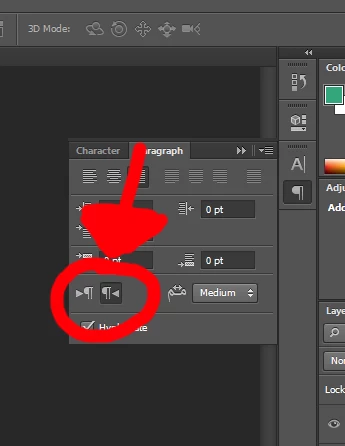
Howerver my paragraph panel does not have that option.
I have read this thread: http://forums.adobe.com/thread/1056427
And there is nothing there to help.
Anyone help me out with this?
Thanks
Neil
 AdChoices