
Participant
April 22, 2010
Question

PS Script - Change Layer Color

  • April 22, 2010
  • 4 replies
  • 15392 views

This Is My First Post Here, So Hello Everyone,

Hope I Am Posting In The Right Section,
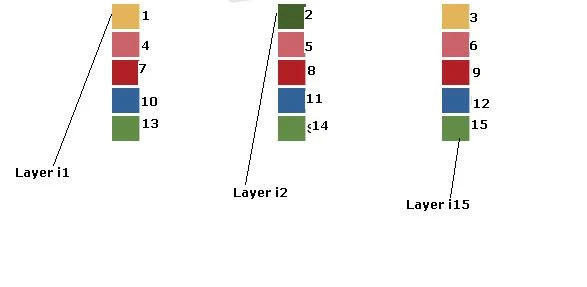
I Have A Photoshop File Which Looks Like Shown Above..

The Text 1 2 3 ...15 Are Different Layers..

And The Boxes Are Different Layers, Named i1 i2 i3 ...... i15

I Want To Write A Script That Will Change The Color Of Boxes (Actually This Is Legend Section For A Pie Chart)

I Want To Write Very Hard-Coded Script, Nothing Dynamic,

Like

layer[i1].color = #9f13a8
layer[i2].color = #520457
layer[i3].color = #cc626c
layer[i4].color = #aa5705

I Tried Searching Around, But Very Less Help Available On ps-script And Complicated Examples....

I Just Want Some Simple Lines, How To Easily Reference A Layer By Name And Change The Color (Forecolor, I Guess)

I Wrote This But It Does Not Works

var myDocument = app.activeDocument;
var myLayer;

myLayer=myDocument.artLayers.getByName("i1");
myLayer.color="#9f13a8";

I Don't Know If .artLayers Is Only For Text Layers Or Something.. I Found It In An Example...

Thanks

This topic has been closed for replies.

4 replies

December 18, 2014

I want to apply different colors and patterns to a cloth in an image. E.g. color of a shirt, pant, collar etc.

Would you please suggest me how to automatize this concept.

November 20, 2014

Hey Michael

I want to apply pattern to solid layer as same as we applied color. Can you please help me with this.

Chuck Uebele
Community Expert
Community Expert
November 20, 2014

If you want to apply a pattern you can use scriptlistener to generate the code. It might be best to create the shape first by either drawing it or by using scriptlistener to generate the code, then use scriptlistener to generate code to change the fill pattern. This way you can use that code for any type of shape layer: oval, rectangle, etc. If you don't want a dialog box, you will have to find both the name and id number for the pattern used - again, this will show up using scriptlistener. If you want have a dialog box come up and be able to select which pattern you want to use, change the last line of the scriptlistener code to:

executeAction( idsetd, desc10, DialogModes.ALL );

But be sure to reset the dialog mode to No after that line. Here's an example of the code for changing a pattern:

#target photoshop

var idsetd = charIDToTypeID( "setd" );

    var desc10 = new ActionDescriptor();

    var idnull = charIDToTypeID( "null" );

        var ref2 = new ActionReference();

        var idcontentLayer = stringIDToTypeID( "contentLayer" );

        var idOrdn = charIDToTypeID( "Ordn" );

        var idTrgt = charIDToTypeID( "Trgt" );

        ref2.putEnumerated( idcontentLayer, idOrdn, idTrgt );

    desc10.putReference( idnull, ref2 );

    var idT = charIDToTypeID( "T  " );

        var desc11 = new ActionDescriptor();

        var idPtrn = charIDToTypeID( "Ptrn" );

            var desc12 = new ActionDescriptor();

            var idNm = charIDToTypeID( "Nm  " );

            desc12.putString( idNm, """$$$/Presets/Patterns/Patterns_pat/TieDye=Tie Dye""" );//pattern name

            var idIdnt = charIDToTypeID( "Idnt" );

            desc12.putString( idIdnt, """1b29876b-58b7-11d4-b895-a898787104c1""" );//pattern ID number

        var idPtrn = charIDToTypeID( "Ptrn" );

        desc11.putObject( idPtrn, idPtrn, desc12 );

    var idpatternLayer = stringIDToTypeID( "patternLayer" );

    desc10.putObject( idT, idpatternLayer, desc11 );

executeAction( idsetd, desc10, DialogModes.ALL );//Change the NO to ALL

app.displayDialogs = DialogModes.NO;//Make sure you reset!!!

November 21, 2014

Thank you for your prompt help.

Layer type is PsLayerKind.psNormalLayer.

I tried your code, but it gives me below error.

General Photoshop error occurred. This functionality may not be available in this version of Photoshop.

- The object "current fill layer" is not currently available.

October 26, 2010

This works great, and almost does what i want, i would like to expand upon this by using the color picker to set the colors, rather than declaring them in the code. Is this possible?

I found this handy color picker script on ps-sripts, which was actually from here somewhere. Is this something that could be tied into this?

http://www.ps-scripts.com/bb/viewtopic.php?f=13&t=2886&sid=04726f28d56f823e757c4afaf957ca4c

Hopefully this all makes sense. I basically have a file, that i have to 3-5 times a day, open up and change the color palette on it. It has 7 colors that need to change quite often, but its much easier to use the color picker during the process, rather than using it then updating the js file, then running it on the template.

Thanks.

Ryan

Inspiring
April 22, 2010

What kind of layers are the one with color?. Are they soild fill layers, shape layers, or just pixel layers where you made a selection and filled with color?

JForJeetuAuthor
Participant
April 22, 2010

They Are Shape Layers..

I Select The Layer, And Can Change Color With Paint-Bucket Tool

Inspiring
April 22, 2010

Good. Here is how to change the color of a fill or shape layer

var sColor =  new SolidColor;
sColor.rgb.hexValue = '9f13a8';
app.activeDocument.activeLayer = app.activeDocument.layers.getByName("i1");
setColorOfFillLayer( sColor );

function setColorOfFillLayer( sColor ) {
    var desc = new ActionDescriptor();
        var ref = new ActionReference();
        ref.putEnumerated( stringIDToTypeID('contentLayer'), charIDToTypeID('Ordn'), charIDToTypeID('Trgt') );
    desc.putReference( charIDToTypeID('null'), ref );
        var fillDesc = new ActionDescriptor();
            var colorDesc = new ActionDescriptor();
            colorDesc.putDouble( charIDToTypeID('Rd  '), sColor.rgb.red );
            colorDesc.putDouble( charIDToTypeID('Grn '), sColor.rgb.green );
            colorDesc.putDouble( charIDToTypeID('Bl  '), sColor.rgb.blue );
        fillDesc.putObject( charIDToTypeID('Clr '), charIDToTypeID('RGBC'), colorDesc );
    desc.putObject( charIDToTypeID('T   '), stringIDToTypeID('solidColorLayer'), fillDesc );
    executeAction( charIDToTypeID('setd'), desc, DialogModes.NO );
}