Participant
January 4, 2023
Answered

PS Script - Render to Video

  • January 4, 2023
  • 1 reply
  • 793 views

Hi,


How do I export a psd file and render it as a video. Export > Render Video programmatically (js)?


I have seen suggestions that say to install ScriptListener but I seem to be having issues running it.


Thank you!!


Ps-2019CC

This topic has been closed for replies.
Correct answer Stephen Marsh

@Mikel27804403lxm5 


Are you using PS2023? Anecdotally, the SL plugin appears to work in PS2022 or earlier...


It would be helpful if you posted a screenshot of the render settings that you require to be scripted.


For example, the following settings:
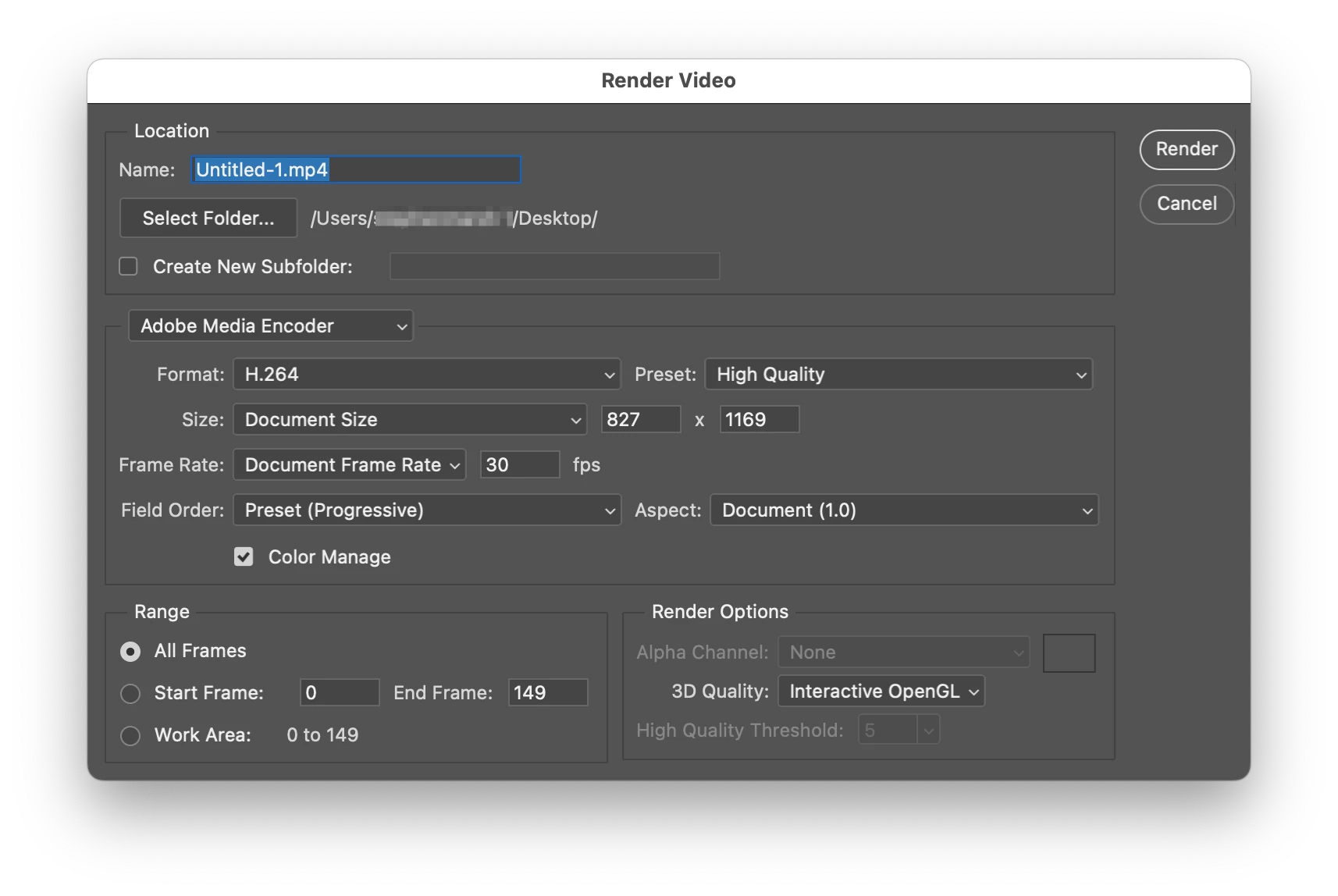


Produced this result with the SL plugin:


var idexport = stringIDToTypeID( "export" );
    var desc387 = new ActionDescriptor();
    var idusing = stringIDToTypeID( "using" );
        var desc388 = new ActionDescriptor();
        var iddirectory = stringIDToTypeID( "directory" );
        desc388.putPath( iddirectory, new File( "~/Desktop" ) );
        var idameFormatName = stringIDToTypeID( "ameFormatName" );
        desc388.putString( idameFormatName, """H.264""" );
        var idamePresetName = stringIDToTypeID( "amePresetName" );
        desc388.putString( idamePresetName, """1_High Quality.epr""" );
        var iduseDocumentSize = stringIDToTypeID( "useDocumentSize" );
        desc388.putBoolean( iduseDocumentSize, true );
        var iduseDocumentFrameRate = stringIDToTypeID( "useDocumentFrameRate" );
        desc388.putBoolean( iduseDocumentFrameRate, true );
        var idpixelAspectRatio = stringIDToTypeID( "pixelAspectRatio" );
        var idpixelAspectRatio = stringIDToTypeID( "pixelAspectRatio" );
        var iddocument = stringIDToTypeID( "document" );
        desc388.putEnumerated( idpixelAspectRatio, idpixelAspectRatio, iddocument );
        var idfieldOrder = stringIDToTypeID( "fieldOrder" );
        var idvideoField = stringIDToTypeID( "videoField" );
        var idpreset = stringIDToTypeID( "preset" );
        desc388.putEnumerated( idfieldOrder, idvideoField, idpreset );
        var idmanage = stringIDToTypeID( "manage" );
        desc388.putBoolean( idmanage, true );
        var idallFrames = stringIDToTypeID( "allFrames" );
        desc388.putBoolean( idallFrames, true );
        var idrenderAlpha = stringIDToTypeID( "renderAlpha" );
        var idalphaRendering = stringIDToTypeID( "alphaRendering" );
        var idnone = stringIDToTypeID( "none" );
        desc388.putEnumerated( idrenderAlpha, idalphaRendering, idnone );
        var idquality = stringIDToTypeID( "quality" );
        desc388.putInteger( idquality, 1 );
        var idZthreeDPrefHighQualityErrorThreshold = stringIDToTypeID( "Z3DPrefHighQualityErrorThreshold" );
        desc388.putInteger( idZthreeDPrefHighQualityErrorThreshold, 5 );
    var idvideoExport = stringIDToTypeID( "videoExport" );
    desc387.putObject( idusing, idvideoExport, desc388 );
executeAction( idexport, desc387, DialogModes.NO );



1 reply

Stephen Marsh
Community Expert
Stephen MarshCommunity ExpertCorrect answer
Community Expert
January 5, 2023

@Mikel27804403lxm5 


Are you using PS2023? Anecdotally, the SL plugin appears to work in PS2022 or earlier...


It would be helpful if you posted a screenshot of the render settings that you require to be scripted.


For example, the following settings:


Produced this result with the SL plugin:


var idexport = stringIDToTypeID( "export" );
    var desc387 = new ActionDescriptor();
    var idusing = stringIDToTypeID( "using" );
        var desc388 = new ActionDescriptor();
        var iddirectory = stringIDToTypeID( "directory" );
        desc388.putPath( iddirectory, new File( "~/Desktop" ) );
        var idameFormatName = stringIDToTypeID( "ameFormatName" );
        desc388.putString( idameFormatName, """H.264""" );
        var idamePresetName = stringIDToTypeID( "amePresetName" );
        desc388.putString( idamePresetName, """1_High Quality.epr""" );
        var iduseDocumentSize = stringIDToTypeID( "useDocumentSize" );
        desc388.putBoolean( iduseDocumentSize, true );
        var iduseDocumentFrameRate = stringIDToTypeID( "useDocumentFrameRate" );
        desc388.putBoolean( iduseDocumentFrameRate, true );
        var idpixelAspectRatio = stringIDToTypeID( "pixelAspectRatio" );
        var idpixelAspectRatio = stringIDToTypeID( "pixelAspectRatio" );
        var iddocument = stringIDToTypeID( "document" );
        desc388.putEnumerated( idpixelAspectRatio, idpixelAspectRatio, iddocument );
        var idfieldOrder = stringIDToTypeID( "fieldOrder" );
        var idvideoField = stringIDToTypeID( "videoField" );
        var idpreset = stringIDToTypeID( "preset" );
        desc388.putEnumerated( idfieldOrder, idvideoField, idpreset );
        var idmanage = stringIDToTypeID( "manage" );
        desc388.putBoolean( idmanage, true );
        var idallFrames = stringIDToTypeID( "allFrames" );
        desc388.putBoolean( idallFrames, true );
        var idrenderAlpha = stringIDToTypeID( "renderAlpha" );
        var idalphaRendering = stringIDToTypeID( "alphaRendering" );
        var idnone = stringIDToTypeID( "none" );
        desc388.putEnumerated( idrenderAlpha, idalphaRendering, idnone );
        var idquality = stringIDToTypeID( "quality" );
        desc388.putInteger( idquality, 1 );
        var idZthreeDPrefHighQualityErrorThreshold = stringIDToTypeID( "Z3DPrefHighQualityErrorThreshold" );
        desc388.putInteger( idZthreeDPrefHighQualityErrorThreshold, 5 );
    var idvideoExport = stringIDToTypeID( "videoExport" );
    desc387.putObject( idusing, idvideoExport, desc388 );
executeAction( idexport, desc387, DialogModes.NO );


Participant
April 25, 2023

This is perfect.


Thank you.


Do you know a script i can use to automatically name each video the subfolder or folder name?


I am exporting a lot of videos in different subfolders and will like to name it that automatically

c.pfaffenbichler
Community Expert
Community Expert
April 26, 2023

Do you really mean Folders (on the OS-side) or Groups (as indicated in the Layers Panel)? 


Determining the name of the Folder in which an open File resides is not difficult. 

alert (Folder(File(activeDocument.fullName).parent).name);