Participant
December 21, 2024
Question

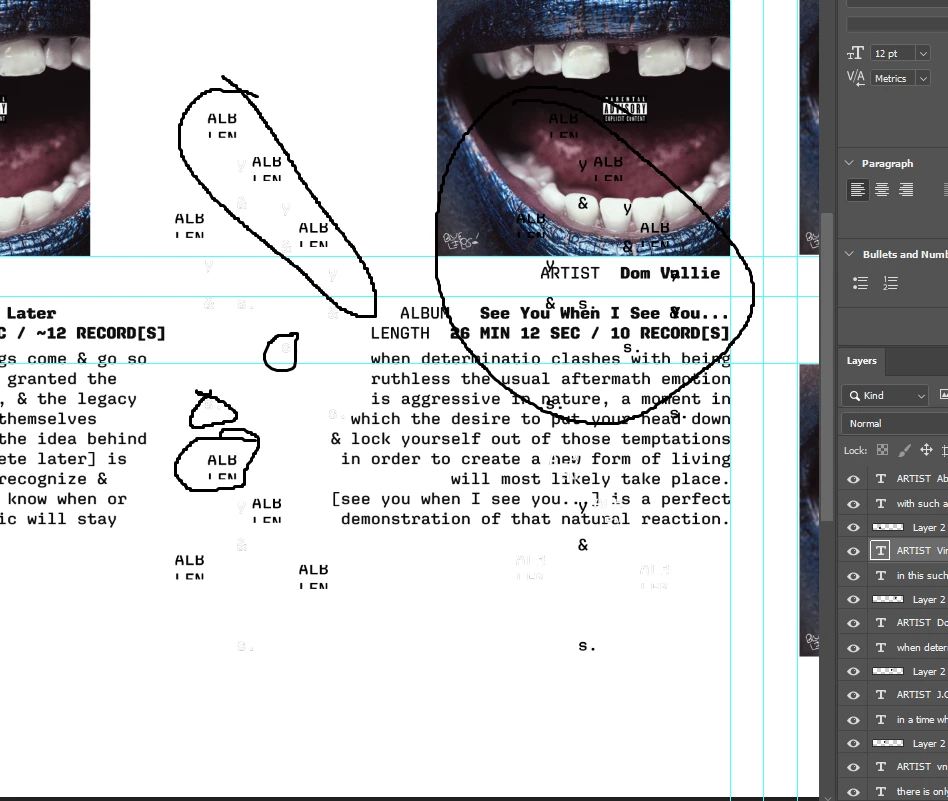
[PS] Text is broken & spaced oddly or different colors & split in half.

  • December 21, 2024
  • 1 reply
  • 161 views

Alright, Hi, Thank you for looking at my issue. Normally I write all my "speeches" so this would just be extra labor however I was working off the cuff so now it's kind of inconvient, will be saving many versions going forward. This is my dilemma.. I was working on a project took a break, came back & now my text are invisible & unable to see despite being visible in the layers right side bar or on another version I saved prior the text is spread across the canvas & scattered.. unaligned.. but not how I had it, some is cut in half & just missing in general. I have added an image to help explain. 

if there is any fix, that would be helpful if not.. well I guess I'mma restart ! 


This topic has been closed for replies.

1 reply

Sameer K
Community Manager
Community Manager
December 24, 2024

Hey, @Zqcharia. Welcome to the Photoshop Community. I'll move your response to discussions for now. I'll need more info to help you figure this out. Please share the system info from Photoshop Help > System info > Copy and paste into a text document > upload and attach here. 


Does this happen with the specific documents? Is it stored on an external drive or in a folder associated with cloud backup services? Working through a network, or external drive is unpredictable & is not recommended. Head here to learn more: https://adobe.ly/3A2G2zK


Please share if you find a repeatable pattern or series of steps along with a sample PSD file with me via direct message. 


Thanks!
Sameer K

(Type '@' and type my name to mention me when you reply)