MahaB82A
September 14, 2025
Answered

PSD & PSB Issue

  • September 14, 2025
  • 3 replies
  • 360 views

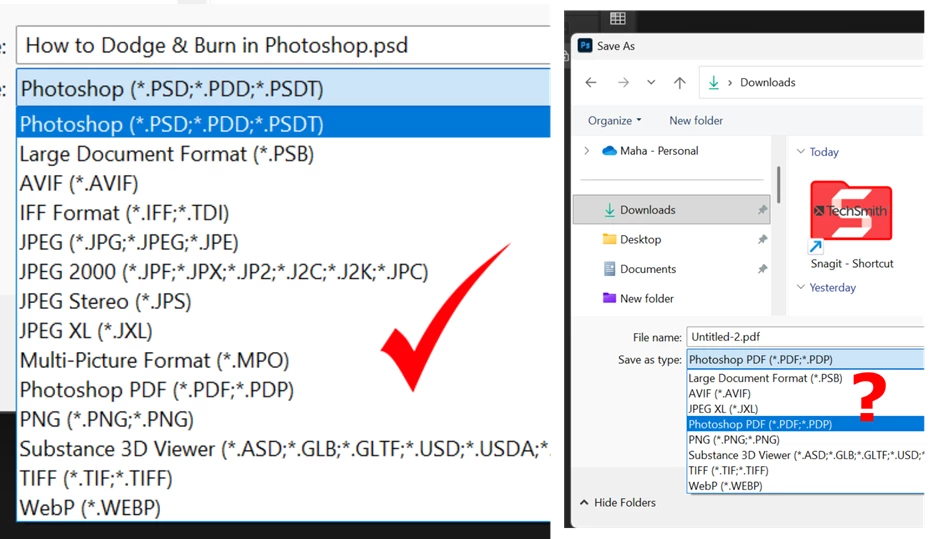
Normaly I save Ps as *.PSD shows in first screenshot. But it shows now like in second screenshot. How to fix it?



Correct answer Stephen Marsh

How to make 1920 x 1080 default because canves is always back to big value?


Use Image > Image Size with resample checked/on and specify pixels as the unit of measure, then OK. You may wish to explore different resampling/interpolation algorithms and the preview feature. Then you can Save As.

3 replies

MahaB82A
MahaB82AAuthor
September 14, 2025

Thanks for all

Stephen Marsh
Community Expert
Community Expert
September 14, 2025

@MahaB82A 


Things that can affect availabile file format options:


* Total pixel width or height 

* Bit depth

* Colour mode 

* Alpha channels 

* Layers (flattened or single+)


As @Ged_Traynor  mentioned, enabling Legacy Save As can help in many (but not all) cases.


For specifics, as PSB is available when PSD is not, is the canvas pixel width or depth greater than 30,000px?

MahaB82A
MahaB82AAuthor
September 14, 2025

Canves & Image size shows like this. Problem is this has been a default value. That means if I set to 1920x1080 & close the app & re-open it, it shows same value. How to fix it?


Stephen Marsh
Community Expert
Community Expert
September 14, 2025

Yes, it's larger than 30,000px which makes it inappropriate for PSD, which is the whole reason that PSB was introduced.


https://helpx.adobe.com/photoshop/using/file-formats.html


Large Document Format (PSB)

The Large Document Format (PSB) supports documents up to 300,000 pixels in any dimension. All Photoshop features, such as layers, effects, and filters, are supported. (With documents larger than 30,000 pixels in width or height, some plug-in filters are unavailable.)


You can save HDR, 32-bits-per-channel images as PSB files.


Note: Most other applications and older versions of Photoshop cannot support documents with file sizes larger than 2 GB.
Ged_Traynor
Community Expert
Community Expert
September 14, 2025

@MahaB82A you can either select save a copy from the file menu

Or enable this option in preferences