
Inspiring
October 23, 2019
Frage

.PSD file not showing up as Photoshop thumbnail

  • October 23, 2019
  • 1 Antwort
  • 784 Ansichten

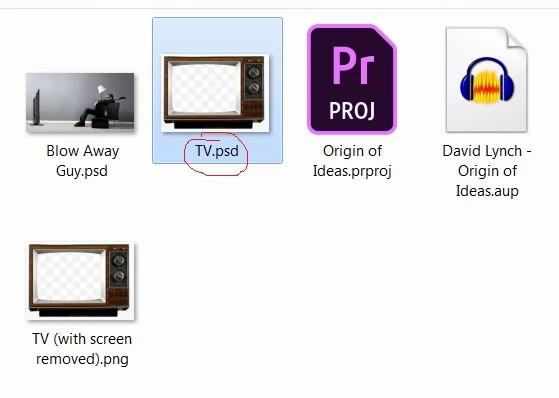
I just saved a file as a .PSD and the thumbnail in not the typical Adobe thumbnail (see screenshot), rather it shows as the image with the file extension .psd. You can see in the screenshot the Premiere Pro file saved shows as an Adobe thumbnail. What do I set so the Photoshop file is saved as an Adobe thumbnail?
 

    Dieses Thema wurde für Antworten geschlossen.

    1 Antwort

    Bojan Živković11378569
    Community Expert
    Community Expert
    October 23, 2019

    Are you on Windows? Some program is forcing system to show preview image instead of default thumbnail. It can be any program like Sage thumbs or some other which is installed on your system.

    Inspiring
    October 23, 2019

    Yes, I have Windows 7 Professional. As a matter of fact, I recently put Sage Thumbs on my computer trying to fix not being able to see all my thumbnails. It seemed to help for some. Should I remove it?  What steps would I take to see ALL thumbnails?

    Bojan Živković11378569
    Community Expert
    Community Expert
    October 23, 2019

    You must acess preferences in Sage thumbs and to instruct it what to do with PSD files. If you do not want to see previews but rather default thumbs then simply uncheck PSD - if I can remember how Sage thumbs works. It is simple enough just find a way to acess its preferences or configuration-properties which are maybe available on right click or context menu in Explorer.