Inspiring
October 26, 2022
Answered

PSD files are saving as PDF

  • October 26, 2022
  • 4 replies
  • 2037 views

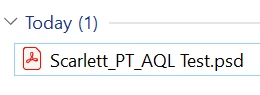
I am saving a layered file as a PSD within photoshop and the file ends up as a PDF format.

Any reasones why this would happen?


This topic has been closed for replies.
Correct answer Emma24402745sfb3

Our IT department worked it out. It was a PC thing. The default settings for .PSD was set to PDF which effected the app saving the file correctly., they dont know why.
Thank you for all you help.

4 replies

Emma24402745sfb3AuthorCorrect answer
Inspiring
October 26, 2022

Our IT department worked it out. It was a PC thing. The default settings for .PSD was set to PDF which effected the app saving the file correctly., they dont know why.
Thank you for all you help.

Chuck Uebele
Community Expert
Community Expert
October 26, 2022

So glad you got it worked out! Very odd.

Chuck Uebele
Community Expert
Community Expert
October 26, 2022

I would try resetting your preferences and reinstalling PS.

Inspiring
October 26, 2022

Ok thanks, I did reinsal but didnt change my preference before hand, will give it another try.

Inspiring
October 26, 2022

This have issues after resetting preferences.

Chuck Uebele
Community Expert
Community Expert
October 26, 2022

What OS are you using?

Inspiring
October 26, 2022

I am on my work PC. Would it be the update for photoshop?

Chuck Uebele
Community Expert
Community Expert
October 26, 2022

What happens when you open it?  Does it open as a psd or pdf?

Inspiring
October 26, 2022

It opens as a PDF even though it has a .PSD

