Copy link to clipboard
Copied
Hi, I recently upgraded to Catalina OS and also updated photoshop to the latest version. For some reason now when I save my files they are saving much larger than they were previosuly. As an example, I opened a PSD that I was working on before upgrading and that file was 32MB. I opened the same file, made a very minor change and saved again. That same file is now 672MB. In addition to the file being very large, it's also saving two copies of the file with the second file having the same name but with a long number appended to the end of the file. So, what was taking up 32MB is now taking up 1.2GB.
Any help with this issue would be most appreciated.
Thanks!

Copy link to clipboard
Copied
In Preferences > File Handling is Disable Compression of PSD and PSB checked? That increases file size but decreases opening times so it is a balance between speed vs file size on disk.
In addition, is Maximise PSD and PSB File compatibilty set to always? That increases file size by adding a flattened layer, but also improves compatibility with other applications (e.g. Lightroom).
Dave
Copy link to clipboard
Copied
Copy link to clipboard
Copied
Just checked but neither is the issue.
Copy link to clipboard
Copied
Also, it seems to happen only when I open an old file to make changes and resave. If I create a new file in Photoshop and save, it is the correct file size. (new)19MB versus (old file)159MB.
Copy link to clipboard
Copied
Do you happen to have logging turned on?
Preferences/History Log?
An easy way to check is to go to File Info on the larger file and look at the Photoshop metadata.
Copy link to clipboard
Copied
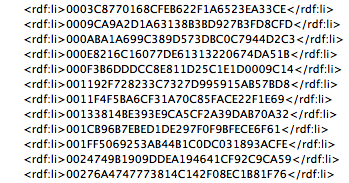
It could possibly be photoshop:DocumentAncestors metadata.
Check out the following recent topic for info on how to check for this data and remove it:
https://community.adobe.com/t5/photoshop/larger-file-sizes/m-p/10875069
https://prepression.blogspot.com/2017/06/metadata-bloat-photoshopdocumentancestors.html
Copy link to clipboard
Copied
If an additional image had been added I would understand that, but not from just opening a PSD making a minor change and resaving. I suppose it depends what the "minor change" was.
Dave
Get ready! An upgraded Adobe Community experience is coming in January.
Learn more