Known Participant
September 30, 2017
Question

psd files from PS with layers Importing into AE (CS6)

  • September 30, 2017
  • 4 replies
  • 667 views

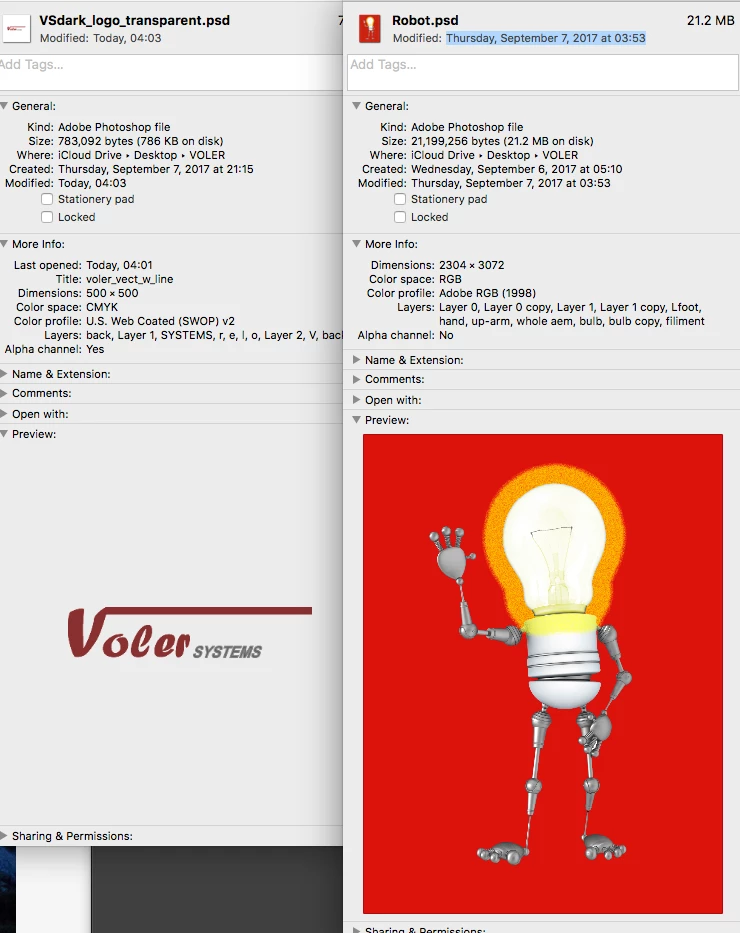
I can import Robot.psd into AE with layers.

When I import VSdark....psd I don't get the layers.  How come the format are slightly different...CMYK vs. RGB?

thanks
    This topic has been closed for replies.

    4 replies

    Janos Thanatos
    Participating Frequently
    December 2, 2024

    It's 7 years later and I'm struggling with seemingly the same problem, though the solution by now is undoubtedly different. With so many changes to Adobe products, and help files scattered across so many locations, and full of all sorts of confusing legacy options, the more I look for an answer, the more confused I seem find myself. If only there was a centralised, one stop solution to guide me through all the applications of the CC, solutions to such simple problems mightn't be scattered amongst an overabundance of informaton, which can be just as bad as no information at all. 

    davescm
    Community Expert
    Community Expert
    December 3, 2024

    If your problem is the 'same' i.e. a CMYK file, then the anser is the same - convert to an RGB colour profile and do not flatten the layers


    Dave

    bdaulAuthor
    Known Participant
    October 2, 2017

    bdaulAuthor
    Known Participant
    October 2, 2017

    C.p,  thanks for your reply.  If I convert to RGB I LOOSE all my layers...I don't want to loose them. 

    c.pfaffenbichler
    Community Expert
    Community Expert
    October 2, 2017
    If I convert to RGB I LOOSE all my layers..

    That would seem to be true only if all your Layers are Adjustment Layers.

    Edit: Or if you flattened on conversion, see the following post.

    Please post a screenshot with the Layers Panel visible of before and after conversion.

    How exactly do you convert to RGB?

    c.pfaffenbichler
    Community Expert
    Community Expert
    September 30, 2017

    Have you converted a copy of the CMYK file to the appropriate RGB space and tried that yet? (Image > Mode > … or better Edit > Convert to Profile)
