Exit
  • Global community
    • Language:
      • Deutsch
      • English
      • Español
      • Français
      • Português
  • 日本語コミュニティ
  • 한국 커뮤니티
0

Python actions in Photoshop 2019 cc not working.

New Here ,
Oct 17, 2019 Oct 17, 2019

Can anyone shed some light on this problem.


We have a Python script that calls Actions to convert CMYK tiffs, firstly to Greyscale, then it merges the tiff into 1 tiff, before changing the resolution to 660.4dpi. This script worked perfectly fine in Photoshop cc.


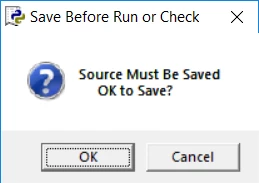
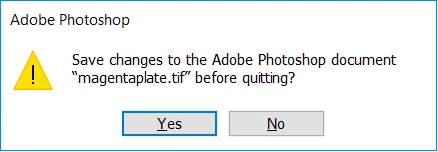
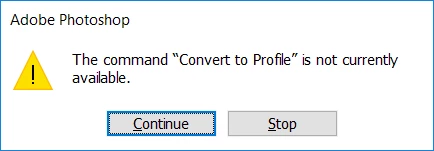
Upgrading to Photoshop cc 2019, at seemingly random points when running the actions, we get the following meassages;
clipboard_image_0.png 

clipboard_image_1.png 

clipboard_image_2.png

We have re-recorded the actions in cc2019, but no joy. Just to emphasis nothing has changed regarding the scripts or the tiffs. 


The four Tiffs= indexed colour/8 bits channel

clipboard_image_0.png

The python script then calls the actions (screen shot below).

# open each tif plate in photoshop and convert to greyscale
plateC = psApp.Open(Ctif)
psApp.DoAction( "Greyscale", "SheetTileProduct")
plateM = psApp.Open(Mtif)
psApp.DoAction( "Greyscale", "SheetTileProduct")
plateY = psApp.Open(Ytif)
psApp.DoAction( "Greyscale", "SheetTileProduct")
plateK = psApp.Open(Ktif)
psApp.DoAction( "Greyscale", "SheetTileProduct")
# merge all CMYK tifs to form a combined CMYK tif
psApp.DoAction( "Merge", "SheetTileProduct")

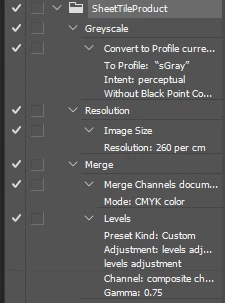
Firstly turning each tiff to Greyscale.  
clipboard_image_1.png

The next action merges the 4 greyscale tiffs into 1 tiff

The next action then changes the resolution of the tiff to 660.4dpi.

Just to repeat this all worked fine before moving to Photoshop cc2019.

TOPICS
Actions and scripting
508
Translate
Report
Community guidelines
Be kind and respectful, give credit to the original source of content, and search for duplicates before posting. Learn more
community guidelines
Adobe
Community Expert ,
Oct 17, 2019 Oct 17, 2019

Please try to better explain the process (in particular what is »then it merges the tiff into 1 tiff« supposed to mean?), provide more info about the involved Actions (and the steps included therein) and post sccreenshots (including the pertinent Panels like Layers, Channels, Actions, …) of the moment the Photoshop-alerts pop up with the Action ecpanded in the Actions Panel. 

Translate
Report
Community guidelines
Be kind and respectful, give credit to the original source of content, and search for duplicates before posting. Learn more
community guidelines
New Here ,
Oct 17, 2019 Oct 17, 2019
I have four Tiffs, that are indexed colour /8 bits channel
Translate
Report
Community guidelines
Be kind and respectful, give credit to the original source of content, and search for duplicates before posting. Learn more
community guidelines
Community Expert ,
Oct 17, 2019 Oct 17, 2019
Are they indexed or 8bit/channell?
Translate
Report
Community guidelines
Be kind and respectful, give credit to the original source of content, and search for duplicates before posting. Learn more
community guidelines
Community Expert ,
Oct 17, 2019 Oct 17, 2019

HEllo, are you running Photoshop CC 20.0.6, the latest version?

Translate
Report
Community guidelines
Be kind and respectful, give credit to the original source of content, and search for duplicates before posting. Learn more
community guidelines
New Here ,
Oct 17, 2019 Oct 17, 2019
Running Photoshop CC 20.0.5
Translate
Report
Community guidelines
Be kind and respectful, give credit to the original source of content, and search for duplicates before posting. Learn more
community guidelines
Community Expert ,
Oct 17, 2019 Oct 17, 2019
I'd first try to update, then...
Translate
Report
Community guidelines
Be kind and respectful, give credit to the original source of content, and search for duplicates before posting. Learn more
community guidelines
Community Expert ,
Oct 18, 2019 Oct 18, 2019
LATEST

Why are you running a Python script? An action can call another action, if needed, that would remove a parameter.


Also, does the actions work on their own?

Translate
Report
Community guidelines
Be kind and respectful, give credit to the original source of content, and search for duplicates before posting. Learn more
community guidelines