
Inspiring
May 23, 2024
Answered

question about opening and saving PDF in Photoshop

  • May 23, 2024
  • 1 reply
  • 2041 views

Hello,

I am trying Photoshop, and I have noticed a difference in the opening/saving the PDF inside Photoshop :


1) For a PDF of one page that has not been created by Acrobat Distiller (so with full datas inside) :

Photoshop opens the PDF directly in the main window, and when I save it inside Photoshop, it saves directly on the PDF.


2) For a PDF of one page that has been created by Acrobat Distiller (so that has losen most of datas inside) :  Photoshop open it with this window, then it convert it to image :
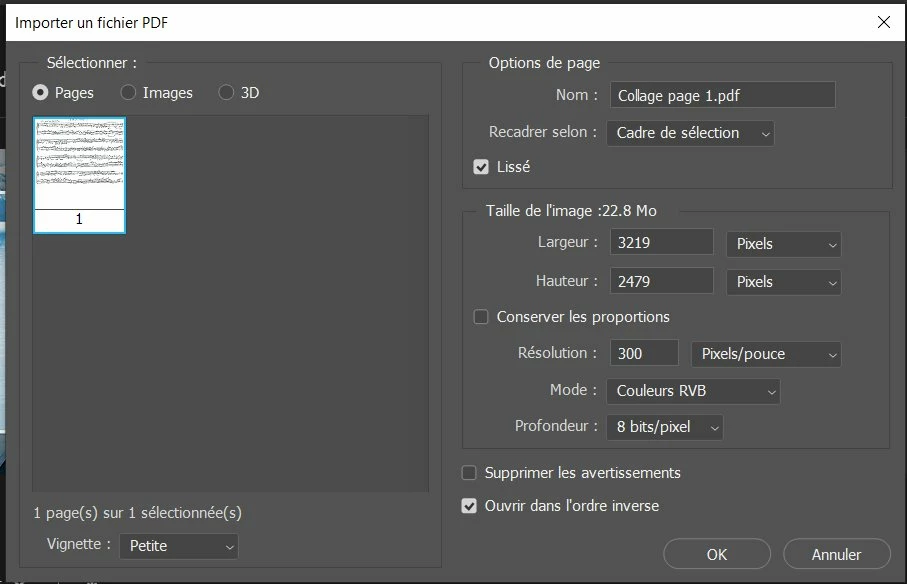
 

So in that case, I cannot directly save inside the same PDF (because that PDF has been converted to image). Why ? 


My goal, for all type of PDF, is to save directly on the PDF inside Photoshop (without a conversion to image inside Photoshop). How to do it ?
This topic has been closed for replies.
Correct answer c.pfaffenbichler

Frankly I am not sure you appreciate th enature of pdf. 

Reediting embedded (and therefore probably compressed) images seems like a bad idea to begin with. 


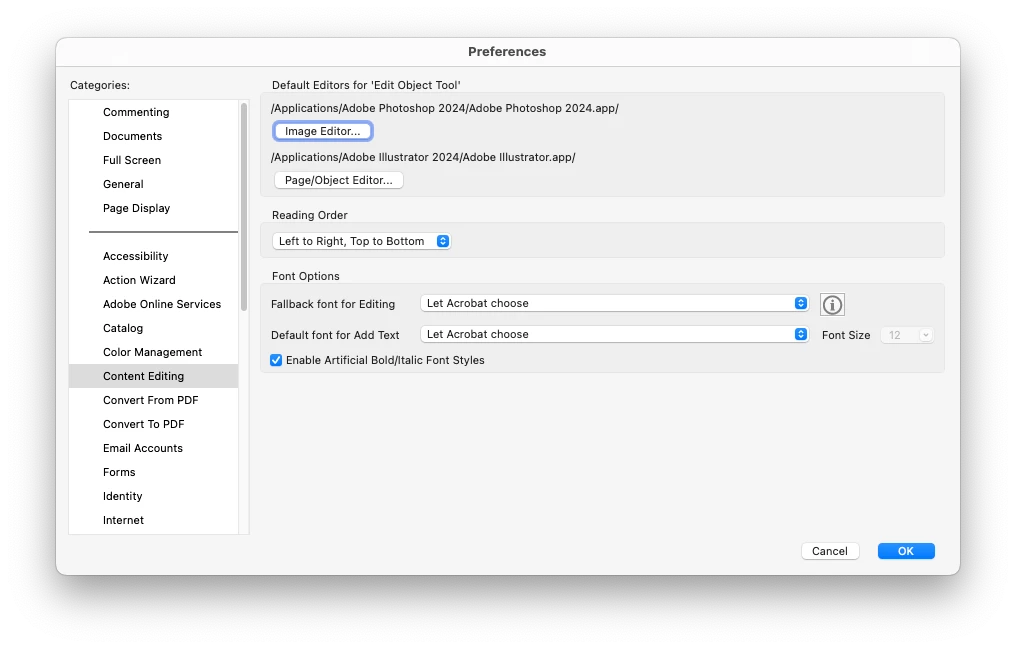
One can edit pdf-pixel-images by alt-double-clicking them with the »Edit Object«-Tool in Acrobat Pro. 

The image is then opened in Photoshop (at least if it is set as the Image Edior in the Acrobat Preferences) and on saving updates in the pdf. 


Please provide a sample pdf. 

1 reply

c.pfaffenbichler
Community Expert
Community Expert
May 23, 2024

What kind of pdfs are you talking about? 

Is there vector-/type-content? Are there multiple images per page? etc. 


Unless a pdf has been created in Photoshop with »Preserve Photoshop Editing Capabilities« editing it in Photoshop seems inadvisable and best avoided. 

Inspiring
May 23, 2024

For the test, it is a normal PDF of one page (no vector inside) with this type of content (music score) :


This PDF has been opened in Photoshop main window, and I have used on it the Level function inside Photoshop in order to remove the yellow background :


But I have noticed that :

1) If Acrobat don't uses acrobat distiller on this PDF, all the datas inside this PDF are left inside the PDF

In that case if I open it inside Photoshop, it opens directly inside the main window of Photoshop and I can work on it, and if I save in Photoshop, it saves directly on this PDF also.


2) If Acrobat  uses Acrobat distiller on this PDF, it removes datas inside the PDF (it clean datas on  it), and when I open it in Photoshop, it does not open the PDF in the main window : first I have this window :


Then it asked me to choose an image file in order to convert it to an image file.


My goal is to do not have this window : I would like to open this PDF directly inside the main window. How to do it ? Perhaps in the preferences, but where ?

c.pfaffenbichler
Community Expert
c.pfaffenbichlerCommunity ExpertCorrect answer
Community Expert
May 24, 2024

Frankly I am not sure you appreciate th enature of pdf. 

Reediting embedded (and therefore probably compressed) images seems like a bad idea to begin with. 


One can edit pdf-pixel-images by alt-double-clicking them with the »Edit Object«-Tool in Acrobat Pro. 

The image is then opened in Photoshop (at least if it is set as the Image Edior in the Acrobat Preferences) and on saving updates in the pdf. 


Please provide a sample pdf.