
solarme
Known Participant
June 16, 2021
Answered

Question about the PS CS6 icon showing up as my new Elements 2021

  • June 16, 2021
  • 1 reply
  • 5121 views

Hello, I installed Elements 2021 yesterday 6-15-21, to a new HP Win10 laptop.  I have not had the chance to use it yet.  Today I uploaded a couple of folders to it and the PS CS6 icon is different, it shows up as the icon for Elements 2021.  I'm attaching a SC for you to see.


Why are the icons changing when I haven't used 2021 yet?


And, is there a way that they can be turned back to PS CS6 icon?


I would appreciate your assistance.


This topic has been closed for replies.
Correct answer Jeff Arola

Hi Jane-e


Great info and links, thank you, I read through both of them. 


I actually followed your second suggestion, to right-click the icon in the Tiles area.  In my old Win7 laptop, you could unlock the Taskbar and drag an Icon to the Desktop, which was perfect - but that did not work for me this time. 


I guess the new Win10 laptops only come with the Pin to Taskbar option, not with the option to create a Shortcut (even though the MSFT info says you can do it.)  Also, that option was not offered when I installed PS from my disc.


So after trying several things, I decided to just choose Pin to the Taskbar for my CS6. And now I have a really tiny PS icon.  (See attached SC)


Thank you again for all the great info and assistance, much appreciated!


Live Long & Prosper

😄


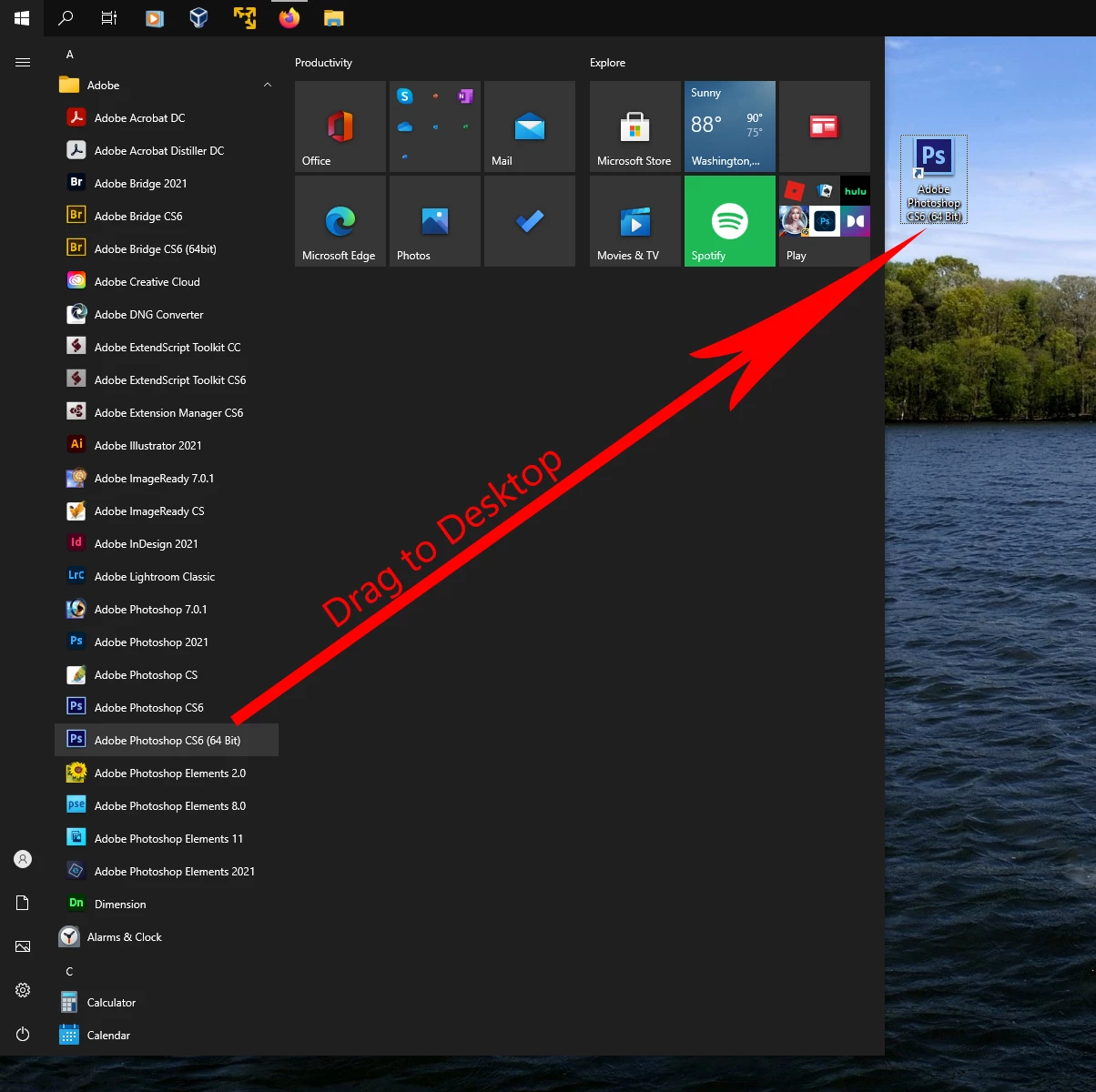
You should be able to drag the Adobe Photoshop CS6 icon from the Start Menu to the Desktop.


1 reply

Jeff Arola
Community Expert
Community Expert
June 17, 2021

Because the windows registry changes when any program is installed even if you have never run it.


Usually you can right click on a psd file, click Properties then Opens with and select Adobe Photoshop CS6

and the icon should change back to the cs6 icon.

solarme
solarmeAuthor
Known Participant
June 17, 2021

I keep trying to reply to Jeff Arola, but I keep getting an Error message.  I don't know why.

solarme
solarmeAuthor
Known Participant
June 19, 2021

@solarme wrote:

Hi Jane-e,

I did Not get a Shortcut to my desktop - so I cannot right click on it to choose other options.  I haven't been able to find any good info on how to create a Shortcut to CS6.


You're welcome, @solarme ,


I am on a Mac, but do use Windows occasionally. Try one of these two ways:


Let me know if this works, as I am going from memory and am not a Windows user.


~ Jane


Hi Jane-e


Great info and links, thank you, I read through both of them. 


I actually followed your second suggestion, to right-click the icon in the Tiles area.  In my old Win7 laptop, you could unlock the Taskbar and drag an Icon to the Desktop, which was perfect - but that did not work for me this time. 


I guess the new Win10 laptops only come with the Pin to Taskbar option, not with the option to create a Shortcut (even though the MSFT info says you can do it.)  Also, that option was not offered when I installed PS from my disc.


So after trying several things, I decided to just choose Pin to the Taskbar for my CS6. And now I have a really tiny PS icon.  (See attached SC)


Thank you again for all the great info and assistance, much appreciated!


Live Long & Prosper

😄