
Participant
September 13, 2019
Question

Question: How do I fix white lines in transparent logo?

  • September 13, 2019
  • 4 replies
  • 3619 views

Hello guys,

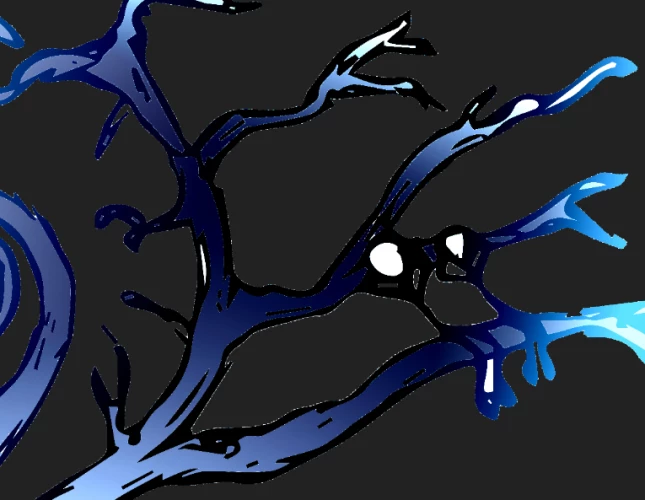
So I am making a logo and after finishing it in illustrator and moving to Photoshop to do some small changes, I made the background transparent however I still do get some white lines and dots which are kept and doing them manually would be a pain. The drawing used for a logo is a hand-drawn one which was later, of course, converted from a sketch to a good looking photo. Is there any way to somehow fix this or do a workaround? 


This topic has been closed for replies.

4 replies

vanko2323Author
Participant
September 13, 2019

Yeah I simply selected the background and deleted it. I have no idea how to do it otherwise, new to the programmes.

Kevin Stohlmeyer
Community Expert
Community Expert
September 13, 2019
Did the solution offered work? If so please mark the answer as correct.
vanko2323Author
Participant
September 13, 2019
I am not at home that is why i haven't checked
Kevin Stohlmeyer
Community Expert
Community Expert
September 13, 2019

Go to the Layer Menu/Matting and defringe or remove white matte.

c.pfaffenbichler
Community Expert
Community Expert
September 13, 2019

»after finishing it in illustrator and moving to Photoshop«

Again the question is: How did you do that? 

Place a Smart Object or rasterize the file or …? 

Kevin Stohlmeyer
Community Expert
Community Expert
September 13, 2019
Looking at the image, it appears the OP simply selected and deleted the white background pixels. This is atypical fringing from a deletion in Photoshop. Removing Matte via the Layer panel cleans this up.
c.pfaffenbichler
Community Expert
Community Expert
September 13, 2019

»I made the background transparent however«

How? Did you create the transparency in Illustator (good idea) or use selection tools in Photoshop and delete (less of a good idea) or apply Layer Masks? 


Please post a scresnhot wioth the pertinent Panels (Layers etc.) visible.