elegant_adventures5E1B
Participant
September 13, 2021
Answered

Quick Actions Not Showing Up

  • September 13, 2021
  • 2 replies
  • 17440 views

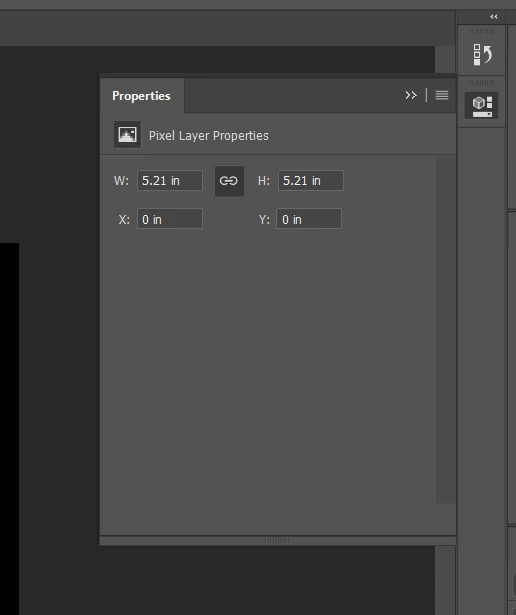
My photoshop is completely up to date but the new "Quick Actions" feature isn't showing up in my properties panel. I reset my toolbar, my workspace, restarted my whole computer and it's still just the old properties panel with no new options. The layer I was working on is unlocked too. I haven't seen anything to fix it on Youtube or on here. Hoping somebodys got this figured out! 
 

Correct answer jane-e

@elegant_adventures5E1B wrote:

it's still just the old properties panel with no new options. 


Can you tell us the exact version of Photoshop that you have open ?

  • Mac: PS menu > About
  • Win: Help menu > About


You can also find it in Help > System Info.


~ Jane

2 replies

Participant
April 14, 2024
Screenshot_2024-04-15_010419.png
jane-e
Community Expert
jane-eCommunity ExpertCorrect answer
Community Expert
September 14, 2021

@elegant_adventures5E1B wrote:

it's still just the old properties panel with no new options. 


Can you tell us the exact version of Photoshop that you have open ?

  • Mac: PS menu > About
  • Win: Help menu > About


You can also find it in Help > System Info.


~ Jane

elegant_adventures5E1B
Participant
September 14, 2021

Ah ha! It was Photoshop 20.0.10 even though auto-update was on. So it certainly wasn't the latest version. I used CreativeCloud online to see that it had updates available, my creative cloud app was telling me it was already up to date. Now the quick action features are there, thank you!!

jane-e
Community Expert
Community Expert
September 14, 2021

You're welcome, @elegant_adventures5E1B 😊 !

~ Jane