Known Participant
April 13, 2024
Answered

Quick Export to PNG Loses All Original Metadata

  • April 13, 2024
  • 2 replies
  • 868 views

This issue is back. Quick export to PNG loses all data from original ARW file. 

This topic has been closed for replies.
Correct answer Per Berntsen

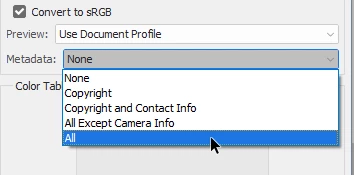
If you want to keep all metadata in the PNG, use Export > Save for Web, with Metadata set to All.

Alternatively, use Save As / Save a copy, which will also keep all metadata.
 

2 replies

Per Berntsen
Community Expert
Per BerntsenCommunity ExpertCorrect answer
Community Expert
April 13, 2024

If you want to keep all metadata in the PNG, use Export > Save for Web, with Metadata set to All.

Alternatively, use Save As / Save a copy, which will also keep all metadata.


RLBostonAuthor
Known Participant
April 13, 2024

Thank you. Keeping this for future work. 

D Fosse
Community Expert
Community Expert
April 13, 2024

I don't know what specific metadata you are referrng to, but the whole point of Export is to strip the file down to essentials to reduce file size. Metadata are supposed to be removed.

RLBostonAuthor
Known Participant
April 13, 2024

Hardly. You miss the point entirely. I found the answer as simply not using PNG.
Despite what you've attempted to assert, saving a copy as a jpg, another lossy compression file type, retains all the original image information. PNG is not suitable for my workflow. 

D Fosse
Community Expert
Community Expert
April 13, 2024

@RLBoston 

You're missing the distinction between Export and Save A Copy.

  • The "Export" function is exclusively intended for web/screen/mobile devices, where file size needs to be cut to the bare minimum, stripping everything non-essential.
  • "Save A Copy" is a regular save operation, retaining all file properties as far as possible. It has just been split out from "Save" to be able to save documents with properties that are not supported in the target file format. To do that, you need to save out a simplified copy with those properties removed.


Save For Web is old legacy code, still kept around because Export isn't quite finished yet. But eventually it will be phased out, or that's the intention anyway. Save For Web does contain an option to preserve metadata, which Export doesn't.