BarryWhitelaw
Known Participant
August 21, 2020
Answered

Quick pen/path cutout

  • August 21, 2020
  • 2 replies
  • 482 views

Hi there


New to Photoshop (and graphics as a whole)


Trying to do something which I am sure is very basic and easy, jsut can't get my head around it.


I have a circle with a pattern fill.  Using the pen too I am drawing a path shape which I then want to erase, leaving a transparent area.  The pen tool path seems to be creating a fresh layer.


Getting myself lost tbh.  Do I need to convert this to a selection, or a mask?


thanks (and apologies for the daft question!)

This topic has been closed for replies.
Correct answer davescm

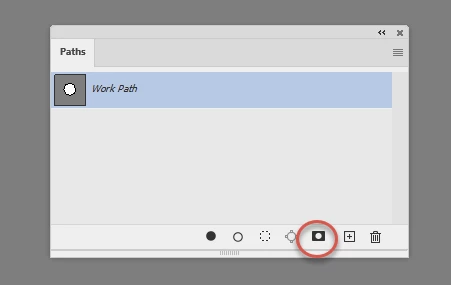
Ensure in the options bar that the pen tool is set to path (not shape). If you want the circle to end up transparent, rather than the area around the path to be transparent, set path options to subtract.


Then create your circular path.


Finally , in the paths panel click twice on the mask symbol at the bottom to add a vector mask in the shape of the path.


Dave

2 replies

davescm
Community Expert
davescmCommunity ExpertCorrect answer
Community Expert
August 21, 2020

Ensure in the options bar that the pen tool is set to path (not shape). If you want the circle to end up transparent, rather than the area around the path to be transparent, set path options to subtract.


Then create your circular path.


Finally , in the paths panel click twice on the mask symbol at the bottom to add a vector mask in the shape of the path.


Dave

BarryWhitelaw
Known Participant
August 21, 2020

Thank you Dave


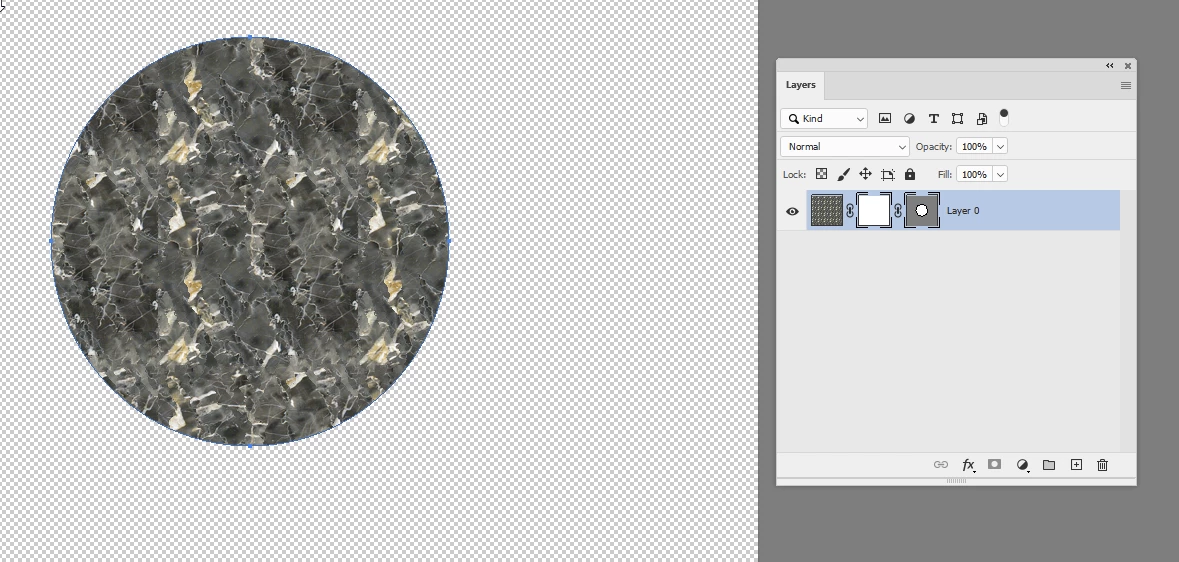
This was the end result I was looking for, got there in the end, but all a learning curve.  


Initially used Gimp, so spent the last few weeks working it out there, then decided Photoshop may be better, so having to learn it all again, and my age that's a challenge! 🙂


thanks

August 21, 2020

Hi

Sounds like you have the Pen Tool set to Shape, change it to Path on the options bar

After you create the selection you can right click and select Make Selection


BarryWhitelaw
Known Participant
August 21, 2020

Hi Ged


Perfect, that makes sense now.


Thank you!