
Loic.Aigon
Legend
October 17, 2022
Answered

Quick question : how to you tackle image size regarding printing projects (distance, dpi…)

  • October 17, 2022
  • 5 replies
  • 1163 views

Hi everyone,

More than ten years ago, I wrote this little utility (likely circa PS CS5.5) that would help users to identify the maximum printable size regarding viewer distance. It was yet a bit empiric.
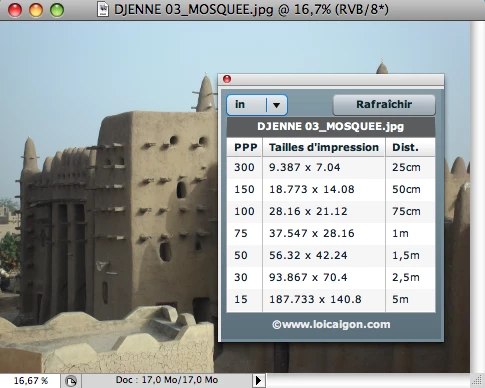
I am tempted to recreate this tool in the new UXP Plugin ecosystem but would enjoy your testimonials. Eventually, the new version would better fit your actual needs. And possibly lay on more scientific rules.

If anyone is interested in sharing his/her thoughts on this, it would be greatly appreciated (features expected…)

TIA

Loic
Correct answer davescm

There is a formula you can use which is ppi required = 6878/Viewing distance in inches


It is not just plucked out of the air, but is based on the resolving power of our eyes. Using anything above that is a waste.

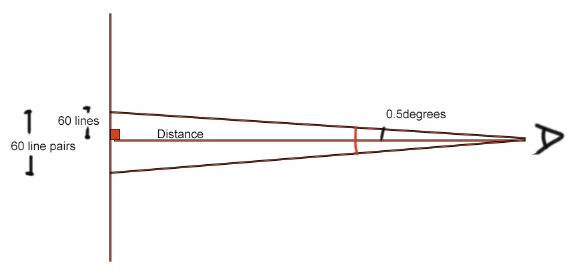
A good human eye can resolve 60 line pairs per degree i.e. pairs of black and white lines.  So in half a degree we would have 60 single lines.


Simple trigonometry means that the width containing those 60 lines can be calculated by:
               Width of 60 lines = Viewing distance x tan(0.5°)

Once we know the width for 60 lines (or pixels) we can calculate how many lines per inch can be seen by using 60/Width of 60 lines.


So putting those together gives:
60/(Viewing distance x tan(0.5°)) = 60/(Viewing distance x 0.0087269) = 2/(Viewing distance x 0.000291)    

Or

1/(Viewing distance x .0001454)

Or

6878/Viewing distance


Dave


5 replies

gener7
Community Expert
Community Expert
October 25, 2022

I agree that not everyone's visual acuity is the same. You can however go for the best case planning your calculator as in 60 line pairs per degree, or Dave's 6878/Viewing Distance in inches. From there others can move closer, move back or get new glasses. 🙂

NB, colourmanagement
Community Expert
Community Expert
October 25, 2022

It might work to have a guideline and for sure it would help some and it's definitely true that viewing distance affects file resolution requirements. But, I fear that eyesight and personal perception will affect the viewers opinion. Plus as DigitalDog showed, some folk will walk right up to even a massive print. 


I hope this helps
neil barstow, colourmanagement net :: adobe forum volunteer:: co-author: 'getting colour right'
google me "neil barstow colourmanagement" for lots of free articles on colour management

D Fosse
Community Expert
Community Expert
October 17, 2022

If you want solid numbers, Dave's formula is the way to go.


Simply put: a good high resolution file from a current camera will work equally well at any reproduction size. Magazine spread, exhibition print, wall size banner, roadside billboard, whatever.


There's no real reason to worry about ppi. If the file is good, it'll work. By good I mean in focus, quality optics, no camera shake, a decent sensor resolution of 6000 pixels long side and upwards. You're good to go.


The reason is that you will automatically take a position where you see the image at a comfortable size, filling a pretty standard angle in your field of view. If it's big, you go back. You can't really stop yourself. You don't want to get up close, it's uncomfortable.


Loic.Aigon
Legend
October 17, 2022

Thanks for the great feedback!

davescm
Community Expert
davescmCommunity ExpertCorrect answer
Community Expert
October 17, 2022

There is a formula you can use which is ppi required = 6878/Viewing distance in inches


It is not just plucked out of the air, but is based on the resolving power of our eyes. Using anything above that is a waste.

A good human eye can resolve 60 line pairs per degree i.e. pairs of black and white lines.  So in half a degree we would have 60 single lines.


Simple trigonometry means that the width containing those 60 lines can be calculated by:
               Width of 60 lines = Viewing distance x tan(0.5°)

Once we know the width for 60 lines (or pixels) we can calculate how many lines per inch can be seen by using 60/Width of 60 lines.


So putting those together gives:
60/(Viewing distance x tan(0.5°)) = 60/(Viewing distance x 0.0087269) = 2/(Viewing distance x 0.000291)    

Or

1/(Viewing distance x .0001454)

Or

6878/Viewing distance


Dave


Loic.Aigon
Legend
October 17, 2022

Hi Dave,

Thanks a lot for this valuable input 🙂

Loic

War Unicorn
Community Expert
Community Expert
October 17, 2022

I haven't done this kind of work, but the obvious one is: Whatever you can get away with. A lower DPI means more distance (needed) and less processing in Photoshop.

Loic.Aigon
Legend
October 17, 2022

thanks for the input