Answered
Quick Selection Tools
Hi, to use the select an mask, you can
use the quick selection tool. But on my photoshop (2017) there is none..
Anybody who knows why or where I can fins it 

Hi, to use the select an mask, you can
use the quick selection tool. But on my photoshop (2017) there is none..
Anybody who knows why or where I can fins it
Open the flyout on the 4th tool: at this moment it is showing the Magic Wand tool, the quick selection is in the flyout menu (click on the triangle).
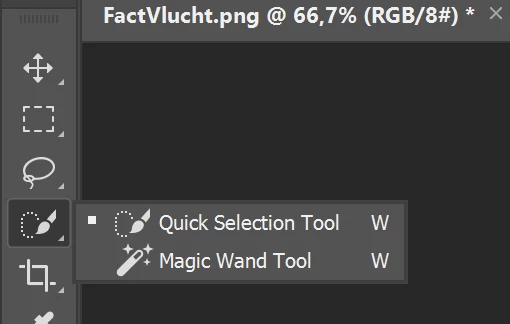
Shortcut key W could work as well (not on my keyboard, which is AZERTY).
Already have an account? Login
Enter your E-mail address. We'll send you an e-mail with instructions to reset your password.
 AdChoices