
Participating Frequently
August 31, 2022
Answered

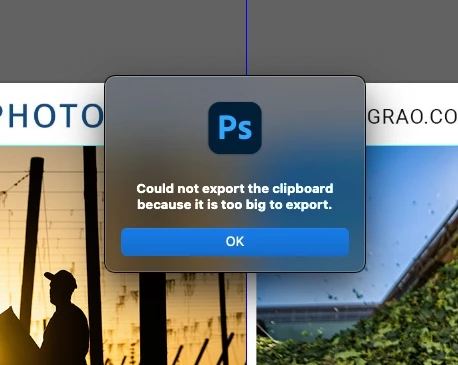
"Could not export the clipboard because it is too big to export." infuriating!
  • August 31, 2022
  • 5 replies
  • 7821 views

This is infuriating and I cant make it go away.  I have goggle the issue, to no avail.

How do I stop this insanly annoying message?


Whatever it is telling me I cant do, After I click it to go away, I still do the thing it says I cant do.  


My update is current.


Thank you.
This topic has been closed for replies.
Correct answer TheDigitalDog

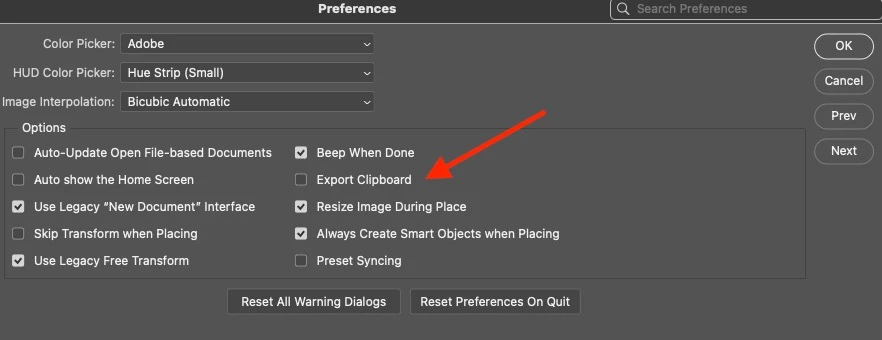
Disable the option in Preferences: Export Clipboard.


5 replies

Participating Frequently
August 31, 2022

Sorry, the suggestion posted here worked for me.

I disabled "Export clipboard" in File Handling.

TheDigitalDog
Inspiring
August 31, 2022

OK good; not a bug so moving to discussion.

This preference has been in PS for decades FWIW and isn't Adobe delighting in annoying you. There has always been a clipboard data limit and hence this old preference.

Author “Color Management for Photographers" & "Photoshop CC Color Management/pluralsight"
Participating Frequently
August 31, 2022

It's still hugely annoying.
And I was obviously being fecicious about Adobe deliting in it.

TheDigitalDog
Inspiring
August 31, 2022

So what fixed it for you?

Author “Color Management for Photographers" & "Photoshop CC Color Management/pluralsight"
Participating Frequently
August 31, 2022

Thanks. All fixed.

I think Adobe delights in adding little [removed by moderator] like this simply to annoy [removed by moderator] its users.  
Add the save to Adobe cloud popup when you "save as". 

Get a grip, Adobe. Seriously.

gener7
Community Expert
Community Expert
August 31, 2022
quote

Thanks.  All fixed.Add the save to Adobe cloud popup when you "save as". 

Get a grip, Adobe. Seriously.

 On that one, you can choose the default save location under Preferences > File Handling

@mj
Community Expert
Community Expert
August 31, 2022

Hi,

Purge your temp files.

Edit Menu > Purge > All

You can also try this suggestion.

https://thecleverest.com/disabling-the-could-not-export-the-clipboard-because-it-is-too-big-to-export-photoshop-warning/

Let us know how you go


TheDigitalDog
TheDigitalDogCorrect answer
Inspiring
August 31, 2022

Disable the option in Preferences: Export Clipboard.


Author “Color Management for Photographers" & "Photoshop CC Color Management/pluralsight"