
Known Participant
September 9, 2024
Answered

"Could not move selection because selected area is empty"

  • September 9, 2024
  • 1 reply
  • 2841 views

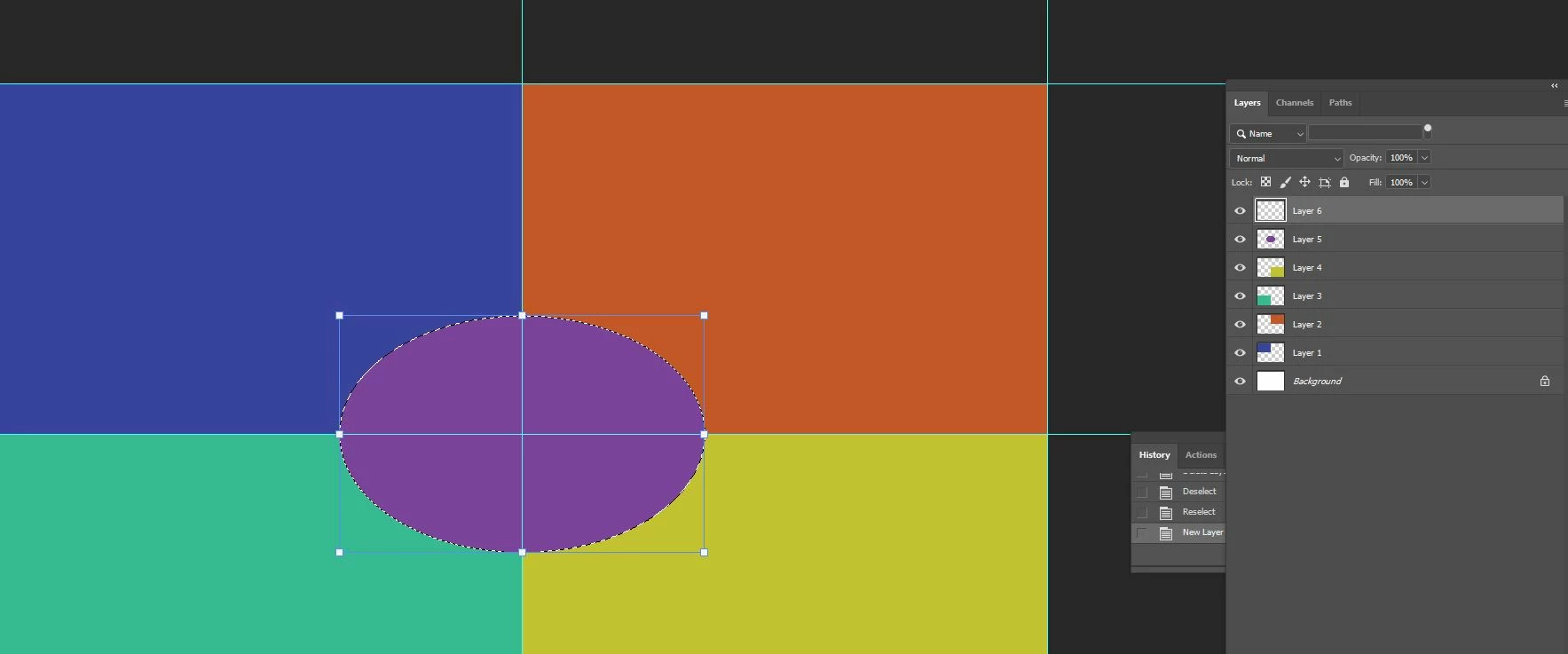
I am trying to make a photo collage. The instructions (on YouTube video) say to create a circle, then fill it with a foreground color (on its own layer). Then keep the circle selected, add a new layer, right click on it and select Stroke. Every time I right click on it to do the Stroke thing, it says "could not move selection because selected area is empty." I tried googling this and came up with a number of different answers.

Can anyone please tell me why this isn't working for me? I have deselected and selected, deleted the new layer and tried to create a new one, and so on.


Here is a screenshot. I'm working with the purple ellipsis in the center.
This topic has been closed for replies.
Correct answer Bojan Zivkovic9706182

Proceed as you normally would, but when you reach the final step (Stroke), switch to the Marquee.

1 reply

Bojan Živković11378569
Community Expert
Community Expert
September 9, 2024

What is your goal? Are you trying to add a stroke on a separate layer using the Edit > Stroke option or the right-click > Stroke command? It works for me without any issues. The only suggestion I have is to reset your preferences, as this situation seems a bit unusual.

Edit: I was able to reproduce the situation. By switching to the selection tool, such as the Rectangular Marquee Tool, before right-clicking, the error message will disappear.

Known Participant
September 10, 2024

Yes--I am trying to add a separate layer, then add a stroke by right-clicking. The tutorial says to leave the oval active with "marching ants" and then right click to add the stroke.


Bojan Zivkovic9706182Correct answer
Participating Frequently
September 10, 2024

Proceed as you normally would, but when you reach the final step (Stroke), switch to the Marquee.