
3nd Grafica
Participating Frequently
November 22, 2018
Answered

"Export As" option not working

  • November 22, 2018
  • 4 replies
  • 80053 views

Hi there,

since updating to new CC 20 the "Export as" option from within the layers panel doesn't work.

If I click on it nothing happens, also if I get there from the drop-down menu File > Export > Export as
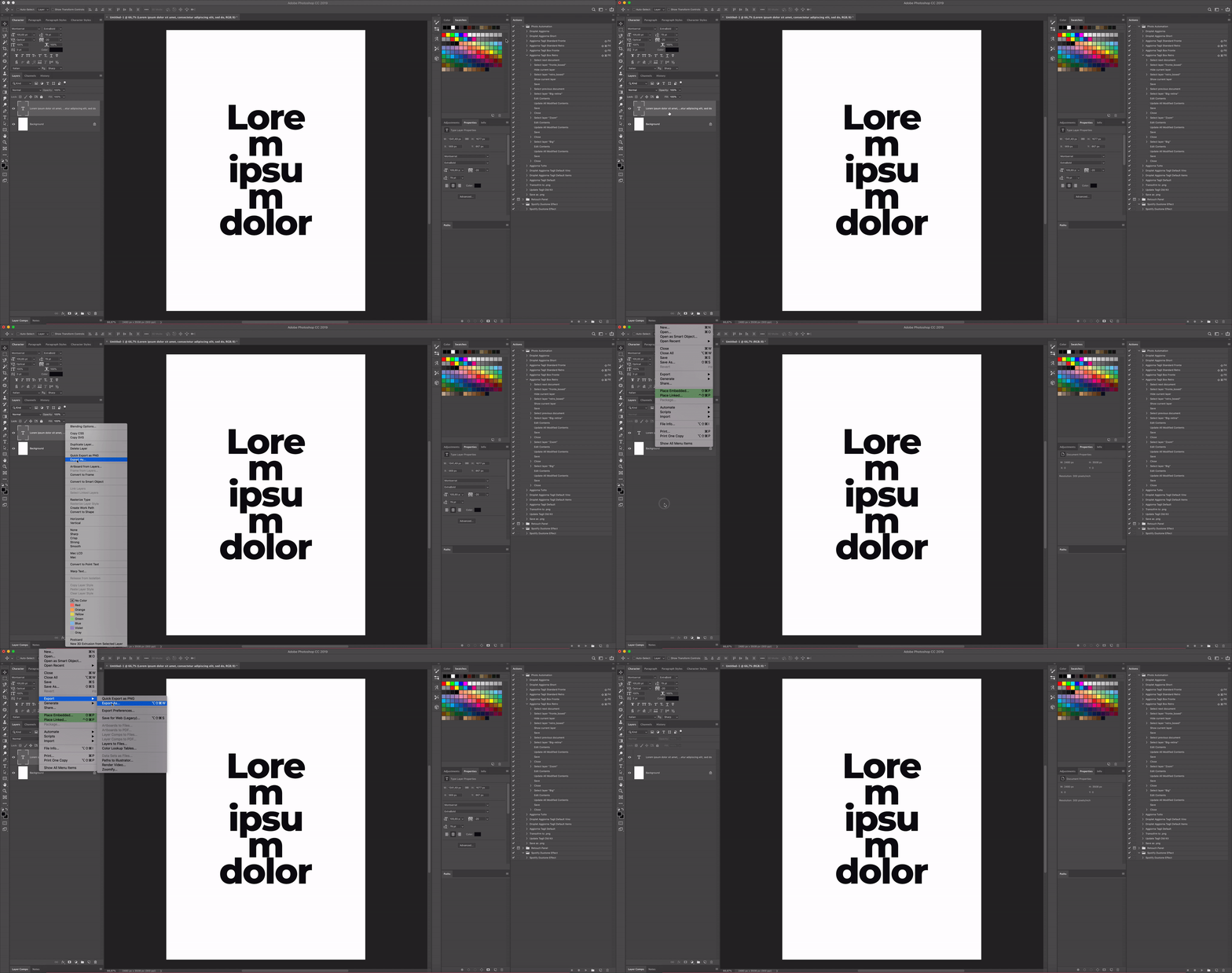
Using Mojave latest version everything up to date.

Any help with that?

Thanks!
Correct answer

Hi

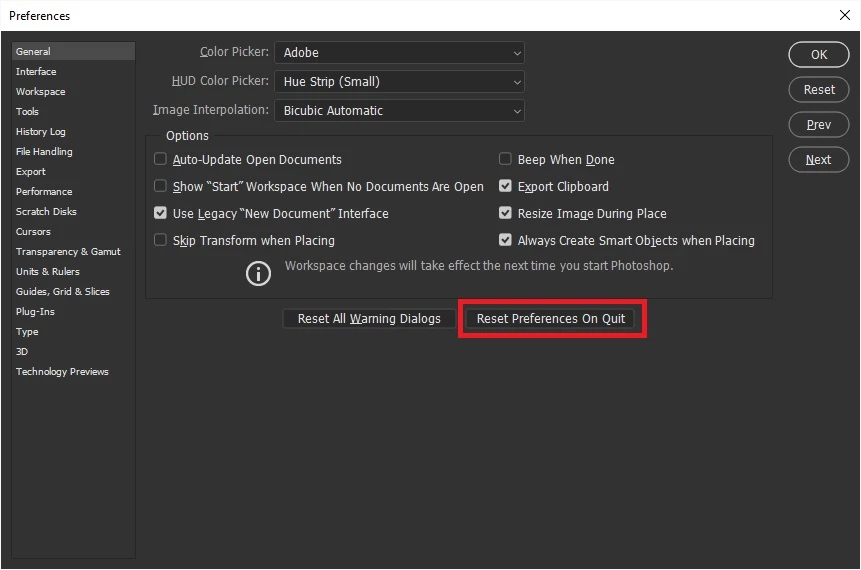
Not seeing the issue here on CC2019 Windows 10, have you tried resetting Photoshop preferences

4 replies

Participating Frequently
March 2, 2024

To update, this is now occurring for me in the latest version (25.5.0) of Photoshop. Have reset my preferences multiple times and have tried opening it in Rosetta to attempt the "Load Extension Panels" workaround, all no result. Can quick export the whole project as png, but cannot do an "Export as" for individual layers, which unfortunately is a big problem for me. 

Participant
May 29, 2024

Not the best solution, but a work around is to choose in Settings: Export>Use Legacy Export As.


At least this will give you an export dialog option. Even if this is the older Export As.

diegodomene
Participant
March 27, 2023

I was also having the issue while trying to export multiple artboards. In my case, I went to Preferences > Plug-Ins > Load Extensions Panels. unchecked and checked the box again and it went back to normal. 

Viraaj_Dobriyaal
Participant
August 24, 2023

Thank You

Participant
June 20, 2020

It worked thank you 🙂

Known Participant
July 23, 2020

There's no need to reset all your settings if this happens! The offending checkbox is found in: Preferences > Plug-Ins > Load Extensions Panels.

If this checkbox is disabled, Export as option will not do anything. If it's enabled, it will work. It would be nice if photoshop warned us of this upon disabling this checkbox, or if they'd actually go and you know... fix the bug.

bentonandoff
Participant
August 22, 2022

This box is checked on my PS and still will not export as

Correct answer
November 22, 2018

Hi

Not seeing the issue here on CC2019 Windows 10, have you tried resetting Photoshop preferences

3nd Grafica
Participating Frequently
November 22, 2018

Awesome, that fixed everything!

Thanks!

Il giorno gio 22 nov 2018 alle ore 09:44 Ged Traynor <

forums_noreply@adobe.com> ha scritto:

Adobe Community <https://forums.adobe.com/?et=watches.email.thread>

"Export As" option not working

reply from Ged Traynor

<https://forums.adobe.com/people/Ged+Traynor?et=watches.email.thread> in

Photoshop - View the full discussion

<https://forums.adobe.com/message/10766236?et=watches.email.thread#10766236>

November 22, 2018

You're welcome