

Nigel Grimstead
Participating Frequently
January 23, 2023
Answered

"Open with" multiple selected files into photoshop possible? Macro suggestion

  • January 23, 2023
  • 3 replies
  • 1299 views

Currently unable to right click > open with photoshop on mutliple files, and having to do them individually is getting old really fast. At the moment, I have to drag selected files to the top part of the photoshop window to open them and it's really not the same. Is there no way to open multiple selected files with photoshop using the right click prompt? 
If you're unsure of what I mean; the option to "Open with" dissapears when you select multiple files, so I'm guessing this is just a windows thing. Honestly I would settle for a macro at this point.
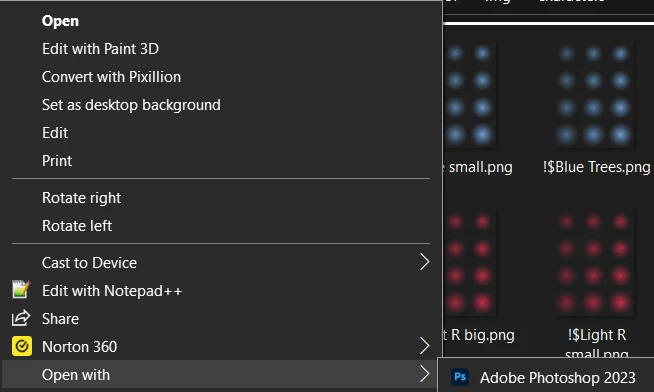
I typically use this to open multiple images outside of psd format, you can open multiple in seperate instances with photo viewer using the top "Open" option, but I would greatly prefer to do this in photoshop (as one instance of ps course).

This topic has been closed for replies.
Correct answer jazz-y

Create a shortcut of Photoshop and move it to folder


%userprofile%\AppData\Roaming\Microsoft\Windows\sendTo


After that, the Photoshop icon will appear in the "Send to" context menu and you can open mutliple files with it.


I recommend that you use Adobe Bridge as a viewer of images - in addition to the fact that it is a very convenient program with many functions, it is completely integrated into the Adobe ecosystem, it does not have any problems to send mutliple files to Photoshop.

3 replies

willcampbell7
Legend
January 24, 2023

Select the files you want to open and drag them to the Photoshop icon in the taskbar or dock. Mac just let go. Windows hover a moment until Photoshop window maximizes, then shift your mouse pointer (holding onto the files still) to the Photoshop window. If no images are currently open, let go and the images open. If an image is open in Photoshop, don't let go on the image or the new images go INTO that image. Instead move the cursor up higher, to the blank area next to the tabs for the one or more images that are open. Let go there. The images will open in their own tabs.


William Campbell
Nigel Grimstead
Participating Frequently
January 24, 2023

I appreciate your detailed response, however I believe you just described the feature I had already mentioned in the question's description: 

At the moment, I have to drag selected files to the top part of the photoshop window to open them and it's really not the same. "

jazz-yCorrect answer
Legend
January 23, 2023

Create a shortcut of Photoshop and move it to folder


%userprofile%\AppData\Roaming\Microsoft\Windows\sendTo


After that, the Photoshop icon will appear in the "Send to" context menu and you can open mutliple files with it.


I recommend that you use Adobe Bridge as a viewer of images - in addition to the fact that it is a very convenient program with many functions, it is completely integrated into the Adobe ecosystem, it does not have any problems to send mutliple files to Photoshop.

Nigel Grimstead
Participating Frequently
January 23, 2023

omg thank you so much!!! I completely overlooked the send to feature, thankfully it works exactly like "open with" and doesn't create an instance of photoshop for each file.

Kevin Stohlmeyer
Community Expert
Community Expert
January 23, 2023

An easier option may be to change the properties for the format you are using to use Photoshop as the main application.