
Inspiring
December 3, 2021
Question

"OpenCL unavailable" and can't use Photoshop

  • December 3, 2021
  • 3 replies
  • 43187 views

Hi there.

When I try to use Photoshop,this message appears and cannot use Photoshop.
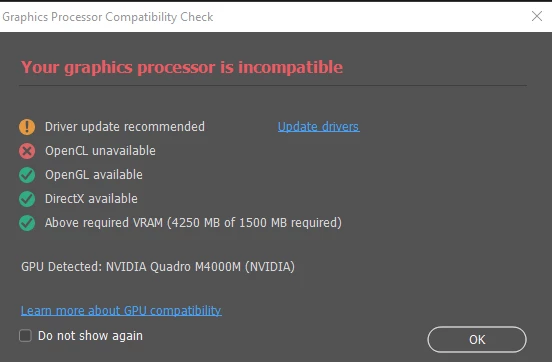


How  can I solve this problem?


This is my computer.

The Intel Graphics driver should be the latest one.


Windows 10 Pro, 20H2

Intel(R) Core(TM) i7-6820HQ CPU @ 2.70GHz 2.71 GHz

64,0 GB

Intel(R) HD Graphics 530
NVIDIA Quadro M4000M


Any help is very appreciated.


Thanks in advance.

This topic has been closed for replies.

3 replies

Participant
April 21, 2022

When I open photoshop, I get the following message... how do I fix this? 

Participant
August 31, 2022


Very annoying problem with little content on the internet ... How I solved it here:

In the BIOS of the motherboard it is configured so when you plug a video card (graphics processor) it stops using the internal graphics processor (intel)..

In some cases it solves just by disabling the intel graphics processor..

With me it was the opposite..

1- Uninstall the Nvidia driver

2- Go to the motherboard Bios and activate the configuration that allows you to use 2 graphics processors
"internal graphics " change from "auto" to "enabled"

3- When I turned on the pc the Nvidia driver installed itself and the problem was solved!


Problema bem chato pouco conteudo na internet ...Como eu resolvi aqui:

Na Bios da placa mãe esta configurado para quando voce pluga uma placa de video(processador grafico) ela para de usar o processador grafico interno (intel)..

Em alguns casos resolve justamente desativando o processador grafico da intel ..

Comigo foi ao contrario..

1- Desistalar o driver da Nvidia

2- Vai na Bios da placa mãe e aciona a configuração que permite usar 2 processadores graficos
"internal graphics " mudar de "auto" para "enabled"

3- Quando liguei o pc o driver da Nvidia instalou sozinho e o problema foi resolvido!


Participant
October 6, 2023

When there is no second graphics processor option in the bios, this solution is not useful. In the case of NVidia, in the Geforce Experience application, going to Check for Updates and selecting and installing the Studio Driver will enable OpenCL.

Ged_Traynor
Community Expert
Community Expert
December 3, 2021

Hi

Did you update the GPU driver from the Intel website

https://www.intel.com/content/www/us/en/support/detect.html

Also have you installed the latest driver for the Nvidia GPU

https://www.nvidia.com/Download/driverResults.aspx/183584/en-us

Take a look here, especially sections 7 and 8

https://helpx.adobe.com/photoshop/kb/troubleshoot-gpu-graphics-card.html

Participant
January 25, 2022
I had the same problem.I solved it by disabling the Intel card in the device manager. Of course, nvidia's 3D features management set for maximum performance. Unfortunately, there were problems with changing the resolution of the photo, but the oil filter works.
 
Participant
June 28, 2022

Hi! I am having the same isquemia but i have an AMD Radeon 5 I allready update my drivers on the AMD Page but I Stiller having the opencl unavailable issue, do you know how I can fix that?

PECourtejoie
Community Expert
Community Expert
December 3, 2021

Hi, I would recommend to 1)update the nvidia driver

2)disable the intel GPU for Ps:  see step 7 in this help document: https://helpx.adobe.com/photoshop/kb/troubleshoot-gpu-graphics-card.html#GPUandgraphicsdrivertroubleshootingsteps