
savladai
Participant
July 31, 2017
Answered

"Save for web" suddenly insisting on saving slices

  • July 31, 2017
  • 2 replies
  • 340 views

As far as I know, I've not recently updated my Photoshop CC 2017.1.1 but all of a sudden the "save for web" interface (Cmd-Opt-Shift-S) wants to save my files in slices. I have NEVER, EVER done slices and have no idea why it would think I would want to. Is there some way to turn off this "feature"? I've been reading help tips for half an hour or more and everything refers to the 2015 release.
    This topic has been closed for replies.
    Correct answer JJMack

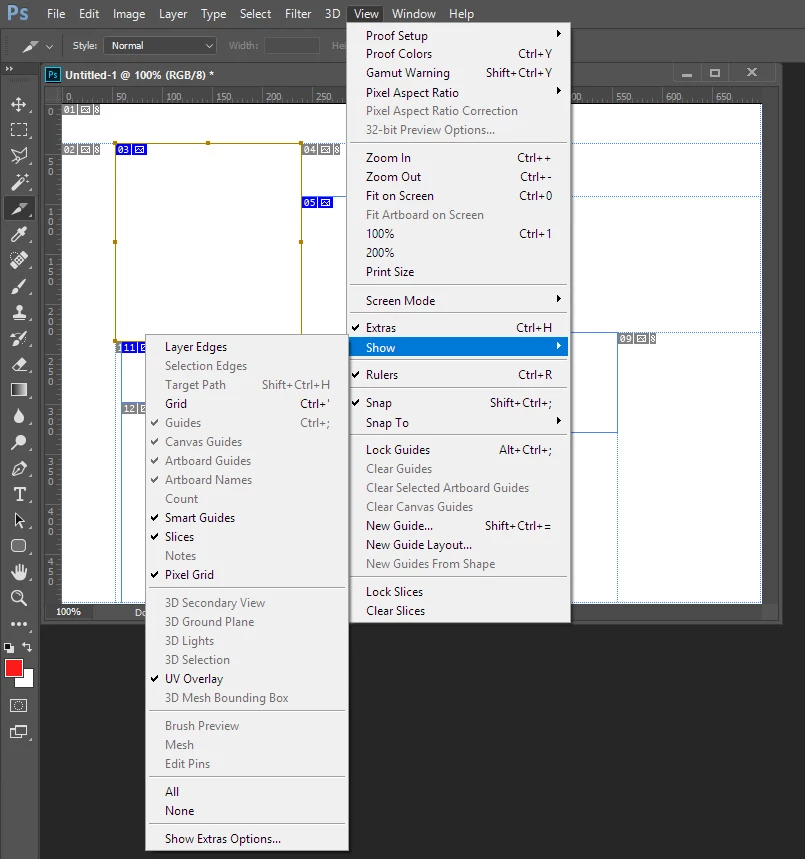
    Make sure there are no slices in your document. Use menu the extras is checked and Show>Slices is checked.  How can Save for web slice up your images if there are no slices defined in the document? It it random slicing?

    2 replies

    Barb Binder
    Community Expert
    Community Expert
    July 31, 2017

    I'm going to guess that you inadvertently added slices to your file. You can do this a few ways:

    • drag with the slice tool (lives with the Crop tool);
    • click on Layer > New layer-based slice. or
    • use the Slices from Guides button on the options bar.

    So, moving forward... go ahead and show the slices as per JJMack, above. Right click over any slices with a blue badge and choose Delete Slice. Repeat until you are down to one gray badge. Then export again and let us know if that takes care of it.

    ~Barb at Rocky Mountain Training
    JJMack
    Community Expert
    JJMackCommunity ExpertCorrect answer
    Community Expert
    July 31, 2017

    Make sure there are no slices in your document. Use menu the extras is checked and Show>Slices is checked.  How can Save for web slice up your images if there are no slices defined in the document? It it random slicing?

    JJMack