
Participating Frequently
January 13, 2022
Answered

"show clipping" not working?

  • January 13, 2022
  • 4 replies
  • 1288 views

So I'm following this adobe tutorial: https://helpx.adobe.com/photoshop/using/levels-adjustment.html and it says that I should be able to see areas that are being clipped by holding Alt and dragging the black and white sliders in the levels menu, but nothing happens when I do so. I've also looked up tutorials and some people do the same thing but using the curves tool, however that doesn't work for me too. My photoshop also doesn't allow me to choose Show Clipping from the curves panel menu (picture). Am I doing something wrong?
Sorry if my english isn't entirely understandable.
This topic has been closed for replies.
Correct answer Jeff Arola

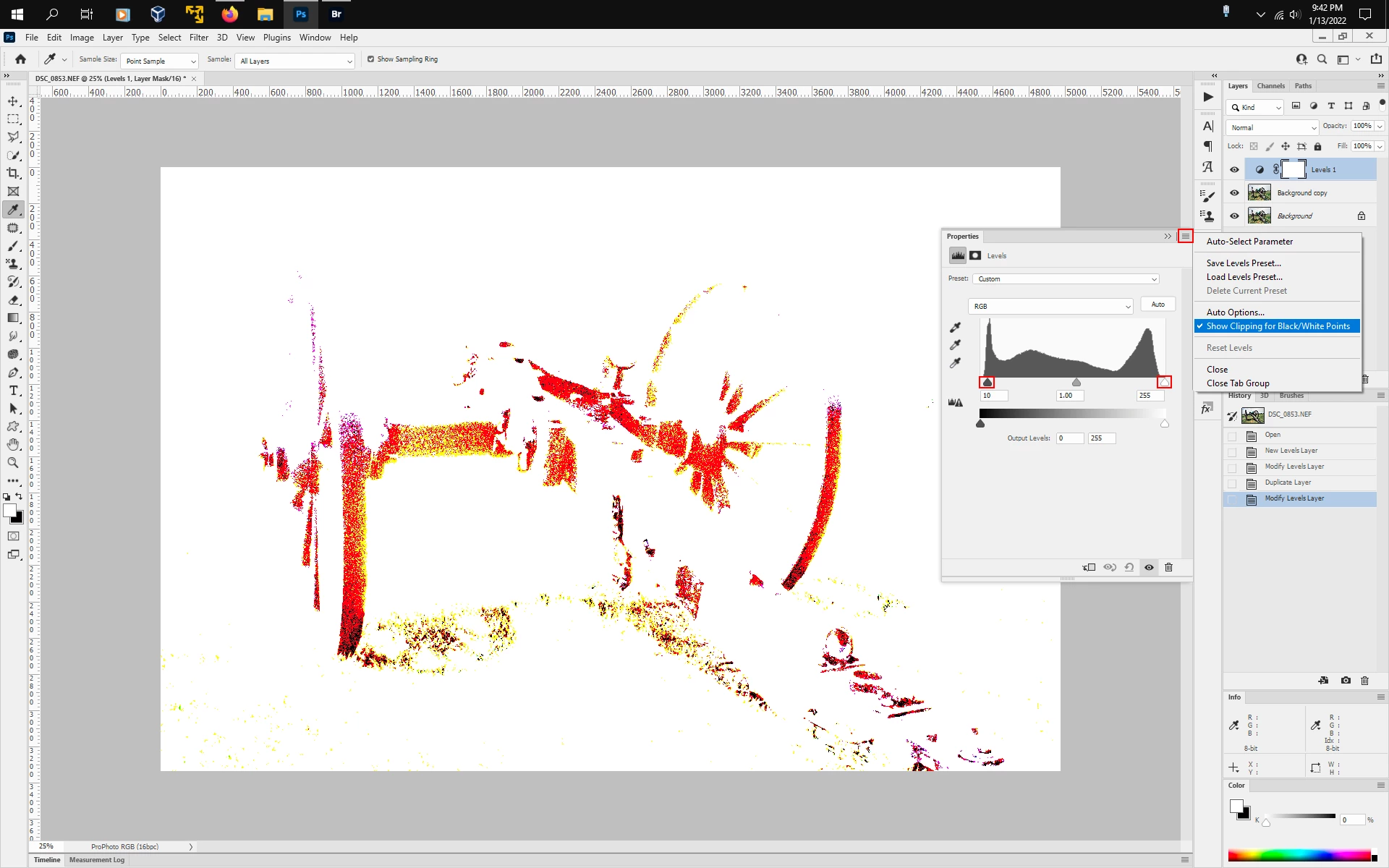
If, for example, you make a Levels Adjustment Layer, go to the properties panel flyout menu and click Show Clipping for Black\White Points, then does moving either the Black Point or White Point slider do anything?


4 replies

Jeff Arola
Community Expert
Community Expert
January 14, 2022

Did you try the alt key on both sides of the keyboard?


It wouldn't hurt to reset the photoshop preferences if the above doesn't make any difference.


In photoshop go to Edit>Preferences>General, click on Reset Preferences on Quit and restart photoshop.

Jeff Arola
Community Expert
Jeff ArolaCommunity ExpertCorrect answer
Community Expert
January 14, 2022

If, for example, you make a Levels Adjustment Layer, go to the properties panel flyout menu and click Show Clipping for Black\White Points, then does moving either the Black Point or White Point slider do anything?


Participating Frequently
January 14, 2022

This worked, thank you very much!

jane-e
Community Expert
Community Expert
January 13, 2022

Hi

Are you Alt+Dragging these sliders or the Output sliders underneath?


Jane


Participating Frequently
January 13, 2022

Hello, I've actually tried dragging all of them... When I drag those that you've pointed out (while pressing alt of course) it just makes my whole picture lighter or darker. From what I know, when I'm dragging the black slider it should slowly reveal the darker areas of my picture which should look like this:
(picture is not mine)

jane-e
Community Expert
Community Expert
January 14, 2022


@s30584u25C9C said: "holding Alt and dragging the black and white sliders in the levels menu"


You asked about the Levels adjustment layer (my screenshot), and your link points to Adobe Help on Levels.


Your screenshot is the Curves adjustment layer. Here is help for Curves:

https://helpx.adobe.com/photoshop/using/curves-adjustment.html


Jane


Jeff Arola
Community Expert
Community Expert
January 13, 2022

What version of photoshop and operating system are you using?

Participating Frequently
January 14, 2022

Windows, version 23.1 I believe