
Inspiring
August 28, 2017
Answered

Radial Blur For Solar Eclipse Post-Processing

  • August 28, 2017
  • 2 replies
  • 1636 views

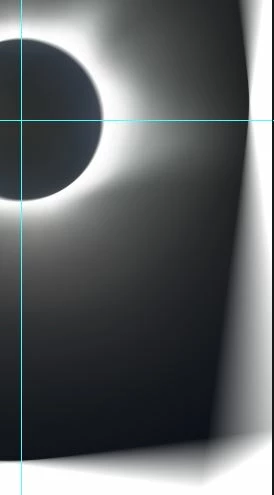
I'm doing some post-processning on some images I took of the total eclipse.  I need to apply a radial blur to a copy of a layer.  However,  the moon/sun are not exactly center in my images.  I've read that you have to shift your image so the radial blur can work properly.  However when I do that and then apply the blur, I get an odd warping on the right and lower portion of the empty canvas (due to the shift to center the image).  See image below.  How can I prevent this from happening?

Thanks
This topic has been closed for replies.
Correct answer derekn38784682

Well, I don't 'think you can select your canvas.  By performing a Select All, that selects the entire image on your canvas.  You should be able to turn your rulers on and use Percentage.  Make a horizontal and vertical ruler line at 50% for each.  Then do the select all on the image and move it to be centered on the ruler marks.  Only then you can perform a proper Radial Blur.

Hope the helps.

2 replies

Inspiring
August 28, 2017

I think I resolved my problem.  When I centered the image, I failed to select the full image prior to applying the Radial Blur.

Participant
September 5, 2017

Would you mind spelling out for me what you mean by "selecting the whole image?"  I have the same problem.  It seems like my whole image is selected, including the blank canvas.  If I crop the image, it goes back to off-center.  Move it back to center, and I get the canvas edges again.  Very frustrated.  Thanks in advance.

derekn38784682AuthorCorrect answer
Inspiring
September 6, 2017

Well, I don't 'think you can select your canvas.  By performing a Select All, that selects the entire image on your canvas.  You should be able to turn your rulers on and use Percentage.  Make a horizontal and vertical ruler line at 50% for each.  Then do the select all on the image and move it to be centered on the ruler marks.  Only then you can perform a proper Radial Blur.

Hope the helps.

c.pfaffenbichler
Community Expert
Community Expert
August 28, 2017

Did you apply the Filter as a Smart Filter?