Exit
  • Global community
    • Language:
      • Deutsch
      • English
      • Español
      • Français
      • Português
  • 日本語コミュニティ
  • 한국 커뮤니티
0

radius and refine edge brushes not working at all

Community Beginner ,
Dec 07, 2016 Dec 07, 2016

I just got Photoshop CS6 and the radius does nothing at all to my selection when I slide it left or right. The refine edge brush also does nothing. Please post some help!

1.0K
Translate
Report
Community guidelines
Be kind and respectful, give credit to the original source of content, and search for duplicates before posting. Learn more
community guidelines
Adobe
Community Expert ,
Dec 07, 2016 Dec 07, 2016

Can you post a screen shot showing your image and selection please?  Just load to clipboard, and paste to this thread with Ctrl v (Cmd v)

Translate
Report
Community guidelines
Be kind and respectful, give credit to the original source of content, and search for duplicates before posting. Learn more
community guidelines
Community Beginner ,
Dec 08, 2016 Dec 08, 2016

Translate
Report
Community guidelines
Be kind and respectful, give credit to the original source of content, and search for duplicates before posting. Learn more
community guidelines
Community Expert ,
Dec 08, 2016 Dec 08, 2016

Hi

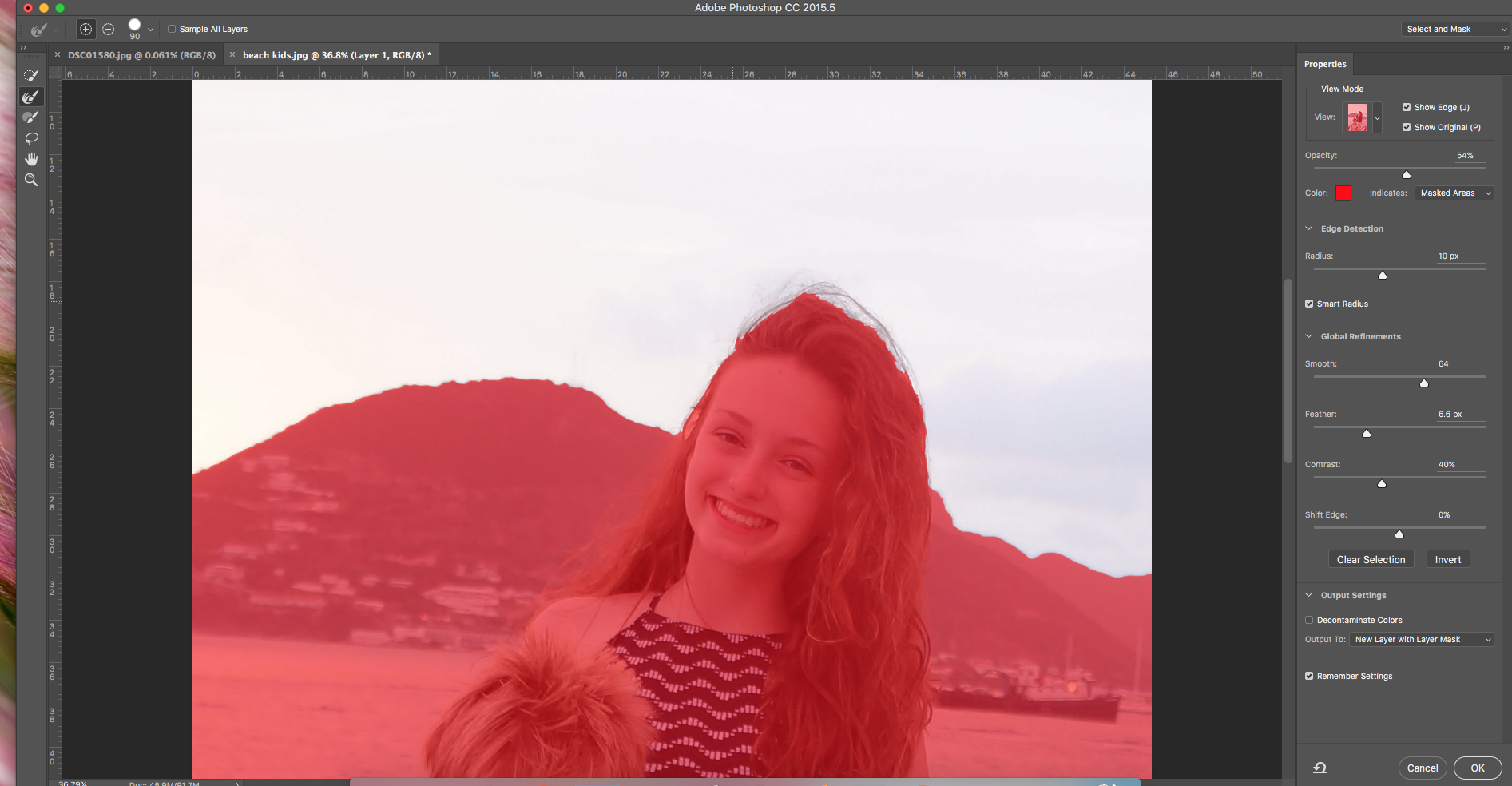
Just for clarity - you said CS6 in your first post but your screenshot is of the select and mask workspace in  CC2015.5.

Assuming that you have CC2015.5, there have been several improvements made to Select and Mask since that version - one of which is to allow Smart Radius to be applied (you have it ticked)  without the slider immediately sticking at 10.

The impact of refine edge is best shown with the View set against black or white and the opacity around 80% (image dependant). You will quickly see what refine is doing that way on hair etc. If it is not doing anything at all, you could try resetting preferences

If you are able,  I would recommend updating to CC2017. Disk space permitting, you can download and install it alongside CC2015.5 provided you use the Advanced option in CC desktop and do not let it remove old versions.

Dave

Translate
Report
Community guidelines
Be kind and respectful, give credit to the original source of content, and search for duplicates before posting. Learn more
community guidelines
Community Beginner ,
Dec 09, 2016 Dec 09, 2016

it was actually looking like it was starting to work but It was making this

debri around the top of the head where I painted- See screen shot below.

On Fri, Dec 9, 2016 at 8:20 AM, Ellen Gagliano <egagliano@athenscsd.org>

Translate
Report
Community guidelines
Be kind and respectful, give credit to the original source of content, and search for duplicates before posting. Learn more
community guidelines
Community Expert ,
Dec 09, 2016 Dec 09, 2016

Did you try updating and using the later version?

Dave

Translate
Report
Community guidelines
Be kind and respectful, give credit to the original source of content, and search for duplicates before posting. Learn more
community guidelines
Community Beginner ,
Dec 09, 2016 Dec 09, 2016

My tec department has to do the upgrade and it takes months to get them to

respond (insert frowny face). Can you talk me through how to do it? I

didn't subscribe, they did, I just teach the class.

Translate
Report
Community guidelines
Be kind and respectful, give credit to the original source of content, and search for duplicates before posting. Learn more
community guidelines
Community Expert ,
Dec 09, 2016 Dec 09, 2016

It depends how your tech department have implemented this. If it is a standard CC installation :

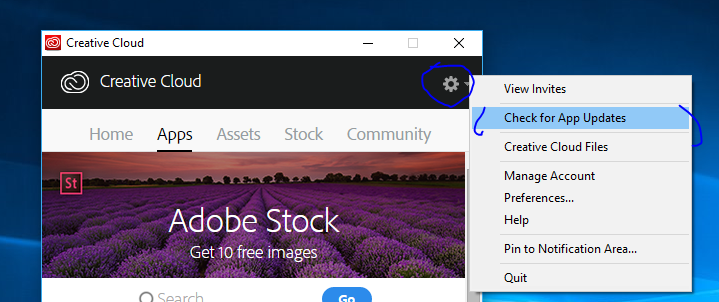
Do you have the creative cloud desktop app on your PC?
If so, click at the top right and check for updates.

If you do get the option to update - ensure you go to the advanced settings and uncheck Remove old versions - otherwise it will remove CC2015

Dave

Translate
Report
Community guidelines
Be kind and respectful, give credit to the original source of content, and search for duplicates before posting. Learn more
community guidelines
Community Expert ,
Dec 09, 2016 Dec 09, 2016

Select and Mask didn't work in CC 2015.5. It works now, in CC2017 - you need to upgrade, as stated above.

Melissa Piccone | Adobe Trainer | Online Courses Author | Fine Artist
Translate
Report
Community guidelines
Be kind and respectful, give credit to the original source of content, and search for duplicates before posting. Learn more
community guidelines
Community Beginner ,
Dec 09, 2016 Dec 09, 2016
LATEST

Thank you for the response. I will try this this afternoon.

On Fri, Dec 9, 2016 at 11:11 AM, melissapiccone <forums_noreply@adobe.com>

Translate
Report
Community guidelines
Be kind and respectful, give credit to the original source of content, and search for duplicates before posting. Learn more
community guidelines