

Randomly corrupted PSD when saving out JPG
I was working on a commission, getting ready to save out a few JPG renders, then I quickly noticed that the first JPG's thumbnail looked strange; upon opening it rendered looked like a crusty dank meme. When I looked back at the open PSD it too was suddenly corrupt—thankfully I saved out another JPG prior to show the client before moving on. Here is a comparison of what the PSD went from looking like before and after it corrupted: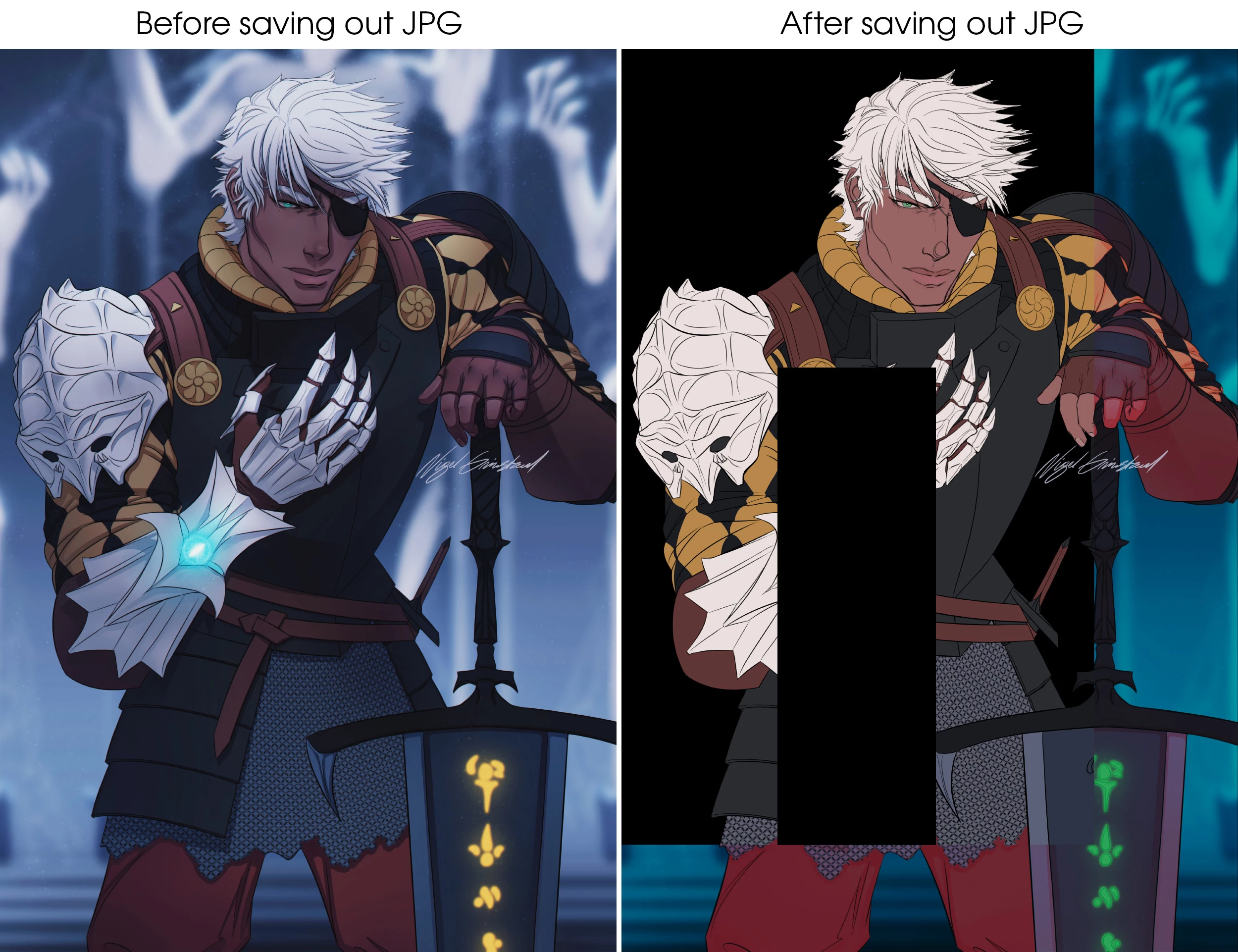
I've never seen a PSD corrupt file saving out a JPG before. All the layers existed however some were completely blank, others were missing the exact same rectangle cut-out in the middle, and very few were practically untouched. This isn't my first time having a large file with many layers, so I want to believe that this corruption is the result of a new bug.
Details of the event:
- I'm using PS 2022 version 23.2.2 — I didn't know there was another update is avaible at the time, I have disabled creative cloud's on-startup auto updates and other features through task manager to spare my RAM and whatnot.
- The PSD is 979 MB in size, and I wasn't using the auto recovery system so there were no other versions or temp files to reference.
- All my other PSD files on this computer are perfectly fine regardless of date, size, and drive location.
- There were no area blackouts at the time of corruption (I'm also using a hefty APC surge arrest bar) and no major background applications processes running aside from idle spotify, discord, norton 360 antivirus, and google chrome.
- I restarted my computer and reinstalled my nvidia drivers thinking it was a display issue and that changed nothing.
Here is my computer specs:
WIN 10 64-bit operating system, x64-based processor
AMD Ryzen 7 5800X 8-Core Processor 3.80 GHz
NVIDIA GeForce RTX 3080 (DirectX runtime version 12.0)
Hopefully this is just an issue with the 23.2.2 version. I'm going to update PS right now, yet I'm still haunted and vexed by the potential that this corruption could happen again at any moment with my precious files.
 AdChoices