
Answered

I also get the not allow cursor. But did you try to actually click with the "not allow" cursor on the SmOb?
Yes I get a popup stating it can not be done without you merging the group.
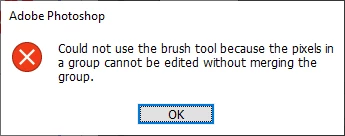
The group would be the frame mask and layers pixels transformed by the layers associated layer transform. Frame layer content are Smart Objects and all smart objects have an associated layer transform. Photoshop would need to apply the Frame mask to the layer transformed pixels and make the results the merged raster layer. You would no longer have a frame layer. You would just have a pixel layer
Adobe Frame layer are not well implemented. I wrote I removed the Frame tool from my tool bar I also disabled it shortcut. I have never had a problem framing images layers. Adobe does.
Already have an account? Login
Enter your E-mail address. We'll send you an e-mail with instructions to reset your password.
 AdChoices