josantgomez
Legend
December 31, 2023
Answered

Re: Generative fill not available

  • December 31, 2023
  • 1 reply
  • 929 views

Me pasa lo mismo. En descubrir aparece desactivado
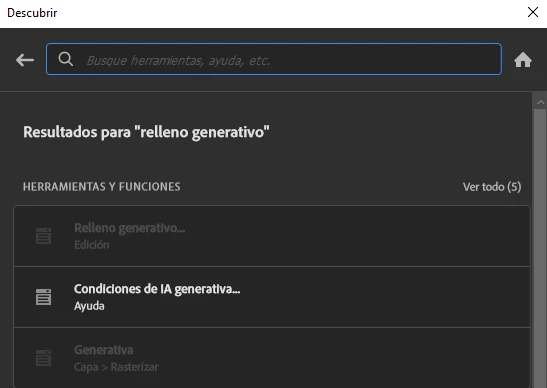
¿Dónde está el menú desplegable que mencionas?

    This topic has been closed for replies.
    Correct answer Derek Cross

    Try this:

    Window > Contectual Task Bar

    Select the Crop Tool

    Select Generative Expand from the Fill drop-down

    Expand the size and area of the image you want to expand with the Crop tool

    Hit return, it should expand and fill the additional area you selected with three Variations for you to choose from the the Properties panel 

    Does that work for you?

    1 reply

    Derek Cross
    Community Expert
    Derek CrossCommunity ExpertCorrect answer
    Community Expert
    December 31, 2023

    Try this:

    Window > Contectual Task Bar

    Select the Crop Tool

    Select Generative Expand from the Fill drop-down

    Expand the size and area of the image you want to expand with the Crop tool

    Hit return, it should expand and fill the additional area you selected with three Variations for you to choose from the the Properties panel 

    Does that work for you?

    josantgomez
    Legend
    December 31, 2023

    He rehecho los pasos. Esta vez correctamente y la expansión generativa funcionó

    Desconocía el menú contextual en el comando ventana. Una vez que empecé ahí y después fuí a recortar, entonces se resolvió.


    Pero... ¿Y cómo activo el relleno generativo? En el menú recortar solo me aparen dos opciones , normal o perspectiva. No sé dónde activar el menú desplegable que decías en la primera publicación (versión PS última)

    Derek Cross
    Community Expert
    Community Expert
    December 31, 2023

    Excellent!