Zee333
Inspiring
July 26, 2023
Answered

Reading Hex Codes on each layer of a Photoshop Document?

  • July 26, 2023
  • 2 replies
  • 2453 views

I have this script (modified a bit) from @jazz-y  that allows me to read all the hex codes in a document into an array which is great. I was wondering if there was a way to push the hexes into their own arrays based off the layers?


const DE_CIE76 = 0; //color difference: 0-255
const THRESHOLD = 0; //color pixels threshold

var s2t = stringIDToTypeID,
    t2s = typeIDToStringID,
    colorsObj = {},
    colorsArr = [];
(r = new ActionReference()).putProperty(s2t('property'), p = s2t('mode'));
r.putEnumerated(s2t('document'), s2t('ordinal'), s2t('targetEnum'));
if (t2s(executeActionGet(r).getEnumerationValue(p)) == 'RGBColor') {
    var f = new File(Folder.temp + '/colors.raw');
    (d = new ActionDescriptor()).putBoolean(s2t("channelsInterleaved"), true);
    d.putBoolean(s2t('copy'), true);
    (d1 = new ActionDescriptor()).putObject(s2t("as"), s2t("rawFormat"), d);
    d1.putPath(s2t("in"), f);
    executeAction(s2t("save"), d1, DialogModes.NO);
    f.open('r');
    f.encoding = "BINARY";
    doForcedProgress('Reading colors', 'readColors(f.read(), colorsObj)');
    f.close();
    f.remove();
    for (var a in colorsObj) if (colorsObj[a] > THRESHOLD) colorsArr.push({hex: a });
    if (DE_CIE76) doForcedProgress('Filtering colors by dE = ' + DE_CIE76, 'filterByDE(colorsArr)');
}
        
function readColors(s, colorsObj) {
    for (var i = 0; i < s.length; i += 3) {
        var cur = toHex(s, i, 3)
        updateProgress(i, s.length)
        if (colorsObj[cur]) colorsObj[cur]++; else colorsObj[cur] = 1;
    }
}
function filterByDE(c) {
    for (var i = 0; i < c.length; i++) {
        updateProgress(i, c.length)
        if (c[i] == null) continue;
        var cA = new SolidColor;
        cA.rgb.hexValue = c[i].hex;
        for (var x = i + 1; x < c.length; x++) {
            if (c[x] == null || c[i] == null) continue;
            var cB = new SolidColor;
            cB.rgb.hexValue = c[x].hex;
            if (deltaE(cA, cB) <= 10) {
                if (c[i].pixels > c[x].pixels) {
                    c[i].pixels += c[x].pixels
                    c[x] = null
                } else {
                    c[x].pixels += c[i].pixels
                    c[i] = null
                }
            }
        }
    }
}
function toHex(s, from, bits) {
    var h = '';
    for (var i = from; i < from + bits; i++) h += (('0' + s.charCodeAt(i).toString(16)).slice(-2));
    return h
}
function deltaE(a, b) {
    return Math.sqrt(Math.pow(b.lab.l - a.lab.l, 2) + Math.pow(b.lab.a - a.lab.a, 2) + Math.pow(b.lab.b - a.lab.b, 2))
}


Here is my example document:
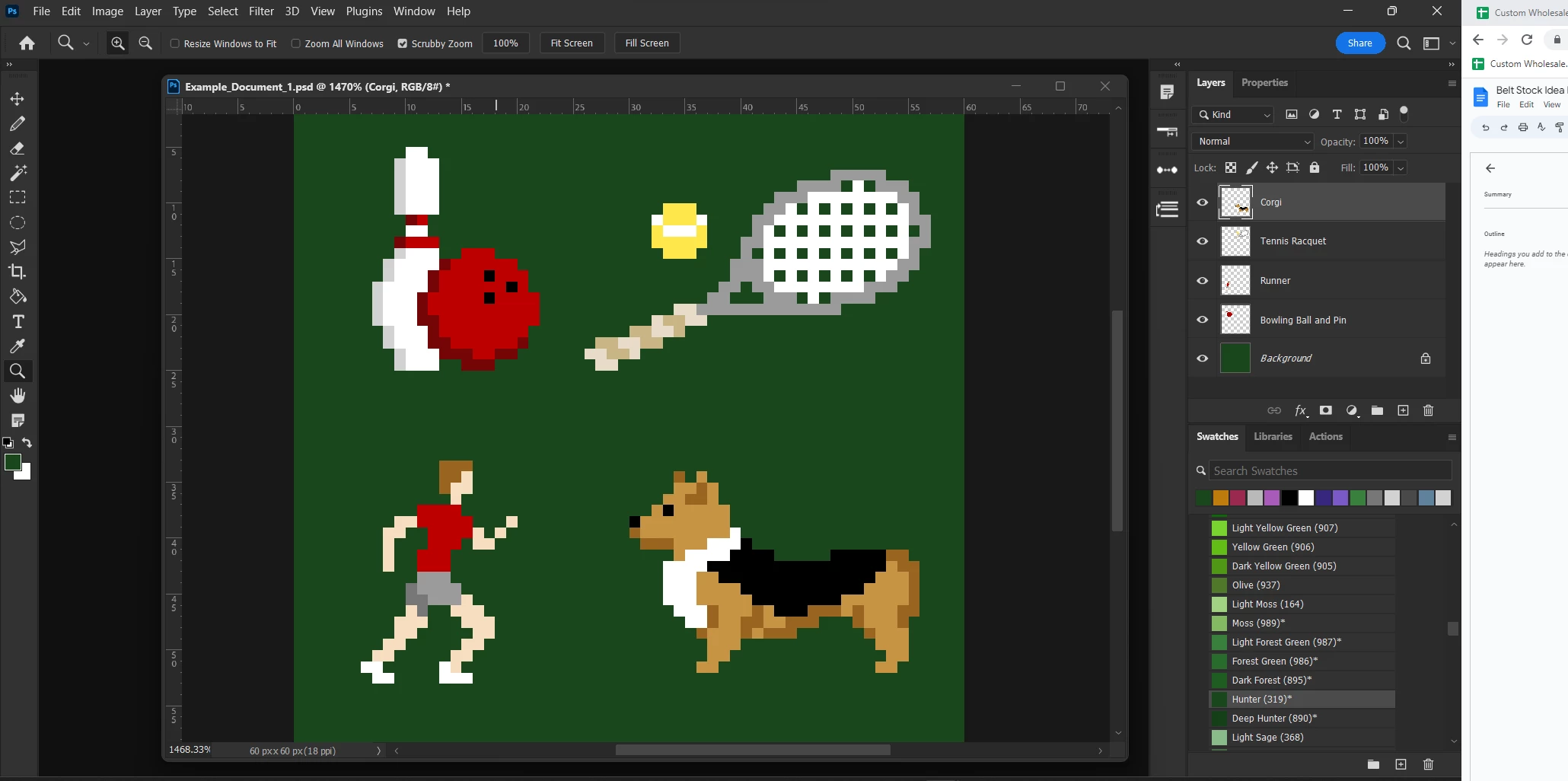
 

In this example I have four layers named Corgi, Tennis Racquet, Runner, and Bowling Ball and Pin as well as a background layer. The current code generates a list of hex codes which I put in a note. I can shift the background color into it's own array so that my note reads

"Background: Hex1

Hex2

Hex3

Hex4

etc."

But what I really want is a note like this:

"Background: Hex1

Layer 1

Hex2

Hex3

Layer 2

Hex2

Hex4

etc."

I understand that in this code to read the colors a temporary raw file is made and read, ignoring all the layers. Is there a way to read the colors layer by layer or somehow sort the colors after the colors are read?

I really appreciate any help anyone can offer! 


This topic has been closed for replies.
Correct answer r-bin
quote

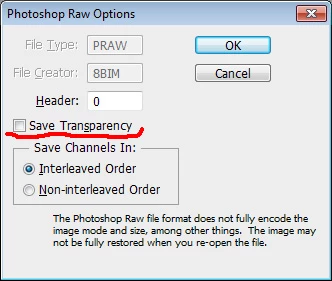
As far as I can tell the Raw has no transparency, so ....


By @c.pfaffenbichler


2 replies

c.pfaffenbichler
Community Expert
Community Expert
August 2, 2023

Were you able to Script the necessary steps? 

Zee333
Zee333Author
Inspiring
August 2, 2023

Unfortunately I'm still pretty new at scripting so not yet, I am trying though. I have a script that hides all layers and shows them one at a time but I'm having trouble getting the color reading to work in the context of a plugin or my layer cycling script to work outside the context of a plugin (I don't understand how the color reading code works very well)

const app = require("photoshop").app;
const activeLayers = app.activeDocument.activeLayers;

function circulateLayers() {
    activeLayers.visible = false
//sets all selected layers to hidden
    activeLayers.forEach(layer => {
  //shows one layer at a time
      layer.visible = true; 
  
     //Needs to read document colors and push them into an array named after the layer
     const DE_CIE76 = 0; //color difference: 0-255
     const THRESHOLD = 0; //color pixels threshold
//Modified Color Reading Code

        var s2t = stringIDToTypeID,
            t2s = typeIDToStringID,
            colorsObj = {},
            colorsArr = [],
            tempArr = [];
        (r = new ActionReference()).putProperty(s2t('property'), p = s2t('mode'));
        r.putEnumerated(s2t('document'), s2t('ordinal'), s2t('targetEnum'));
        if (t2s(executeActionGet(r).getEnumerationValue(p)) == 'RGBColor') {
            var f = new File(Folder.temp + '/colors.raw');
            (d = new ActionDescriptor()).putBoolean(s2t("channelsInterleaved"), true);
            d.putBoolean(s2t('copy'), true);
            (d1 = new ActionDescriptor()).putObject(s2t("as"), s2t("rawFormat"), d);
            d1.putPath(s2t("in"), f);
            executeAction(s2t("save"), d1, DialogModes.NO);
            f.open('r');
            f.encoding = "BINARY";
            doForcedProgress('Reading colors', 'readColors(f.read(), colorsObj)');
            f.close();
            f.remove();
            for (var a in colorsObj) if (colorsObj[a] > THRESHOLD) tempArr.push({hex: a });
            if (DE_CIE76) doForcedProgress('Filtering colors by dE = ' + DE_CIE76, 'filterByDE(colorsArr)');
            }
            colorsArr.concat(tempArr);
     
    layer.visible = false; 
    console.log("Here I Go!") 
})
console.log(activeLayers.length)
     activeLayers.forEach(layer => {
      layer.visible = true; 
      console.log("Here I Am Again!") 
     })
 
    }

    function readColors(s, colorsObj) {
      for (var i = 0; i < s.length; i += 3) {
          var cur = toHex(s, i, 3)
          updateProgress(i, s.length)
          if (colorsObj[cur]) colorsObj[cur]++; else colorsObj[cur] = 1;
      }
    }
    function toHex(s, from, bits) {
      var hex = '';
      for (var i = from; i < from + bits; i++) h += (('0' + s.charCodeAt(i).toString(16)).slice(-2));
      return hex
    }

///////////////////////////////////////////////////////////////////////////////////

// Insert text in this created note

///////////////////////////////////////////////////////////////////////////////////

var idsetd = charIDToTypeID( "setd" );

    var desc58 = new ActionDescriptor();

    var idnull = charIDToTypeID( "null" );

        var ref12 = new ActionReference();

        var idannotation = stringIDToTypeID( "annotation" );

        ref12.putIndex( idannotation, 0 ); // the number/index of note

    desc58.putReference( idnull, ref12 );

    var idT = charIDToTypeID( "T   " );

        var desc59 = new ActionDescriptor();

        var idTxtD = charIDToTypeID( "TxtD" );

        desc59.putData( idTxtD, String.fromCharCode( 255, 254, 116, 0, 104, 0, 105, 0, 115, 0, 32, 0, 105, 0, 115, 0, 32, 0, 116, 0, 101, 0, 120, 0, 116, 0, 32, 0, 105, 0, 110, 0, 

32, 0, 97, 0, 32, 0, 110, 0, 111, 0, 116, 0, 101, 0 ) );

        var idtext = stringIDToTypeID( "text" );
       
        desc59.putString( idtext, colorsArr.join("   "));

    var idannotation = stringIDToTypeID( "annotation" );

    desc58.putObject( idT, idannotation, desc59 );

executeAction( idsetd, desc58, DialogModes.NO );

 Here is what I have so far. Right now, it stops at  

activeLayers.forEach(layer => { because the code I wrote for this I wrote in a plugin and it doesn't work when I just run it as a script. Any documentation on how scripting for photoshop differs as straight script vs script in a plugin would be helpful to me. I know it's messy and incomplete but that's where I'm at, thanks for checking in!
c.pfaffenbichler
Community Expert
Community Expert
July 27, 2023

You can hide all and show each Layer in turn and run the opration once per Layer.

As far as I can tell the Raw has no transparency, so a background would be introduced and change the quantity of the white pixels. 

r-binCorrect answer
Legend
July 27, 2023
quote

As far as I can tell the Raw has no transparency, so ....


By @c.pfaffenbichler


c.pfaffenbichler
Community Expert
Community Expert
July 28, 2023

Thanks, @r-bin ! 


Then the OP should be able to run the operation on each Layer in turn and get meaningul quantities.