
Participant
April 6, 2017
Answered

Rectangle tool not creating custom shapes

  • April 6, 2017
  • 1 reply
  • 3085 views

So this is a new problem I've encountered with PS CC,

previously in CS6, when I used the Rectangle Tool to draw out a shape, I'd be able to drag out any rectangle size, now when I do it, the same action simply gives me this tiny, default square shape, which I can drag out to size after, but what happened to simply dragging a shape in the same fashion AI lets you draw shapes?

Thanks in advance
    This topic has been closed for replies.
    Correct answer quirky_Glow157F

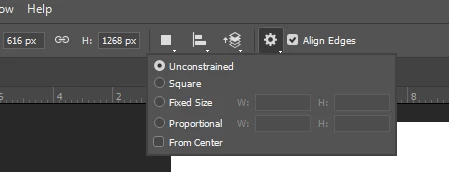
    On the Rectangle Tool, the Gear Icon has a menu. Is your Rectangle Option on that menu set to Unconstrained?

    1 reply

    quirky_Glow157FCorrect answer
    Participating Frequently
    April 6, 2017

    On the Rectangle Tool, the Gear Icon has a menu. Is your Rectangle Option on that menu set to Unconstrained?

    Participant
    April 6, 2017

    That's it, thank you very much!!