Mustafa Akşit
Participant
September 16, 2016
Question

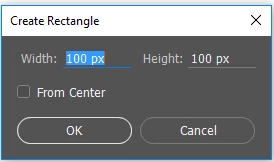
Rectangle Tool Size Setting
  • September 16, 2016
  • 2 replies
  • 51707 views


I am working with cm everytime. When I want to create new shapes, coming pixel sizes. I dont want this. I need to cm

How can I change every size to cm like illustrator?

This topic has been closed for replies.

2 replies

Trevor.Dennis
Community Expert
Community Expert
June 6, 2019

I couldn't make it default to cm either, but if you have to enter the value, it is not a lot work to add cm after the value

davescm
Community Expert
Community Expert
September 16, 2016

Right click on the number and it will bring up a choice of scale.

Unfortunately I don't know how to make it stick - to avoid needing to right click each time.

Dave

Mustafa Akşit
Participant
September 16, 2016

Thank you for answer Dave,

But I already use this method,

How can it always stay in cm, I want to learn it.

You know, When do you change measurement unit in illustrator, change all them. I needed that tricks

Thanks again

Barb Binder
Community Expert
Community Expert
September 16, 2016

Change the ruler defaults:

Win: Edit  > Preferences> Units & Rulers

Mac: Photoshop > Preferences > Units & Rules

Select the Units options you want to use for the Rulers to sets a default measuring system for the Rulers as well as for measuring within the document.

~Barb at Rocky Mountain Training