Mustafa Akşit
Participant
September 16, 2016
Question

Rectangle Tool Size Setting
  • September 16, 2016
  • 2 replies
  • 51687 views


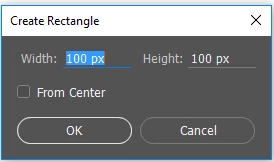
I am working with cm everytime. When I want to create new shapes, coming pixel sizes. I dont want this. I need to cm

How can I change every size to cm like illustrator?

This topic has been closed for replies.

2 replies

Trevor.Dennis
Community Expert
Community Expert
June 6, 2019

I couldn't make it default to cm either, but if you have to enter the value, it is not a lot work to add cm after the value

davescm
Community Expert
Community Expert
September 16, 2016

Right click on the number and it will bring up a choice of scale.

Unfortunately I don't know how to make it stick - to avoid needing to right click each time.

Dave

Mustafa Akşit
Participant
September 16, 2016

Thank you for answer Dave,

But I already use this method,

How can it always stay in cm, I want to learn it.

You know, When do you change measurement unit in illustrator, change all them. I needed that tricks

Thanks again

davescm
Community Expert
Community Expert
September 17, 2016

Change the ruler defaults:

Win: Edit  > Preferences> Units & Rulers

Mac: Photoshop > Preferences > Units & Rules

Select the Units options you want to use for the Rulers to sets a default measuring system for the Rulers as well as for measuring within the document.


Hi Barbara

Thanks for replying. Unfortunately that doesn't seem to work here. I am on Windows 10 and CC2015.5 and CS6 were the same.

My default rulers (set via preferences) are in inches (also just tried setting to cm to check if changing made a diffrence).

Whilst the small rich cursor box that appears whilst dragging the cursor is in inches, the dialogue box for the rectangle, which comes up when you click in the document still comes up in pixels first - no matter what the ruler preferences.

Dave