
February 27, 2017
Answered

Red screen/tint on images

  • February 27, 2017
  • 1 reply
  • 704 views

Hi,

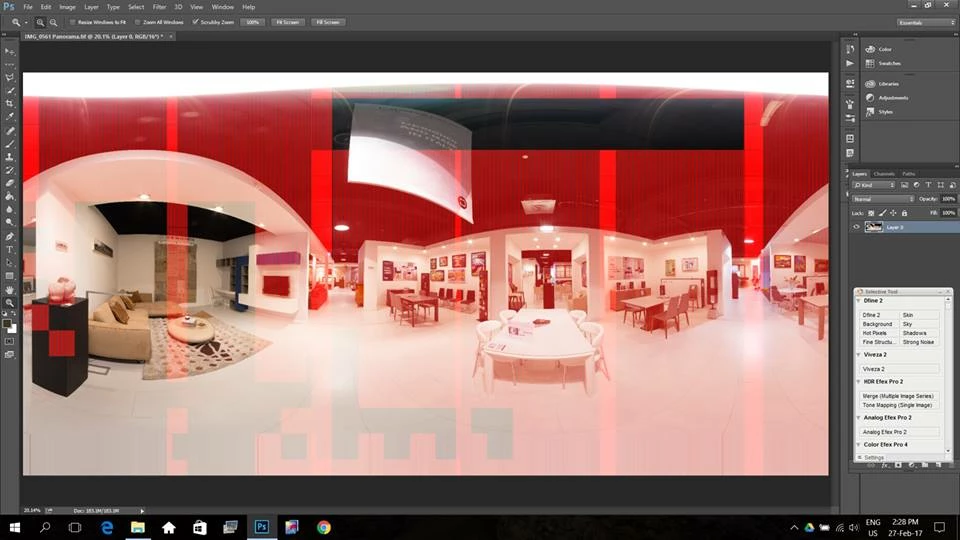
I am frequently getting a red screen/tint over parts of the image when opening in photoshop (does not happen in other programs). Please see attached screenshot.

Not sure if this is a problem with the software or hardware. Maybe someone has encountered this issue before?

Any help is greatly appreciated.

Cheers,

Niki
    This topic has been closed for replies.
    Correct answer Benjamin Root

    Doesn't look loke quick mask, but tap Q a few time to be sure.

    More likely it's a graphics problem. Disable the GPU under Edit > Performance and restart Photoshop. Of that clears it up it's the GPU. Check for new GPU drivers.

    1 reply

    Benjamin Root
    Benjamin RootCorrect answer
    Legend
    February 27, 2017

    Doesn't look loke quick mask, but tap Q a few time to be sure.

    More likely it's a graphics problem. Disable the GPU under Edit > Performance and restart Photoshop. Of that clears it up it's the GPU. Check for new GPU drivers.