
December 5, 2019
Question

Reduced image quality on a website

  • December 5, 2019
  • 4 replies
  • 1134 views

Hi,

When I upload a background image for the bottom of my website image quality suffers regardless of its resolution.

Wordpress or browser strethces the image over the entire width of the display.

Could you please tell me if there is any photoshop function that can help?
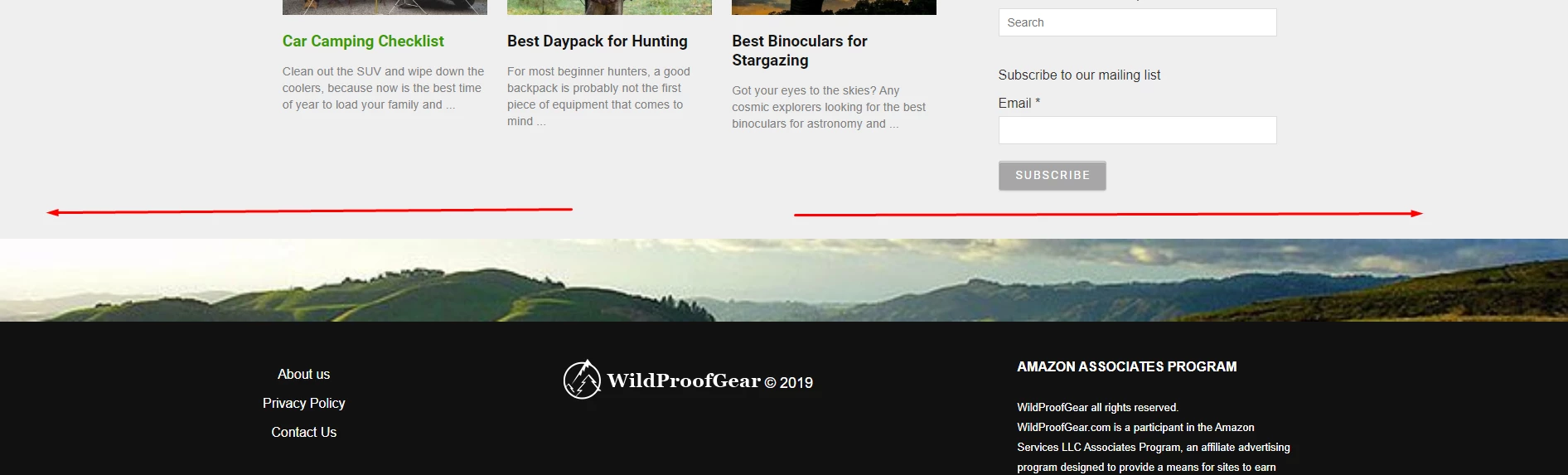

If the attached screenshot doesn't show the problem my website https://wildproofgear.com/ 


Thanks!

This topic has been closed for replies.

4 replies

Bojan Živković11378569
Community Expert
Community Expert
December 5, 2019

Photoshop can help you to resize image to correct dimensions which depends on theme and your preference. You must learn that by hard, I do not know easy way to explain. Perhaps you have option to upload multiple dimensions of your image for different screen dimensions or that job is set to be done automatically? If you can upload multiple dimensions of the same image then Photoshop can help you to properly scale plus to optimize images when exporting them.

ensel
Participating Frequently
December 5, 2019

The width of the image is 827px.

You made the Screenshot with a width of your browser of about 1900 px.

Since the image is resized to full browser-width it looks blurry.

It looks fine, when you rescale your browser-window to a lower width.

If the original image is big enough, you could rescale the image in Photoshop to the width of the biggest monitor you wish to provide (for example 1920px) and re-upload the image to wordpress.

But consider that the kBs and loading-time of your image will increase (about four times), so I would cut the image in the height to save some kBs, the upper and lower parts are never visible.

Take care to disable wordpress to rescale the image during the import (there should be a setting, I dont´t remember where to find in current wordpress versions)

Mylenium
Legend
December 5, 2019

Theme images are alway rescaled or cropped. That's inherent in how WP themes work. Only Media Library images can be set to not scale, but only if you have your own WP install with full administrative access. Most pre-hosted WP installs will still "crunch" your image to save storage space.


Mylenium

December 5, 2019

Hi @paulblair ; what wordpress theme are you using ? Maybe that can be fixed in the theme settings .

JJMack
Community Expert
Community Expert
December 5, 2019

Resolution is meanless on the web. Display use their resolution. All that matters is the number and quality of the pixels you have for an image. To me it sounds  like you resizing your images to small or are using a poor choice of interpolation method.

JJMack