Participant
February 2, 2025
Answered

Regular Path in Photoshop 2025

  • February 2, 2025
  • 3 replies
  • 441 views

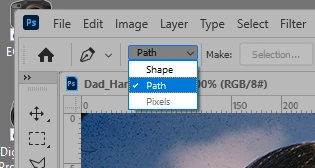
How do you draw a regular path and not a shape path in Photoshop 2025? 

Correct answer Semaphoric

Select Path in the drop down in the Option bar
 

3 replies

Bojan Živković11378569
Community Expert
Community Expert
February 2, 2025

My $0.02. When you draw with the Pen tool and select the Path option as previously explained, Photoshop will create a Work Path in the Paths panel. That's a temporary item that can be overwritten accidentally. To avoid loss, double-click on the name Work Path to rename it, or click on Create new path in the Paths panel before drawing.

Trevor.Dennis
Community Expert
Community Expert
February 2, 2025

You can copy the path from a shape layer if you find yoursel;f in that position. 


Drag a window to enclose the shape with the Direct Selection tool to make the points active, and copy with Ctrl c

Click on the New Path icon at the bottom of the Paths panel, and paste (Ctrl v)

Semaphoric
Community Expert
SemaphoricCommunity ExpertCorrect answer
Community Expert
February 2, 2025

Select Path in the drop down in the Option bar