
Known Participant
February 8, 2020
Question

REMOVE Duplicate brush list?

  • February 8, 2020
  • 1 reply
  • 1669 views

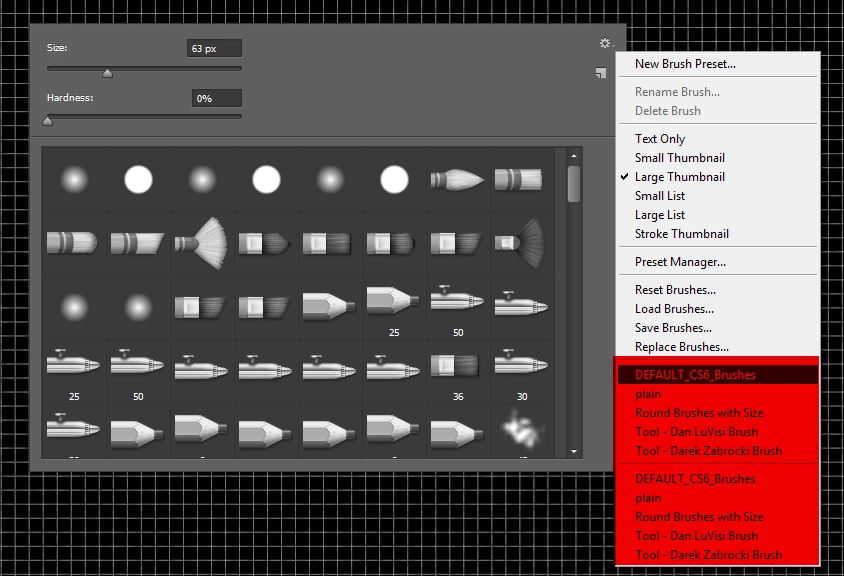
Why is there a duplicte brush list and how to remove it.?
There is only one set of brushes in the default path (not roaming) on the HDD.
All the brushes except for the few displayed here were removed. When there are more than the default brushes Photoshop will display all the brushs and it can fill the entire screen.
This topic has been closed for replies.

1 reply

c.pfaffenbichler
Community Expert
Community Expert
February 8, 2020

»There is only one set of brushes in the default path (not roaming) on the HDD.«

What do you mean? The »Brushes«-Folder on the application Folder or the one in the user library (Application Support > Adobe > Adobe Photoshop 2020 > Presets > Brushes)? 

sadicusAuthor
Known Participant
February 8, 2020

I'm not useing Adobe cloud, the point is there is only one set of brushes anywhere on the hard drive, yet in photoshop the brushes are listed twice.

  1. Delete all brush from computer, except the brushes shown in the list and their location is this path:
    (App Folder) C:\Program Files\Adobe\Adobe Photoshop CS6 (64 Bit)\Presets\Brushes
  2. There are no .abr files at this path:
    (User Folde) C:\Users\tepar\AppData\Roaming\Adobe\Adobe Photoshop CS6\Presets\Brushes
  3. So why are the brushes being displayed in the list twice?
c.pfaffenbichler
Community Expert
Community Expert
February 8, 2020

What have you done for trouble-shooting so far? 

Restoring Preferences after making sure all customized presets like Actions, Patterns, Brushes etc. have been saved might be a good starting point:

https://helpx.adobe.com/photoshop/kb/basic-trouble-shooting-steps.html