Participant
July 19, 2025
Answered

Remove “Edit with Adobe” context menu item

  • July 19, 2025
  • 1 reply
  • 811 views

Recently I noticed that when selecting an image file, there is an Edit with Adobe item in the context menu. How do I get rid of it?


The Photoshop version is 26.8.1, and the Adobe Creative Cloud version is 6.7.0.278.
Correct answer Ged_Traynor

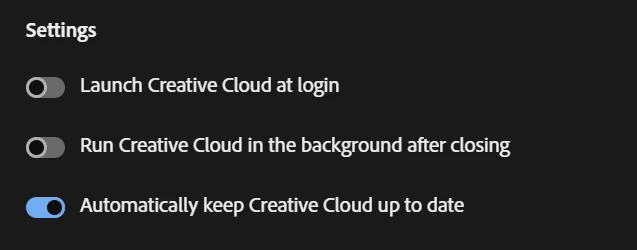
@Ged_Traynor That was the first place I checked, but I don't have that option under Preference > General > Settings:

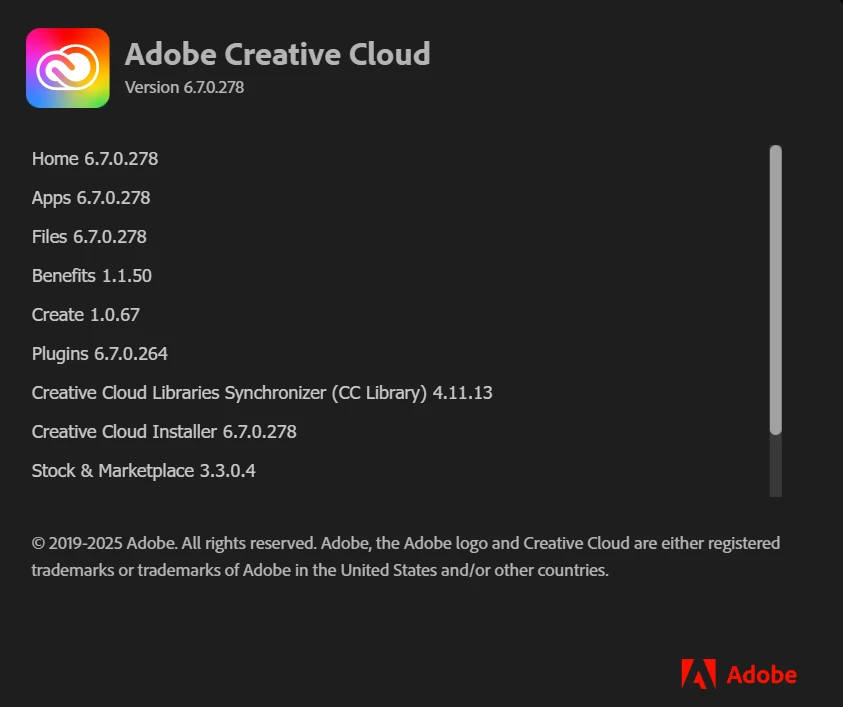
Would you might checking what is the Adobe CC version? Mine says 6.7.0.278 and no updates are available.


@jim-l I have the same version, have you tried signing out of the CC app and signing back in again

If that doesn't help, you can try uninstalling the CC app and then reinstall

https://helpx.adobe.com/ie/creative-cloud/help/uninstall-creative-cloud-desktop-app.html

1 reply

jane-e
Community Expert
Community Expert
July 19, 2025

@jim-l 


Where do you see this message? In Windows File Explorer? In Photoshop when you choose File menu > Open?


Does it just say "Adobe" or does it include a specific Adobe application? Please share a screenshot so we can see what you are seeing.


Jane

jim-lAuthor
Participant
July 20, 2025

Sorry - should've been more clear.


It's in Windows Explorer. After selecting a media file (image or video), there is a context menu item named Edit with Adobe with a submenu that includes actions like Resize image, and Remove background.

I also justn noticed that it only appears after I open the Creative Cloud app for the first time in each Windows user session, but stays even after quitting the Creative Cloud app. 

Ged_Traynor
Community Expert
Ged_TraynorCommunity ExpertCorrect answer
Community Expert
July 20, 2025

@Ged_Traynor That was the first place I checked, but I don't have that option under Preference > General > Settings:

Would you might checking what is the Adobe CC version? Mine says 6.7.0.278 and no updates are available.


@jim-l I have the same version, have you tried signing out of the CC app and signing back in again

If that doesn't help, you can try uninstalling the CC app and then reinstall

https://helpx.adobe.com/ie/creative-cloud/help/uninstall-creative-cloud-desktop-app.html